 LeafBound
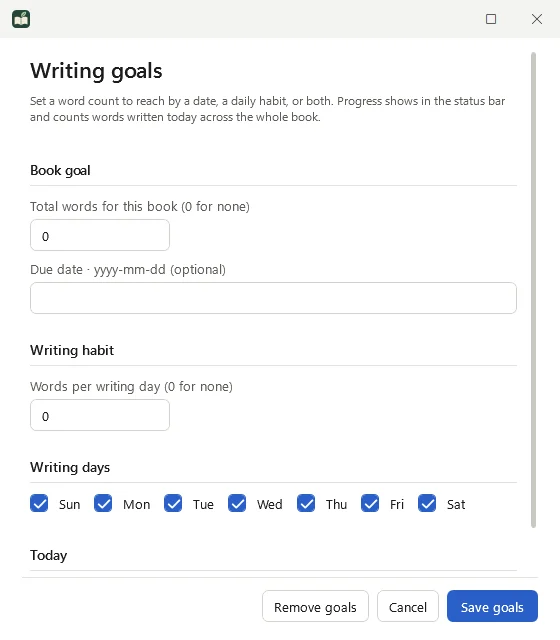
- Choose View then Writing goals….
- Under Book goal, type the Total words for this book (0 for none) and, if you like, a Due date · yyyy-mm-dd (optional).
- Under Writing habit, type the Words per writing day (0 for none).
- Under Writing days, check the days you write.
- Choose Save goals.
Your progress
Once a goal is set, the status bar shows it, for example 40,000 of 80,000 words, 1,250 a day to finish · today 300 of 500 · 3-day streak. The daily part changes color when you reach today's target. The words-a-day figure spreads what is left over your writing days until the due date.
The Today section of the window shows the book's word count, the words written today and your streak, and Last days lists the words written on each of the last 14 days you worked.
Good to know
- Words are counted across the whole book, including notes. Words written today are today's count minus the count when you first worked on the book today, so deleting text lowers it.
- Goals and the daily log are saved in the book file, so they survive closing and reopening the book.
- Enter the due date as year-month-day, for example 2027-03-01, and check at least one writing day; LeafBound tells you if either is missing.
- Remove goals clears both goals. The daily log stays.
Related
Still stuck?
Choose Help then Report a problem… in LeafBound to send us the details, or write to support.