 LeafBound
Guide · Print
PDF/X-1a, PDF/X-3 and PDF/X-4 for book printing.
PDF/X is a family of PDF subsets built so a printer can print a file without asking questions. This guide defines PDF/X-1a, compares it with X-3 and X-4, says which one KDP and IngramSpark accept, and shows how to get one from Word, InDesign, Affinity, Reedsy, Vellum and LeafBound.
What PDF/X-1a is
PDF/X-1a is an ISO 15930-1 subset of PDF for blind print exchange: every font is embedded, color is CMYK or spot only with no RGB, transparency is flattened, and an output intent declares the press condition. A printer can open it and print it without asking the sender anything.
“Blind exchange” is the point. An ordinary PDF can reference a font the printer does not have, carry RGB images that will shift when converted, or hold live transparency that renders differently in different software. PDF/X-1a forbids each of those, so what the printer sees is what you saw. The two dated versions in use are PDF/X-1a:2001 and PDF/X-1a:2003; distributors name the 2001 version.
X-1a, X-3 and X-4 compared
| PDF/X-1a:2001 | PDF/X-3:2002 | PDF/X-4 | |
|---|---|---|---|
| ISO standard | ISO 15930-1 | ISO 15930-3 | ISO 15930-7 |
| Color spaces allowed | CMYK and spot only; no RGB | CMYK, spot, and RGB or Lab with an embedded profile | Any, with profiles |
| Transparency | Flattened | Flattened | Live transparency allowed |
| Fonts | Embedded | Embedded | Embedded |
| Output intent | Declared | Declared | Declared |
| PDF version | PDF 1.3 (2001) or 1.4 (2003) | PDF 1.3 (2002) or 1.4 (2003) | PDF 1.6 |
| IngramSpark | Accepted: PDF/X-1a:2001 | Accepted: PDF/X-3:2002 | Not named in the File Creation Guide |
| KDP | Preferred “if possible” | Not named; plain PDF accepted | Not named; plain PDF accepted |
| Best for | Black-and-white interiors; any press | Color interiors with RGB images and a profile | Designer workflows where the printer asks for it |
For a book interior the choice is simple. Black-and-white text: PDF/X-1a. Color interior with photographs that you have not converted to CMYK yourself: PDF/X-3 with the profiles embedded, so the printer converts. PDF/X-4 is for design workflows where a printer has asked for it and can handle live transparency.
Does KDP require PDF/X-1a?
No. KDP asks for PDF/X-1a “if possible” and accepts a standard PDF as long as every font is embedded and the other file rules are met. Those rules are the ones that cause rejections: images at 300 dpi, text at 7 pt or larger, lines at 0.75 pt or heavier, gray fills at 10% or darker, transparency flattened, and no crop marks, bookmarks, annotations or encryption.
PDF/X-1a helps because it enforces several of those rules by definition: fonts embedded, transparency flattened, no annotations. It does not check margins, bleed, page size or page count. The KDP paperback formatting guide covers those.
What IngramSpark accepts
IngramSpark’s File Creation Guide names two standards: PDF/X-1a:2001 or PDF/X-3:2002, with all fonts embedded, single pages at trim size (plus bleed when used), 300 ppi images, grayscale for black-and-white interiors and CMYK, or PDF/X-3 with profiles, for color. A standard PDF without a PDF/X conformance level may be accepted, but the guide does not promise it, and a file that fails Ingram’s check costs time. Export PDF/X. The IngramSpark formatting guide has the margins and bleed.
How to get one from each tool
| Tool | PDF/X output |
|---|---|
| Microsoft Word | No PDF/X. Standard PDF (or PDF/A); upload to KDP as is or convert in Acrobat Pro |
| Adobe InDesign | PDF/X-1a, X-3 and X-4 presets; CMYK conversion |
| Affinity (by Canva) | PDF/X presets; CMYK conversion; free with a Canva account |
| Reedsy Studio | PDF/X-1a:2001 |
| Vellum (Mac) | PDF/X-1a (the year and output intent are not stated on its site) |
| Scrivener 3 | PDF/X-1a in the paperback compile formats (macOS 3.3) |
| Atticus, Cambric, Kindle Create | PDF/X not stated by the vendor |
| LeafBound | PDF/X-1a:2001 for black-and-white interiors (converted to grayscale); PDF/X-3:2002 for color (RGB kept with an embedded profile); in Pro, CMYK color PDF/X-1a:2001 through a GRACoL profile; every font embedded; not independently certified |
From Word
Word cannot write PDF/X. Use File, Save As, PDF, with Optimize for set to Standard, not Minimum size, because the minimum setting can leave fonts unembedded. For KDP, upload that PDF. For IngramSpark, open it in Acrobat Pro and use Preflight to convert to PDF/X-1a:2001, or import the manuscript into a formatter that writes PDF/X directly.
From InDesign and Affinity
Both have PDF/X presets in the export dialog. Choose PDF/X-1a:2001 for a black-and-white book, set the output intent to the printer’s profile if they give you one, and check that images are converted to CMYK (X-1a) or carry profiles (X-3). Affinity is free with a Canva account; InDesign is a subscription.
From Reedsy, Vellum and LeafBound
Reedsy Studio writes PDF/X-1a:2001. Vellum (the Mac book formatter at vellum.pub) writes PDF/X-1a (the year and output intent are not stated on its site). LeafBound writes PDF/X-1a:2001 for black-and-white interiors and PDF/X-3:2002 for color, chosen in Print and page setup under PDF standard, and in Pro a CMYK color PDF/X-1a:2001; see below for what each does to the file.
Color, rich black and ink limits
A PDF/X file carries color rules the printer relies on. For IngramSpark color interiors, the published limits are these.
| Rule | IngramSpark value |
|---|---|
| Rich black for large areas | 60% cyan, 40% magenta, 40% yellow, 100% black |
| Total ink coverage | 240% maximum |
| Body text | 100% black only, no other inks |
| Black-and-white interior | Grayscale, not RGB or CMYK |
| Color interior | CMYK, or PDF/X-3 with embedded profiles and the printer converts |
Two practical points. First, a large black background made from 100% black ink alone prints as a flat dark gray next to a photograph; rich black fixes that, but only on big areas, never on text. Second, a photograph straight from a camera can exceed the 240% ink limit in its shadows after conversion; a formatter or Acrobat’s Preflight can report the maximum coverage so you know before the printer does.
How to check a PDF’s standard
Open the file in Acrobat (the free Reader is enough). Choose File, Properties. The Description tab shows the PDF version; the Custom or Advanced area shows a PDF/X conformance entry such as PDF/X-1a:2001 when the file declares one. The Fonts tab lists every font and says “Embedded” or “Embedded Subset” after each; a font with neither word is the one KDP will reject.
In Acrobat Pro, Tools, Print Production, Preflight has profiles that verify a file against PDF/X-1a and PDF/X-3 and report every violation, which is the same check the distributors run.
What LeafBound writes
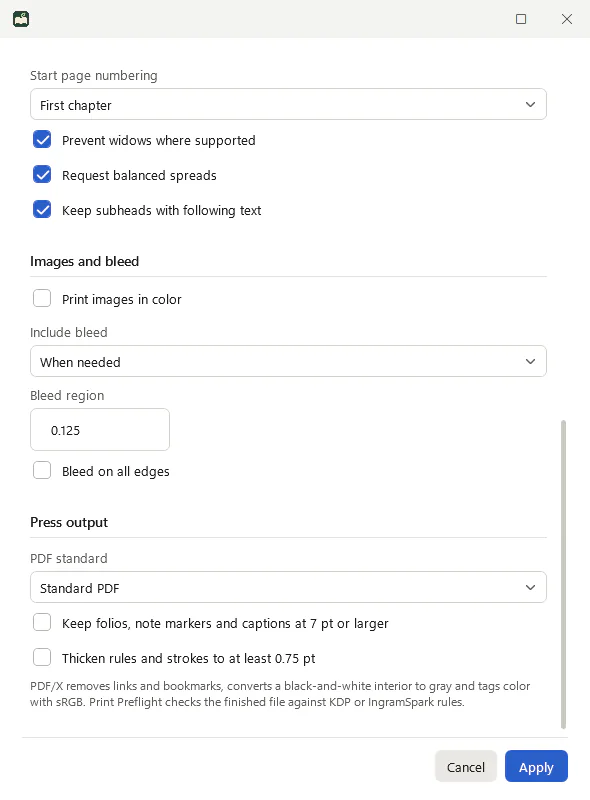
In Print and page setup, PDF standard offers Standard PDF, PDF/X-1a:2001 and PDF/X-3:2002. PDF/X-1a:2001 is for black-and-white interiors: the file is converted to grayscale and links and bookmarks are removed, as the standard requires. PDF/X-3:2002 is for color interiors: RGB images are kept with an embedded color profile and the printer converts them. Every font is embedded in both. In Pro, CMYK color interiors write a color PDF/X-1a:2001 with every color converted through a GRACoL profile and a total-ink limit, for a printer that wants CMYK data rather than profiled RGB. The output is tested in LeafBound’s own suite and has not been independently certified.
Print preflight then reads the finished file and checks embedded fonts, transparency, interior color for black-and-white books and the rest of its more than 25 checks against the KDP or IngramSpark profile you choose.
PDF/X questions
Does KDP require PDF/X-1a?
No. KDP asks for PDF/X-1a “if possible” and accepts a standard PDF with every font embedded. A plain PDF that meets the other rules (embedded fonts, 300 dpi images, flattened transparency, no bookmarks, annotations or encryption) prints the same.
Does IngramSpark accept PDF/X-3?
Yes. IngramSpark’s File Creation Guide accepts PDF/X-1a:2001 or PDF/X-3:2002, with every font embedded. PDF/X-3 is the one to use for a color interior that keeps RGB images with an embedded color profile, so the printer does the conversion. Black-and-white interiors should be grayscale in either standard.
What is the difference between PDF/X-1a and PDF/X-3?
Color. PDF/X-1a allows only CMYK and spot colors, so every image has already been converted for the press. PDF/X-3 also allows RGB and Lab images that carry a color profile, and leaves the conversion to the printer. Both embed fonts, flatten transparency and declare an output intent.
Is PDF/X-4 accepted for books?
KDP and IngramSpark name PDF/X-1a (and, for IngramSpark, PDF/X-3) in their published rules. PDF/X-4 keeps live transparency, which both printers ask you to flatten. Export X-1a or X-3 for a book interior unless the printer’s page says otherwise.
Can Word export PDF/X-1a?
Not directly. Word’s Save as PDF makes a standard PDF, with an option for PDF/A, and its “Minimum size” setting can drop font embedding. Export the standard PDF with “Standard (publishing online and printing)” selected, then either upload it to KDP as is or convert it to PDF/X in Acrobat Pro or a formatter.
Does a PDF/X-1a file guarantee acceptance?
No. PDF/X-1a sets the file format rules: fonts, color spaces, transparency and the output intent. It says nothing about margins, bleed, page size, page count or image resolution, which are the rules that cause most rejections. A conforming PDF/X-1a file with a 0.2 in margin still fails.
What is rich black?
A black made from all four inks rather than black ink alone, used for large solid areas so they print dense rather than dark gray. IngramSpark’s guide gives 60% cyan, 40% magenta, 40% yellow and 100% black, within a 240% total ink limit. Body text stays 100% black only.
Is LeafBound’s PDF/X output certified?
No. LeafBound writes PDF/X-1a:2001 for black-and-white interiors, PDF/X-3:2002 for color ones and, in Pro, CMYK color PDF/X-1a:2001, and its own test suite checks the output, but the files have not been certified by an independent body. Acrobat’s Preflight or a printer’s own check is the final word, as it is for every tool.
More guides
Export PDF/X-1a:2001 and check it before you upload.
Choose the standard in Print and page setup, generate the PDF, and let preflight confirm fonts, transparency and color against the KDP or IngramSpark profile.
Early access · Author from $79 once · free 4-day trial · Windows 10 and 11