 LeafBound
Guide · IngramSpark
IngramSpark interior formatting, from PDF/X to the gutter.
IngramSpark distributes to bookstores and libraries, and its automated file check is stricter than KDP’s. Here is what an IngramSpark interior needs, and how LeafBound produces and checks it.
IngramSpark interior requirements
| PDF standard | PDF/X-1a:2001 or PDF/X-3:2002 |
|---|---|
| Fonts | All fonts embedded |
| Margins | At least 0.5 in, plus 0.125 in gutter for perfect-bound and hardcover books |
| Bleed | 0.125 in on the three outer edges, none on the bind side |
| Colour | Greyscale for black-and-white interiors; CMYK for colour |
| Pages | Single pages at trim size, not spreads |
| Images | High resolution; low-resolution artwork is rejected |
How LeafBound produces the file
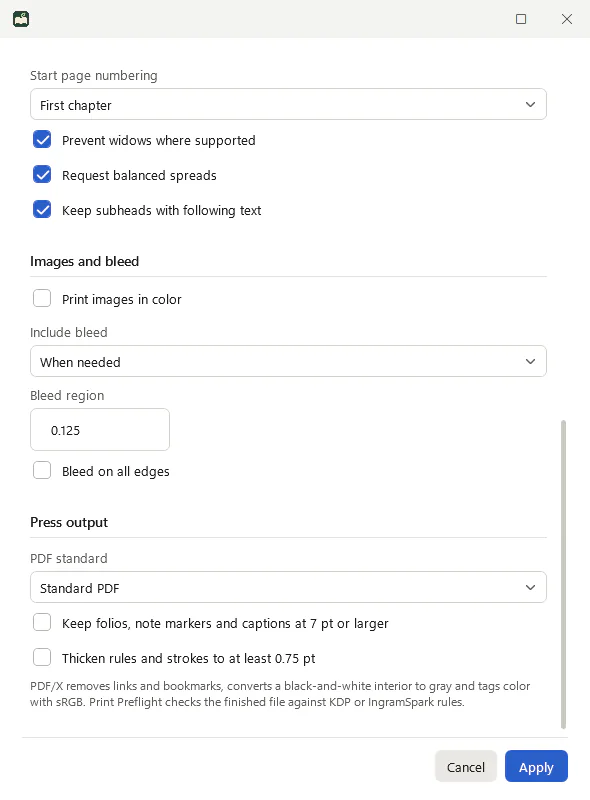
- Choose PDF/X-1a in Print settings for a black-and-white interior: LeafBound converts it to grey and removes links and bookmarks.
- Choose PDF/X-3 for a colour interior.
- Turn on Keep folios, note markers and captions at 7 pt or larger and Thicken rules to at least 0.75 pt if a theme uses fine lines.
- Set bleed to When needed; LeafBound adds 0.125 in to the outer edges only when artwork reaches the trim.
Then run the IngramSpark profile
Print preflight has IngramSpark paperback and hardcover profiles. They check margins with the gutter allowance, bleed geometry, safe area, image resolution, embedded fonts, colour and transparency on the composed PDF.
IngramSpark questions
Does IngramSpark require PDF/X-1a?
IngramSpark asks for print-ready PDFs to PDF/X-1a:2001 or PDF/X-3:2002. LeafBound writes PDF/X-1a:2001 for black-and-white interiors and PDF/X-3:2002 for colour interiors, with every font embedded and transparency removed.
What margins does IngramSpark need?
IngramSpark recommends at least 0.5 in on every side, plus about 0.125 in of extra gutter for perfect-bound and hardcover books, especially beyond 400 pages. LeafBound’s IngramSpark profiles check against these and treat 0.25 in as the hard limit.
How is IngramSpark bleed different from KDP?
Both use 0.125 in on the outer edges. IngramSpark wants bleed on the three outer edges only, never on the bound edge; LeafBound adds it that way.
Does LeafBound convert colour to CMYK?
Not yet. Colour interiors are written as PDF/X-3:2002 with tagged colour, which IngramSpark lists as accepted. Order a printed proof for colour-critical books.
Can I use the same file for KDP and IngramSpark?
Often, yes, if you set margins to the stricter IngramSpark values. Run both preflight profiles to see.
More guides
Make an IngramSpark-ready interior on Windows.
Export PDF/X-1a or PDF/X-3 and check it with the IngramSpark profile before you upload.
LeafBound opens to the public soon, with a free 14-day trial of every feature. Windows 10 and 11, 64-bit.