 LeafBound
Guide · Kindle ebook
Kindle ebook formatting without Kindle-only files.
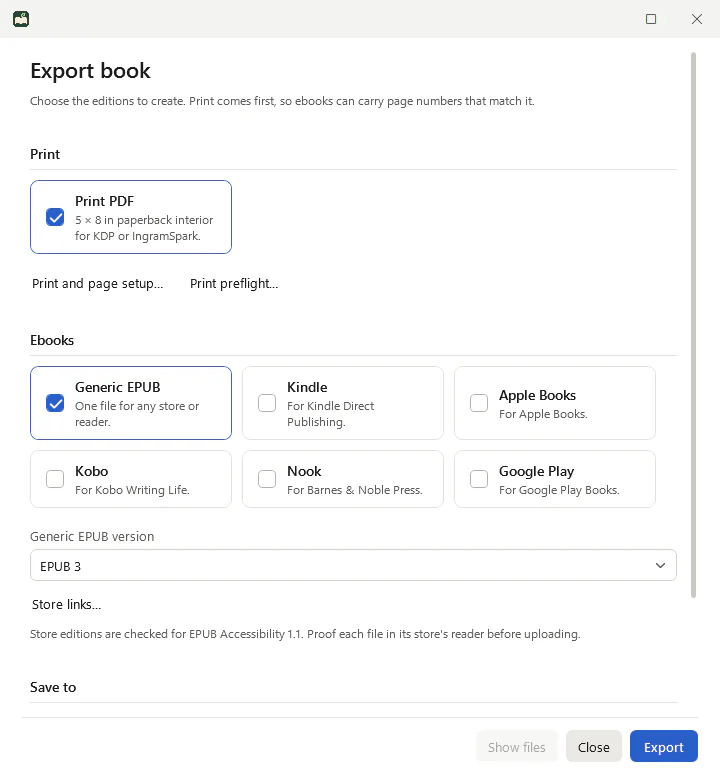
KDP takes an EPUB and converts it for Kindle. The cleaner that EPUB is, the better your book looks on every Kindle device and app. LeafBound exports a Kindle edition alongside editions for Apple Books, Kobo, Nook and Google Play.
What a good Kindle EPUB needs
- Real structure: chapters, headings and a navigation table of contents, not page breaks and bold text.
- Reflowable text that respects the reader’s font and size choices.
- Sensible images: sized for screens, with descriptions for readers who cannot see them. KDP’s guidance is 5 MB or less per image.
- Links that go somewhere: your “Also by” list should point to Amazon in the Kindle edition.
- No print furniture: running heads and page numbers belong to print.
How LeafBound handles it
- Chapters, parts and front and back matter export as proper EPUB sections with a navigation document.
- Ebook styling follows the theme but never fixes the page colour or forces a text size, so readers stay in control.
- Every edition carries EPUB Accessibility 1.1 metadata and semantic roles.
- LeafBound asks for any missing image descriptions before export.
- Store links switch per edition: Amazon for Kindle, Apple for Apple Books, and so on.
Before you publish
- Export print first, then the Kindle edition, so ebook page numbers match print.
- Open the EPUB in Kindle Previewer and check a few chapters on phone, tablet and Kindle sizes.
- Upload the EPUB to KDP and review the online preview.
Kindle formatting questions
What file should I upload to KDP for a Kindle ebook?
An EPUB. KDP no longer accepts MOBI for reflowable ebooks. It converts your EPUB for Kindle devices and apps, so check the result in Amazon’s free Kindle Previewer before you publish.
Is LeafBound’s Kindle edition different from the generic EPUB?
It is an EPUB prepared for Kindle: its store links point to Amazon, and LeafBound warns about images larger than KDP’s guidance. Use the generic EPUB for stores that are not on the list, and the store editions for the others.
Do I need Kindle Create?
No. Kindle Create is free but produces a Kindle-only file and cannot edit tables, lists or footnotes. LeafBound makes one book for Kindle and every other store.
Will the ebook match my print page numbers?
If you export print first, yes: LeafBound adds a page list mapped to the print pages, which reading apps can use for “go to page”.
More guides
See your own book in LeafBound.
Import your Word manuscript, try any of the 28 themes and run a print preflight. The trial includes everything, so you can judge the real result before you pay.
LeafBound opens to the public soon, with a free 14-day trial of every feature. Windows 10 and 11, 64-bit.