 LeafBound
Guide · KDP paperback
KDP paperback formatting: the rules, and how to pass them.
Amazon KDP rejects print files for a short list of reasons: margins, bleed, page size, fonts, image resolution and a few others. This guide lists KDP’s published requirements and shows how LeafBound checks each one on your finished PDF.
1. Trim size and page count
Choose the trim before you set margins: KDP’s margin rules depend on it. Standard sizes include 5 × 8, 5.25 × 8, 5.5 × 8.5 and 6 × 9 in. Custom paperback sizes can be 4 to 8.5 in wide and 6 to 11.69 in tall.
| Paper and ink | Page range |
|---|---|
| White paper, black ink | 24 to 828 pages |
| Cream paper, black ink | 24 to 776 pages |
| Standard colour | 72 to 600 pages |
| Hardcover | 75 to 550 pages |
2. Inside margin (gutter) by page count
The thicker the book, the more paper disappears into the spine, so KDP asks for a larger inside margin.
| Pages | Minimum inside margin |
|---|---|
| 24 to 150 | 0.375 in |
| 151 to 300 | 0.5 in |
| 301 to 500 | 0.625 in |
| 501 to 700 | 0.75 in |
| 701 to 828 | 0.875 in |
3. Outside margins and bleed
- Outside, top and bottom margins: at least 0.25 in, or 0.375 in when the file has bleed.
- Bleed: 0.125 in on the top, bottom and outside edges. A 6 × 9 in book with bleed is 6.125 × 9.25 in per page.
- If one page bleeds, the whole file must be set up with bleed.
4. The file itself
- Fonts embedded (full embedding preferred). PDF/X-1a where possible.
- Images at 300 DPI; text at least 7 pt; lines at least 0.75 pt; grey fills at least 10%.
- Transparency flattened; no crop marks, bookmarks, annotations or encryption.
- Single pages, not spreads, with even page numbers on the left.
- No more than four blank pages in a row at the start or middle, or ten at the end.
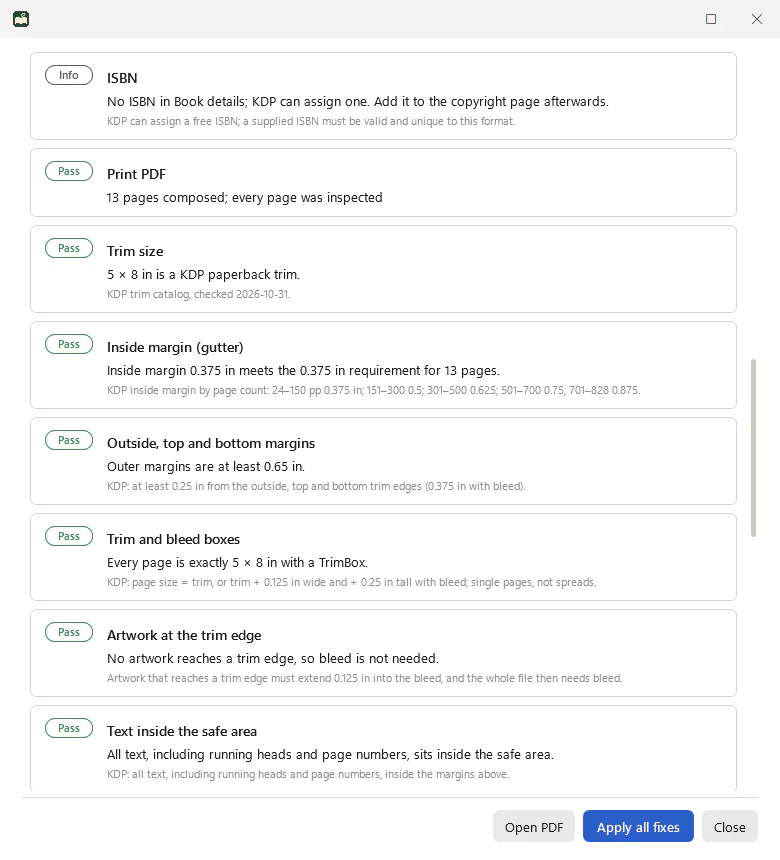
What LeafBound checks
Preflight reads the composed PDF, not the settings, so it catches problems a template cannot.
- Trim size against KDP’s catalog and custom range
- Page count for the trim, ink and paper
- Inside margin against the final page count
- Outside, top and bottom margins, with or without bleed
- Trim and bleed boxes on every page
- Artwork at the trim edge that needs bleed
- Text inside the safe area, including running heads and folios
- Minimum text size of 7 pt
- Minimum line weight of 0.75 pt
- Image resolution after scaling
- Embedded fonts
- Interior colour for black-and-white books
- Light grey fills under 10%
- Transparency
- Blank-page runs
- Page-number sides, even on the left
Failed checks name the page and, where possible, offer a fix that recomposes the book and runs preflight again.
KDP formatting questions
What inside margin does KDP require?
It depends on page count: 0.375 in for 24 to 150 pages, 0.5 in for 151 to 300, 0.625 in for 301 to 500, 0.75 in for 501 to 700 and 0.875 in for 701 to 828. LeafBound checks the inside margin against the final page count after composition.
Do I need bleed for a KDP paperback?
Only if any image or background reaches the edge of the page. Then the whole file needs bleed: 0.125 in added to the top, bottom and outside edges, so the page is 0.125 in wider and 0.25 in taller than the trim.
Does KDP require PDF/X-1a?
KDP recommends PDF/X-1a where possible and requires embedded fonts. LeafBound can export PDF/X-1a:2001 for black-and-white interiors.
Why did KDP reject my file for text outside the margins?
Usually because running heads or page numbers sit closer than 0.25 in to the trim (0.375 in with bleed). LeafBound’s “Text inside the safe area” check finds the exact page and offers a margin fix.
Can LeafBound do KDP hardcovers?
Yes. There is a KDP hardcover profile with its own trims and page limits (75 to 550 pages).
More guides
Check your book against KDP before you upload.
Import your manuscript, choose the KDP paperback profile and see exactly what passes.
LeafBound opens to the public soon, with a free 14-day trial of every feature. Windows 10 and 11, 64-bit.