 LeafBound
Print books
Print book layout, from manuscript to press-ready PDF.
LeafBound typesets your book for KDP and IngramSpark on Windows: trim, margins and bleed set once, a preview built from the real print PDF, 128 themes with Large print versions, and a PDF/X file checked before you upload.
What a print-ready interior needs
A paperback interior is a PDF with the right page size, margins that fit the page count, bleed where artwork reaches the edge, every font embedded and images at print resolution.
| Requirement | What the printers ask for | In LeafBound |
|---|---|---|
| Trim size | One of KDP’s 16 standard sizes, or custom from 4 x 6 to 8.5 x 11.69 in. IngramSpark: single pages at trim size. | Set once; checked against the profile |
| Inside margin | KDP: 0.375 in up to 150 pages, rising to 0.875 in at 701 to 828. IngramSpark: 0.5 in plus about 0.125 in gutter. | Checked against the final page count |
| Outer margins | KDP: at least 0.25 in, or 0.375 in with bleed. IngramSpark: at least 0.5 in on every side. | Checked on every page, running heads and folios included |
| Bleed | 0.125 in on the top, bottom and outside edges when any page has artwork at the trim; 6 x 9 in becomes 6.125 x 9.25 in. | “When needed” or “Every page” |
| Fonts | Every font embedded. | Always embedded |
| Images | 300 ppi at the printed size. | Checked after scaling |
| PDF standard | PDF/X-1a “if possible” for KDP; PDF/X-1a:2001 or PDF/X-3:2002 for IngramSpark. | PDF/X-1a:2001 or PDF/X-3:2002 |
Guides for each row: trim sizes, margins by page count, bleed and PDF/X explained.
Print preview
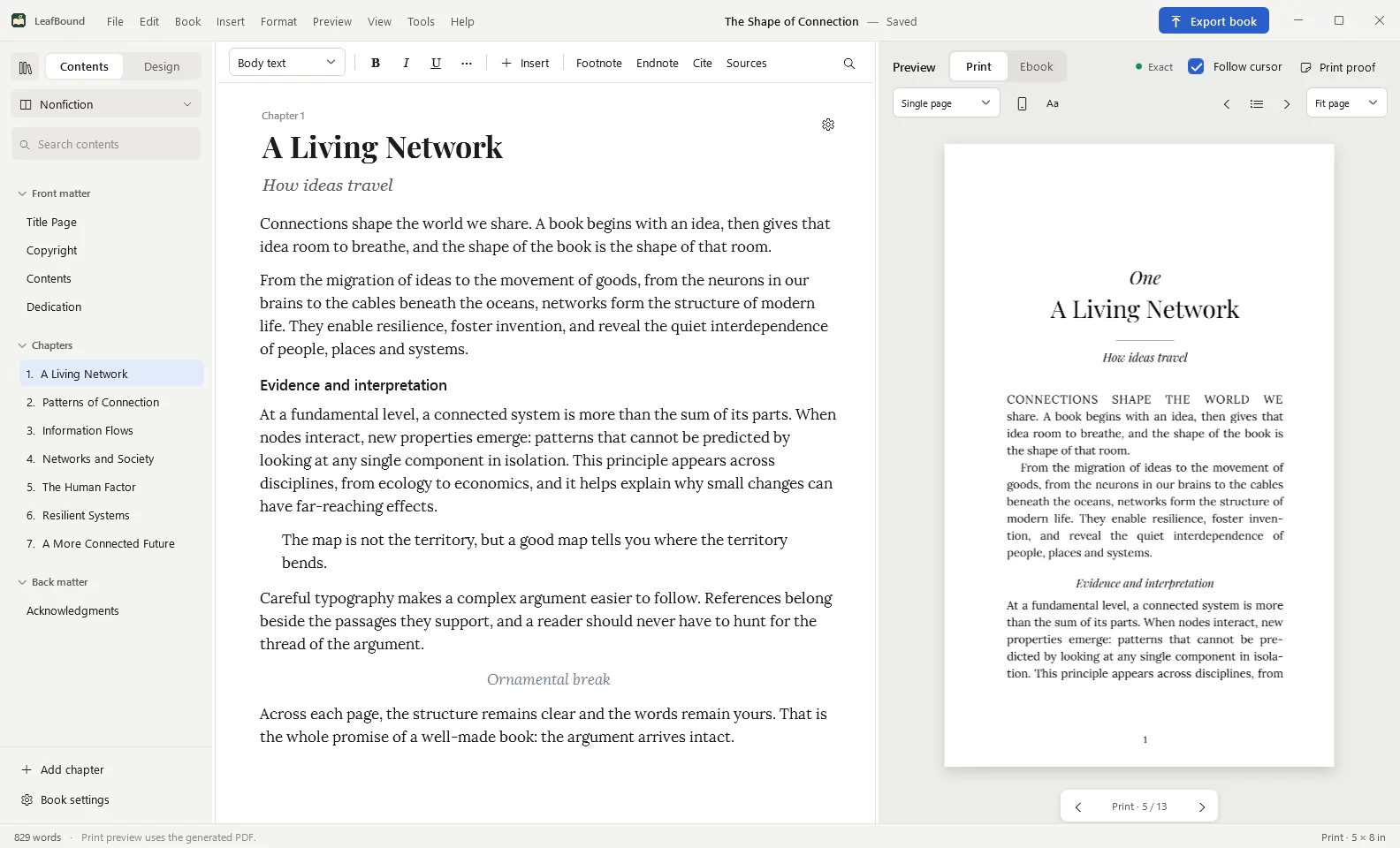
The page beside your text is the printed page.
The preview is the generated print PDF, recomposed a moment after you stop typing. The line breaks, page breaks and page numbers you see are the ones the printer receives.
- Exact print preview beside the editor, with Follow cursor to keep the page you are editing in view, and Print proof to open the full PDF.
- Faster exports: print exports are about 3 to 8 times faster than before. A 224-page book exports in about 11 seconds on our test PC.
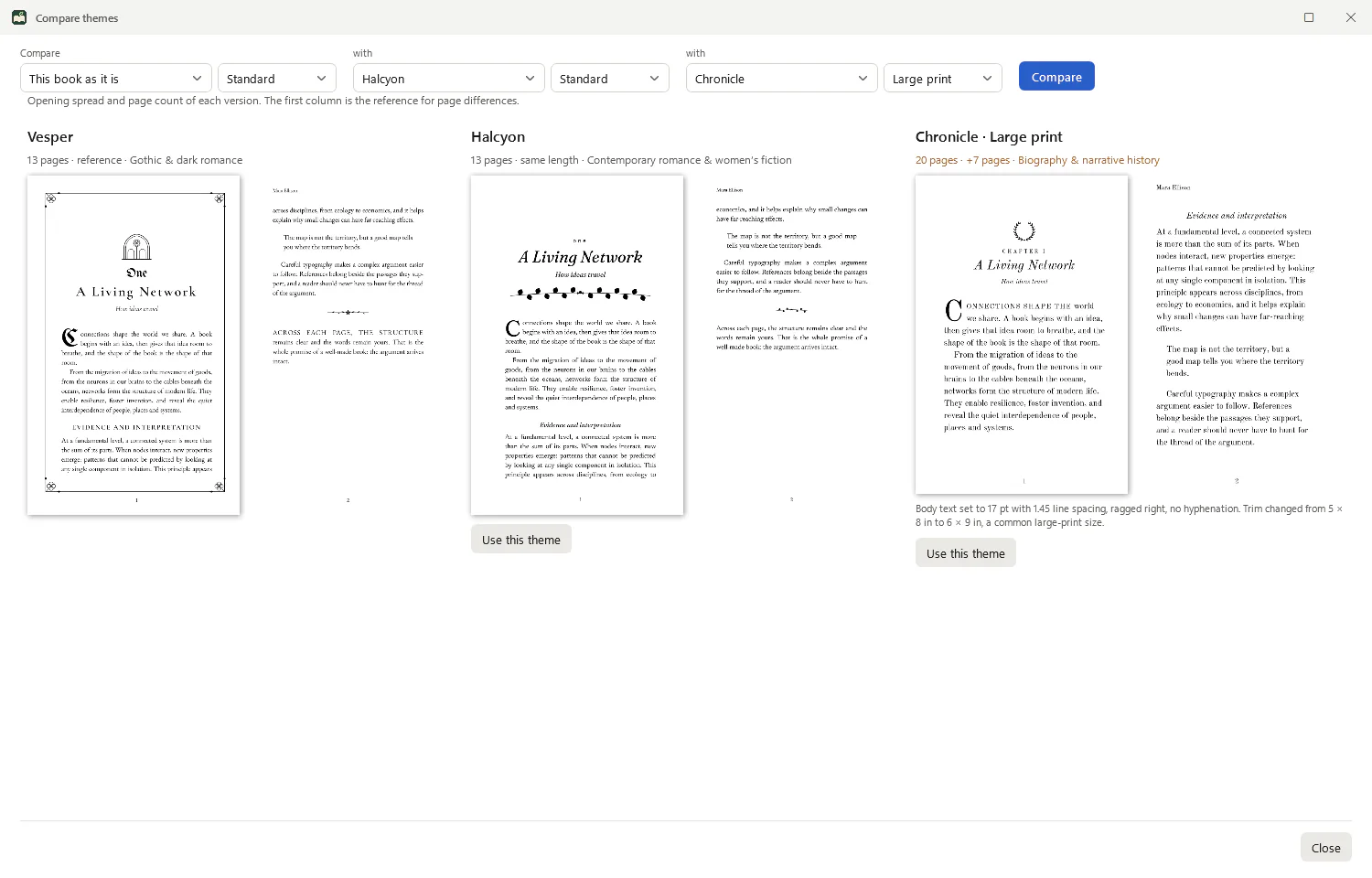
- Compare themes shows your opening spread in up to three designs, each with its page count.
- Ebook preview shows the same text as a reading app would. See the ebooks page.
Trim, margins and bleed
Set the page once. LeafBound keeps it consistent.
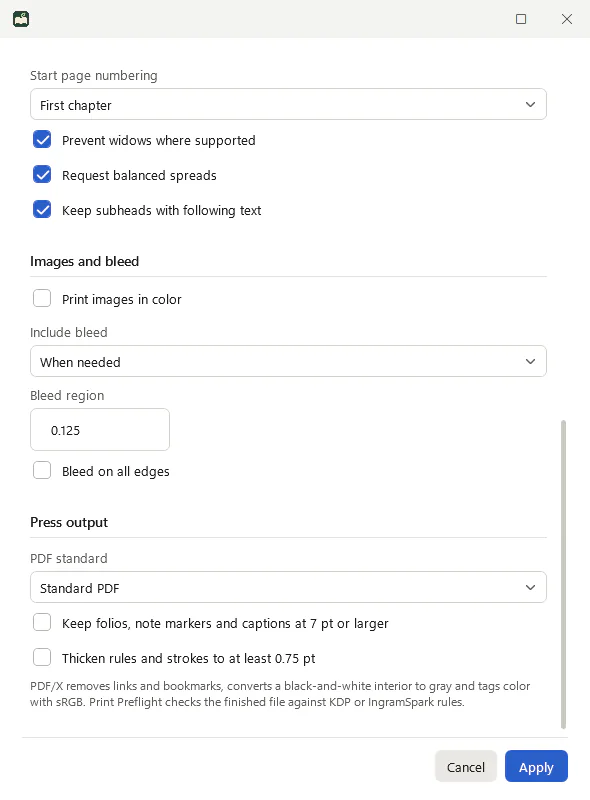
Print and page setup hold the trim, margins and bleed rule for the whole book, so no page drifts outside the printer’s limits on its own.
- Trim size from the standard sizes or a custom size, and margins for inside, outside, top and bottom.
- Bleed “When needed” adds 0.125 in on the three outer edges only when a page has artwork at the trim, or choose “Every page”.
- Typesetting settings: prevent widows, on by default, and keep subheadings with the text that follows. These are settings the composer works toward, not guaranteed results, so read the preview.
- Minimum sizes: keep folios, note markers and captions at 7 pt or larger, and thicken rules to at least 0.75 pt.
Themes
128 themes, each with a Large print version.
Every theme sets typefaces, chapter openings, first-paragraph treatment, scene-break ornaments and running heads, in Standard, Large print and Accessible versions.
- Genre designs from Vesper for gothic and dark romance to Treatise for academic work. See the theme gallery.
- Large print versions for the 16 to 18 pt range the NAVH and NLS standards describe. More in the large print guide.
- Compare themes with page counts, so you know what large print does to spine width and printing cost before you choose.
Typesetting
The parts of a printed book, handled.
Running heads and folios
Headers and footers set per part of the book, with running heads and page numbers where the theme puts them.
Contents pages
An automatic contents page with dot leaders and the final folios, so the numbers are right after every change.
Footnotes on the same page
Footnotes sit at the foot of the page that holds their reference; endnotes print in a Notes section at the end of the book. In ebooks they become linked notes. Study editions can add page-bottom commentary in one or two columns (Academic).
Press output
Press-ready PDF/X, every font embedded.
LeafBound writes PDF/X-1a:2001 for black-and-white interiors: the interior is converted to grayscale, and links and bookmarks are removed, as the standard requires. It writes PDF/X-3:2002 for color interiors: RGB is kept with an embedded color profile and the printer converts it. In Pro, CMYK color interiors convert every color through a GRACoL profile into a color PDF/X-1a:2001, for printers that want CMYK data. Every font is embedded in each.
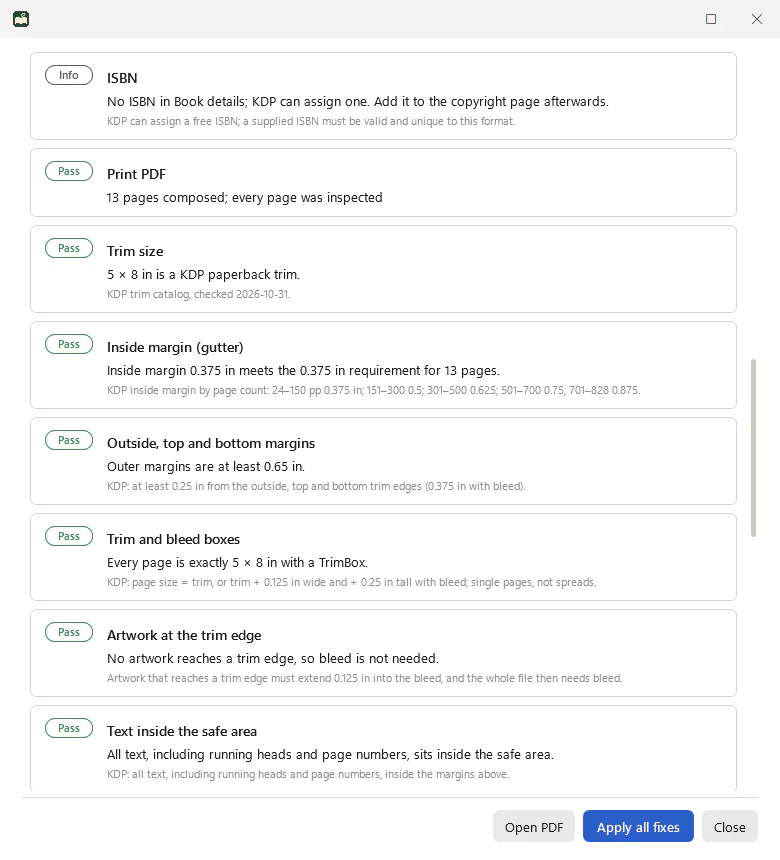
After export, print preflight reads the finished PDF and runs more than 25 checks with KDP and IngramSpark profiles, with one-click fixes and an automatic recheck. Pro adds profiles for 14 print-on-demand printers, with 49 formats and 476 trim sizes.
Hardcover and large print
Hardcover and Large print versions from the same book.
- Hardcover: KDP hardcover and IngramSpark hardcover preflight profiles, with KDP’s 75 to 550 page range and its own trim list.
- Large print: switch any theme to its Large print version and Compare themes shows the new page count. KDP’s large print checkbox is only a label for 16 pt or larger body text.
- Clear Print is the theme designed for Large print and Accessible versions.
Beyond the interior
Covers, color, picture books and special editions.
- Cover designer. A full print wrap with spine and barcode, written as a PDF/X-1a CMYK cover for KDP or IngramSpark.
- CMYK color interiors (Pro): a color PDF/X-1a:2001 converted through a GRACoL profile. Otherwise, color interiors are PDF/X-3:2002 with RGB and an embedded profile, and the printer converts.
- Picture books laid out page by page (Pro), with spreads, bleed and fixed-layout ebooks. See picture books.
- Special editions (Studio): art frames and custom borders, sprayed and printed edges, foil, emboss, deboss and spot-UV plates, dust jackets, cases and endpapers, and numbered limited runs. LeafBound makes the files and your printer applies the finish; not every printer offers every finish.
Print book questions
Can Kindle Create make a paperback?
Yes, from the same project, but with fixed margins and about four locked themes, and tables, lists, footnotes and inline images cannot be edited. Its ebook output is KPF, which only Amazon accepts. For a paperback you control, and a file IngramSpark will also take, you need a print PDF with your own trim, margins and bleed.
What is the best book formatting software for print books?
It depends on your computer. On Windows, LeafBound writes PDF/X-1a:2001 and PDF/X-3:2002 and checks the finished file against KDP and IngramSpark rules. On a Mac, Vellum (the Mac book formatter at vellum.pub) is the usual reference point. For picture books laid out page by page, LeafBound Pro has a picture-book designer with spreads, bleed and fixed-layout ebooks. See every formatter compared.
Does KDP require PDF/X-1a?
KDP recommends PDF/X-1a “if possible” and requires embedded fonts (checked 31 October 2026). IngramSpark asks for PDF/X-1a:2001 or PDF/X-3:2002 (checked 3 November 2026). LeafBound writes both, with every font embedded.
Can I format a print book in Word?
You can, with mirror margins and a KDP template, but Word writes plain PDF rather than PDF/X, has no bleed setting, and leaves widows, running heads and the inside margin to you. LeafBound imports your Word (.docx) manuscript, so you keep writing in Word and let the formatter set the page.
Does LeafBound do hardcovers?
Yes. Preflight has KDP hardcover and IngramSpark hardcover profiles with their own trims, page ranges (KDP hardcover: 75 to 550 pages) and margin rules.
Will my file be accepted?
Preflight checks the finished PDF against the rules KDP and IngramSpark publish; where IngramSpark publishes no exact limit you get a warning rather than a pass. The printer makes the final decision, so order a printed proof before you publish.
Keep reading
Typeset your paperback on the PC you already own.
Import your manuscript, set trim and bleed, export PDF/X and run preflight. Try every tool free for 4 days, then buy LeafBound to export.
Early access · Author from $79 once · free 4-day trial · Windows 10 and 11