 LeafBound
Print preflight
KDP and IngramSpark preflight, built in.
Before you upload, LeafBound reads the finished print PDF and runs more than 25 checks against the rules KDP and IngramSpark publish, names the page for each problem, and fixes most of them in one click.
What preflight is, and why it reads the PDF
Preflight is the check a print shop runs on a file before it goes to press. Most formatting tools check the settings you typed. LeafBound’s print preflight checks the file you are about to upload, which is a different thing.
The settings can be right and the file still wrong. KDP’s inside margin depends on the final page count, which is only known after the book is composed. A running head can sit inside the margins on 300 pages and drift into the safe area on one. An image that is 300 ppi in the manuscript becomes 200 ppi when the theme prints it wider. So LeafBound composes the book, writes the PDF/X file and reads it back, page by page, through the profile you choose. The print books page covers the settings that come first.
Four profiles
Each profile applies the distributor’s own trims, page ranges and margin rules. Run two if you plan to upload to both. Pro adds profiles for 14 print-on-demand printers, with 49 formats and 476 trim sizes.
| Profile | Trim sizes | Page range | Margins |
|---|---|---|---|
| KDP paperback | 16 standard trims; custom 4 to 8.5 in wide by 6 to 11.69 in tall | White 24 to 828; cream 24 to 776; color 72 to 600 | Inside by page count, 0.375 to 0.875 in; outer 0.25 in, or 0.375 in with bleed |
| KDP hardcover | KDP’s published hardcover trims (check KDP’s page) | 75 to 550 | Same inside-margin table and outer-margin rule |
| IngramSpark paperback | Single pages at trim size | 18 to 1,200 by binding | 0.5 in on every side, plus about 0.125 in gutter |
| IngramSpark hardcover | Single pages at trim size | 18 to 1,200 by binding | 0.5 in on every side, plus gutter, especially past 400 pages |
More than 25 checks, grouped
Every check reads the composed PDF. Rows that name several measurements, such as the outer margins, run as separate checks, and some checks run only when they apply to your book.
Geometry
- Trim size against the profile’s catalog or custom range
- Page count for the trim, ink and paper
- Inside margin against the final page count
- Outside, top and bottom margins, with or without bleed
- Trim and bleed boxes on every page
- Artwork at the trim edge that needs bleed
- Text inside the safe area, including running heads and folios
Type and lines
- Minimum text size of 7 pt, including folios, note markers and captions
- Minimum line weight of 0.75 pt
Images
- Image resolution after scaling, at the size the image prints
The file
- Embedded fonts
- Interior color for black-and-white books
- Light gray fills under 10%
- Transparency
- Blank-page runs
- Page-number sides, even on the left
- Checks that apply only to some books, such as the ISBN, the spine, PDF/X and total ink
The numbers are the distributors’ own, checked 31 October 2026. The KDP paperback guide and IngramSpark guide list the rules in full.
Pass, warning and fail
Where the distributor publishes no exact limit, you get a warning rather than a pass.
Pass
The page meets the rule the distributor publishes as a number. It does not replace the distributor’s own review.
Warning
The file is outside a recommendation, or in an area where IngramSpark gives guidance without a figure. Read it and decide.
Fail
The page breaks a stated rule, such as KDP’s 0.25 in outer margin. The check names the page and, where it can, offers a fix.
One-click fixes, then an automatic recheck
Margins, bleed, small text and thin lines can be fixed from the report. LeafBound changes the setting, recomposes the book and runs preflight again.
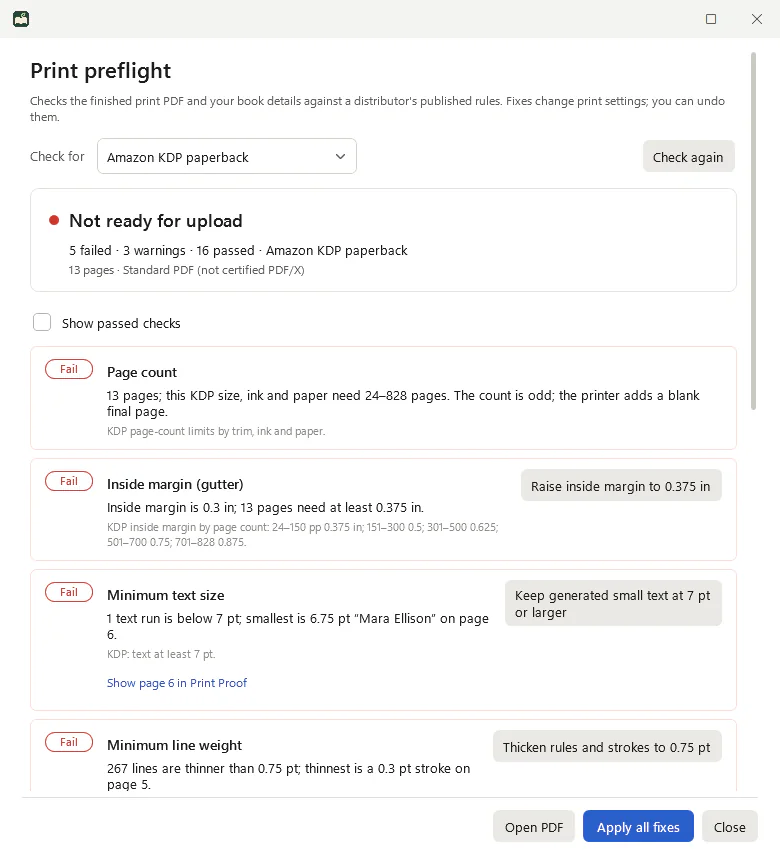
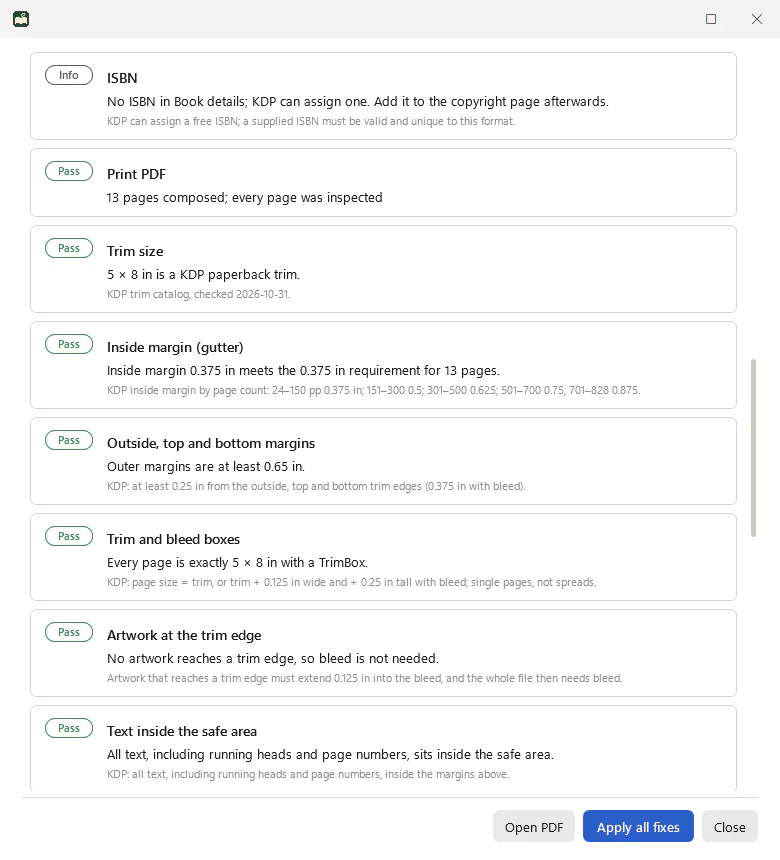
A wider inside margin can change the page count, which is why the recheck runs on the recomposed book.
Common KDP rejections and the check that catches them
The reasons that come up most, with the check that finds each one before the upload does.
| KDP rejection reason | Typical cause | LeafBound check |
|---|---|---|
| Text outside the printable area | Running heads or folios inside the 0.25 in zone (0.375 in with bleed) | Text inside the safe area |
| Margins too small for the page count | A 320-page book with a 0.5 in gutter needs 0.625 in | Inside margin by final page count |
| Page size does not match the trim | A 6 x 9 page for a book with edge artwork; it needs 6.125 x 9.25 in | Trim and bleed boxes on every page |
| Artwork does not reach the bleed | The image stops at the trim line | Artwork at the trim edge |
| Fonts not embedded | A system font referenced but not included | Embedded fonts |
| Low-resolution images | A 1,200 px photo printed 6 in wide is 200 ppi | Image resolution after scaling |
| Text too small or lines too thin | A 6 pt caption; a 0.5 pt table rule | 7 pt minimum text; 0.75 pt minimum lines |
| Too many blank pages | More than 4 in a row at the start or middle, 10 at the end | Blank-page runs |
The file preflight reads is PDF/X-1a:2001 for black-and-white interiors or PDF/X-3:2002 for color, every font embedded, not independently certified. In Pro, CMYK color interiors are a color PDF/X-1a:2001 converted through a GRACoL profile. For who writes which standard, see formatters compared.
Preflight questions
Why did KDP reject my PDF?
The usual reasons: text outside the printable area, an inside margin too small for the page count, a page size that does not match the trim or lacks bleed, fonts not embedded, or images under 300 ppi. Each has its own check, so preflight names the page before KDP does. See KDP rejections explained.
Does IngramSpark accept PDF/X-3?
Yes. IngramSpark’s File Creation Guide asks for PDF/X-1a:2001 or PDF/X-3:2002 with all fonts embedded (checked 3 November 2026). LeafBound writes PDF/X-1a:2001 for black-and-white interiors and PDF/X-3:2002 for color, with RGB kept for the printer to convert. In Pro, CMYK color interiors are written as a color PDF/X-1a:2001 instead.
Does a pass guarantee acceptance?
No. Preflight checks the finished PDF against the rules KDP and IngramSpark publish. The printer makes the final decision when you upload, and only a printed proof shows you the real book. Order one before you publish.
What is the difference between a warning and a fail?
A fail breaks a rule the distributor states as a number, such as KDP’s 0.25 in minimum outer margin. A warning means the file is outside a recommendation, or in an area where IngramSpark gives guidance without an exact figure.
How do the one-click fixes work?
For margins, bleed, small text and thin lines, the failed check offers a fix that changes the setting, recomposes the book and runs preflight again. Other checks, such as image resolution, name the page and tell you what to replace.
Does preflight cover hardcovers?
Yes. The KDP hardcover and IngramSpark hardcover profiles use the hardcover trims and page ranges, for example KDP’s 75 to 550 pages.
What does PDF/X-1a mean?
A print standard for PDF files: every font embedded, no transparency, and the page boxes that define trim and bleed. KDP recommends it where possible; IngramSpark requires it or PDF/X-3. The PDF/X guide explains both.
Keep reading
Check your book against KDP and IngramSpark before you upload.
Import your manuscript, export PDF/X and run all four preflight profiles. Try every tool free for 4 days, then buy LeafBound to export.
Early access · Author from $79 once · free 4-day trial · Windows 10 and 11