 LeafBound
Print preflight · Printer profiles · Pro
Fourteen printer profiles. One preflight.
LeafBound carries profiles for 14 print-on-demand printers, including KDP, IngramSpark, Lulu and Bookvault, with 49 formats and 476 trim sizes, and writes the PDF/X file each one asks for: grayscale, sRGB or CMYK.
Profiles
Pick the printer. The rules follow.
A file that passes KDP can fail IngramSpark. Each printer publishes its own trims, page ranges, margins, bleed, PDF standard and color rules, and they do not agree. A profile holds one printer’s rules so you do not have to.
- 14 printers, 49 formats. KDP, IngramSpark, Lulu, Bookvault and ten more, listed in the app. A format is a trim and binding the printer offers, and Print and page setup shows the ones your chosen printer prints.
- The right PDF/X for each. The profile decides whether the file is PDF/X-1a:2001 in grayscale, PDF/X-3:2002 in sRGB or PDF/X-1a:2001 in CMYK, so you export once.
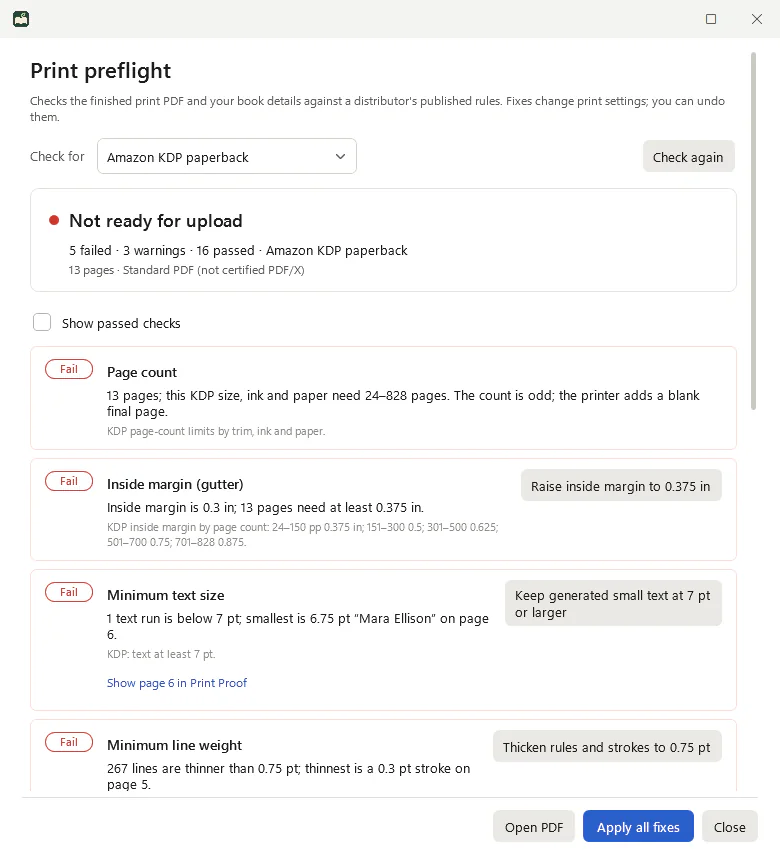
- 1,067 checks across the set. Each profile runs the checks its printer’s rules call for, on the finished PDF, page by page. Where a printer publishes no exact figure, you get a warning rather than a pass.
- Two printers, two runs. Publishing on KDP and IngramSpark? Run both profiles and set the stricter value in each row.
The four most authors ask about
What each profile is built from, and the families of checks it runs. The other ten printers are listed in the app with the same detail.
| Printer | Bindings | Rules from | What the profile checks |
|---|---|---|---|
| KDP | Paperback and hardcover | KDP’s paperback and hardcover help pages, checked 31 October 2026 | Trims and custom range, page count by paper, inside margin by page count, outer margins with or without bleed, 7 pt text, 0.75 pt lines, embedded fonts, gray fills, transparency, blank pages |
| IngramSpark | Paperback and hardcover | IngramSpark File Creation Guide dated 24 August 2026, checked 3 November 2026 | PDF/X-1a:2001 or PDF/X-3:2002, 0.5 in margins plus gutter, bleed on three edges, single pages at trim, 300 ppi, page range by binding |
| Lulu | The formats Lulu publishes | Lulu’s own file specifications | Trim and page range, margins and bleed, PDF requirements, color and resolution, as Lulu publishes them |
| Bookvault | The formats Bookvault publishes | Bookvault’s own file specifications | Trim and page range, margins and bleed, PDF requirements, color and resolution, as Bookvault publishes them |
Print preflight
What the checks look at
Every check reads the composed PDF, not the settings you typed, because the settings can be right and the file still wrong. The families are the same for every printer; the figures come from the profile.
Geometry
Trim size against the printer’s list, page count for the binding and paper, inside margin against the final page count, outer margins with or without bleed, trim and bleed boxes on every page, artwork at the trim edge, and text inside the safe area, running heads and folios included.
Type, lines and images
Minimum text size and minimum line weight where the printer states them, and image resolution measured after scaling, at the size each image prints.
The file
The PDF/X standard the printer asks for, embedded fonts, interior color for black-and-white books, light fills, transparency, blank-page runs and page-number sides.
Margins, bleed, small text and thin lines can be fixed from the report: LeafBound changes the setting, recomposes the book and runs preflight again. The print preflight page walks through a run, and PDF/X explained covers the standards.
Press output
Grayscale, sRGB or CMYK: the file the printer asked for.
Color interiors used to leave LeafBound as RGB for the printer to convert. Now the profile chooses among three PDF/X outputs.
| Output | Used for | What LeafBound writes |
|---|---|---|
| PDF/X-1a:2001, grayscale | Black-and-white interiors | Interior converted to grayscale; links and bookmarks removed; every font embedded |
| PDF/X-3:2002, sRGB | Color interiors for printers that convert, such as KDP | RGB kept with an embedded sRGB profile; the printer converts to its press |
| PDF/X-1a:2001, CMYK | Color interiors for printers that ask for CMYK, such as IngramSpark | Converted to CMYK with a GRACoL TR006 output intent; every font embedded |
Which tier has what
- Author and above: print preflight with the KDP and IngramSpark profiles, PDF/X-1a:2001 grayscale and PDF/X-3:2002 sRGB output.
- Pro and above: all 14 printer profiles and 49 formats, and CMYK color interiors with the GRACoL TR006 output intent.
- Studio: finishing specifications for named printers, for sprayed edges, foil and spot-UV plates, jackets and endpapers, as part of the special editions tools. LeafBound makes the files and the printer applies the finish; not every printer offers every finish. The special edition books guide explains what each printer needs.
Straight answers
What a profile does not do.
- It does not accept the file for the printer. Preflight matches your file to the published rules. Only the printer’s own review and a printed proof settle it.
- The output is not independently certified. The PDF/X files follow the standards and pass the checks we run; no outside body has certified them.
- It does not check the cover. Profiles cover the interior PDF. The cover designer makes the print wrap with spine and barcode, as a PDF/X-1a CMYK file for KDP or IngramSpark.
Printer profile questions
Which printers have profiles?
Fourteen print-on-demand printers, among them KDP, IngramSpark, Lulu and Bookvault, and ten more, listed in the app. Each profile carries that printer’s formats (49 across the set), page ranges, margin and bleed rules, PDF standard and color requirements, and preflight checks the finished file against them.
Does a pass mean the printer will accept the file?
No. Preflight checks the finished PDF against the rules the printer publishes, and where a printer publishes no exact figure you get a warning rather than a pass. The printer makes the final decision when you upload, and only a printed proof shows the real book. Order one.
Do I need CMYK for a color interior?
It depends on the printer. KDP accepts RGB and converts it. IngramSpark asks for CMYK, or a PDF/X-3 file with embedded profiles (checked 3 November 2026). LeafBound writes PDF/X-3:2002 with sRGB for the first case and PDF/X-1a:2001 with CMYK for the second, and the profile picks the right one for its printer.
What is the GRACoL TR006 output intent?
The description of the press condition a CMYK file was prepared for. LeafBound’s CMYK output carries the GRACoL TR006 intent, a common North American sheetfed reference, so the printer knows how the colors were separated. The output follows the PDF/X standards but has not been independently certified.
Where are Lulu’s and Bookvault’s rules?
In each printer’s own file specifications, which the profiles follow. This page does not restate their figures; open the printer’s specification page for the numbers, and run the profile to see them applied to your file.
Which tier includes the printer profiles?
Print preflight for KDP and IngramSpark is in every paid tier from Author up. The full set of 14 printer profiles and CMYK color interiors are in the Pro tier and above. The 4-day trial includes them.
Does it cover hardcovers?
Yes, where the printer offers them. The KDP hardcover profile uses KDP’s hardcover trims and its 75 to 550 page range; the IngramSpark hardcover profile adds the extra gutter IngramSpark asks for on thick books. Hardcover formats at the other printers follow their own lists.
Keep reading
Check your book against the printer you will actually use.
The free 4-day trial includes every printer profile. Import your manuscript, pick the printer, export PDF/X and run preflight before you pay.
Early access · Author from $79 once · free 4-day trial · Windows 10 and 11