 LeafBound
About
About LeafBound.
LeafBound is book formatting software for Windows. This page says what the app is, why it exists, what we believe, how it is built and tested, and how to reach us.
What LeafBound is
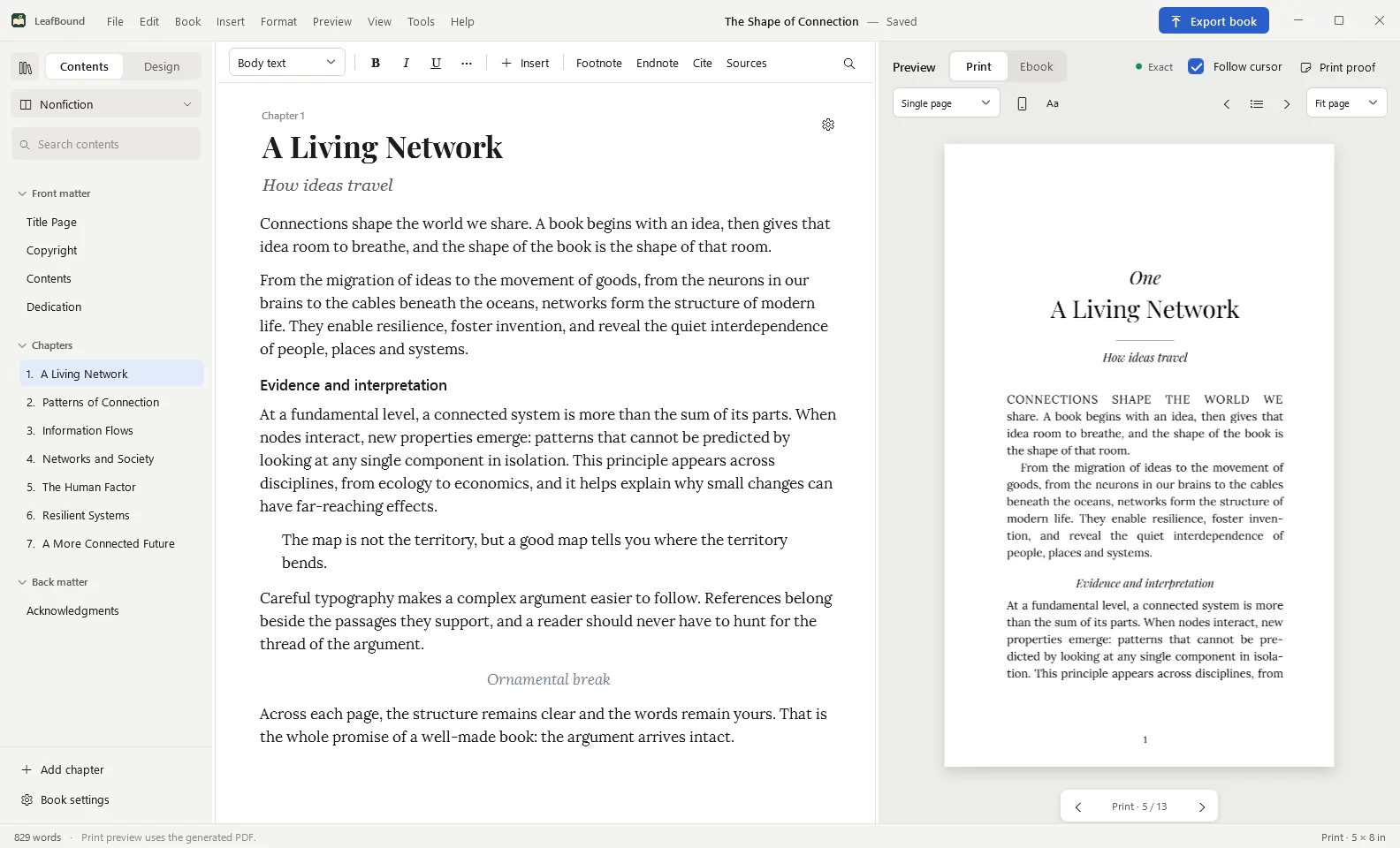
LeafBound turns a manuscript into a print-ready PDF and ebooks for every major store, on your own PC. You import a Word (.docx), RTF, Markdown, plain text or EPUB manuscript, and smart import finds the title page, parts, prologue and chapters; or you write in LeafBound. You choose one of 128 themes and check the real printed page beside your text: the print preview is the PDF itself and recomposes a moment after you stop typing. Print preflight then checks the finished PDF against the rules KDP and IngramSpark publish, and the ebook export writes an EPUB 3 plus editions for Kindle, Apple Books, Kobo, Nook and Google Play, each with accessibility metadata.
It runs on Windows 10 and 11 (64-bit). The Author tier is $79 and the Academic tier, which adds citations, a bibliography, study commentary and LaTeX equations, is $99; Pro and Studio add more tools. All are one-time prices per major version. The latest release is LeafBound 1.0.6.
Why it exists
Windows authors had no native desktop formatter that checked distributor rules. The best-known book formatter is Mac-only, and its makers say no Windows version is planned. The browser tools work on anything but keep your book in an account and tell you little about whether KDP or IngramSpark will accept the file. Most Windows authors were left with Word, a set of margin tables and a rejection email to learn from.
LeafBound was built to close that gap: a desktop app with local files that reads KDP’s and IngramSpark’s published requirements, applies them to the PDF it generated, and names the page when something fails. See KDP paperback formatting for the rules it checks.
What we believe
- Your files stay on your PC. LeafBound never uploads your manuscript. The only traffic is licensing and update checks, and the app works offline after one activation, checking in at least every 10 days.
- Pay once. A major version is a one-time purchase with free minor updates. There is no subscription and no per-book fee.
- Say what the app does not do. LeafBound runs on Windows 10 and 11, it is a single-author app, and its PDF/X output is tested rather than independently certified. The features page lists these limits plainly.
- No fake reviews. This site carries no testimonials, star ratings, download counts or “trusted by” lines, because we have none we can prove.
How it is built and tested
The preflight rules come from KDP’s and IngramSpark’s published pages: trim sizes, page-count limits, inside margins by page count, outer margins with and without bleed, 7 pt text, 0.75 pt lines, 300 ppi images, embedded fonts, grayscale interiors, transparency and blank-page runs. Each rule on the site carries the date it was checked. Where IngramSpark publishes no exact limit, LeafBound warns rather than passes, and every print page on this site says the same thing: the printer makes the final decision, so order a printed proof.
Print output is PDF/X-1a:2001 for black-and-white interiors and PDF/X-3:2002 for color. It is tested against those standards, not independently certified, and we do not use the word. Ebooks are tested with EPUBCheck and Ace by DAISY in LeafBound’s test suite, and every edition carries EPUB Accessibility 1.1 metadata; see the accessibility guide for what that means for the European Accessibility Act.
Release notes are public at leafbound.org/changelog/, with an RSS feed. Updates within a major version are checked when you are online, downloaded in the background and verified before they install.
Contact
Open a request with LeafBound support for anything: questions before you buy, press, licensing for a group, or a correction to this site. Every request is read by a person, and refunds are reviewed individually. Step-by-step help for every feature is in the help center.
Press kit
Product name: LeafBound (capital L, capital B). Maker: LeafBound. The seller of record is named in the Terms of Service.
One line: LeafBound is book formatting software for Windows that turns a manuscript into a print-ready PDF checked against KDP and IngramSpark rules, and accessible ebooks for every major store.
Facts you may quote:
- Price: Author $79, Academic $99, Pro and Studio above, one-time per major version, minor updates free. Upgrade from Author to Academic $20.
- Platform: native app for Windows 10 and 11, 64-bit.
- Trial: 4-day free trial of every feature, including the Academic tools; buy to export.
- Tiers: Reader (free), Author, Academic, Pro and Studio, plus Publisher and Print Shop licenses.
- Design: 128 themes in 394 variations, each in Standard, Large print and Accessible versions (14 core themes in Author, all 128 in Pro); 200 original artworks; 63 bundled font families; seven book types.
- Import: Word (.docx), RTF, Markdown, plain text, EPUB, and Vellum, Scrivener and Apple Pages projects, with chapters, parts, prologue and title page detected; LaTeX (.tex) with BibTeX in Academic.
- Print: PDF/X-1a:2001 and PDF/X-3:2002; print preflight of more than 25 checks with KDP paperback, KDP hardcover, IngramSpark paperback and IngramSpark hardcover profiles; a cover designer for the print wrap. Pro adds CMYK color interiors and profiles for 14 print-on-demand printers; Studio adds special editions.
- Ebooks: EPUB 3 (or EPUB 2) plus Kindle, Apple Books, Kobo, Nook and Google Play editions with EPUB Accessibility 1.1 metadata; classic MOBI for older Kindles; fixed-layout ebooks in Pro.
- Latest release: LeafBound 1.0.6.
Screenshots: use the screenshots on this site; link back to leafbound.org. Each image on the features page carries alt text that describes it, and the files are served from leafbound.org/img/. Do not alter the app interface in them.
Review licenses: reviewers and publishing educators can ask for a free license through LeafBound support. If you publish a review, tell your readers you received a free license; US FTC endorsement rules require that disclosure, and we ask for it wherever you publish.
Questions about us
Who makes LeafBound?
The LeafBound team builds, tests and supports it. The seller of record is named in the Terms of Service.
Why Windows?
Because Windows authors had no native desktop formatter that checked distributor rules. The best-known book formatter runs only on a Mac, and the browser tools keep your book in an account. LeafBound is a native Windows 10 and 11 app with local files, offline use and a KDP and IngramSpark preflight.
How do I contact you?
Open a request with LeafBound support for questions before you buy, problems, refunds or press. Every request is read by a person. From inside LeafBound, choose Help, then Report a problem.
Keep reading
Judge it on your own manuscript.
The free 4-day trial includes every feature. Import your manuscript, pick a theme and run preflight before you pay.
Early access · Author from $79 once · free 4-day trial · Windows 10 and 11