 LeafBound
Guide · Ebooks
EPUB accessibility, explained.
An accessible EPUB is one a reader can use with a screen reader, a braille display, magnification or their own colors and fonts, without losing anything. Since 28 June 2025 the European Accessibility Act has required it of ebooks sold in the EU. This guide gives the 12-point checklist, the metadata snippet, the alt-text rules and the two free tools that test the result.
What an accessible EPUB is
EPUB is already a better starting point than PDF: text reflows, fonts can be changed and a screen reader can read the markup. Accessibility is what you add so that nothing depends on sight alone. Headings carry the structure instead of bold text. Images carry descriptions. The navigation document lists every chapter. The language is declared. Tables have header cells. Equations are MathML, not pictures. And the package document says all of this in metadata, so a store can show a reader what to expect before they buy.
The W3C specification that defines the bar is EPUB Accessibility 1.1. It points to WCAG 2.1 Level AA for the content rules and adds the EPUB-specific parts: the schema.org metadata, a conformance statement and page navigation. An EPUB that meets it can be labelled as such in stores and library catalogs.
What the European Accessibility Act requires
The European Accessibility Act is Directive (EU) 2019/882. It has applied to ebooks and ebook services sold in the EU since 28 June 2025. In practice the standard it is read against is EPUB Accessibility 1.1 with WCAG 2.1 Level AA. Four points matter to a self-publisher:
- Microenterprises are exempt. A business with fewer than 10 staff and under 2 million euro in annual turnover is not obliged to comply as a service provider. Most self-publishers fall under this, but a retailer or aggregator that is not exempt may still require accessible files from you.
- Backlist deadlines vary by country. Member states set their own transition periods for titles published before June 2025. France, for example, runs to 2030. New titles are covered now.
- Sellers outside the EU are covered when they sell into the EU. The directive applies to the market, not the seller’s address.
- Enforcement is national. Each country names its own authority and penalties. Making the file accessible is simpler than tracking them.
The 12-point checklist
Each item names what to do and what Ace by DAISY, the free accessibility checker, can and cannot confirm. Where Ace cannot test something, you check it in a reader.
| Item | What to do | What Ace checks |
|---|---|---|
| 1. Reading order | Content appears in the spine and in each file in the order a reader should meet it. No sidebars or floats that split a sentence. | Ace shows the document outline in its report; you confirm the order yourself. EPUBCheck confirms every file in the spine exists. |
| 2. Headings | One h1 per chapter, h2 and h3 in order, never a level skipped and never a bold paragraph standing in for a heading. | Ace flags empty headings and shows the heading outline so skipped levels stand out. |
| 3. Alt text and decorative images | Every image that carries meaning has a description. Ornaments and scene-break glyphs get alt="" so a screen reader skips them. | Ace flags any image with no alt attribute and lists every image with its description for review. |
| 4. Navigation document | An EPUB 3 nav document (toc) that lists every chapter and section, plus landmarks for the body matter, cover and contents. | Ace prints the navigation outline; EPUBCheck errors if an EPUB 3 has no nav document. |
| 5. Language | xml:lang and lang on the html element of every content file, and dc:language in the package. Short passages in another language carry their own lang. | Ace flags content documents with no language declared. |
| 6. Tables | Real table markup with header cells (th) and scope, used for data only. Layout tables and tables saved as images fail. | Ace flags tables whose data cells have no header cells. |
| 7. MathML | Equations as MathML, with alttext or a fallback image description where a reader lacks MathML support. | Not tested by Ace; test with a screen reader in a MathML-capable reading app. See the equations guide. |
| 8. Page list | If a print edition exists, a page-list nav and pagebreak markers so readers can cite the same page as the print book. | Ace checks that page breaks carry a label and shows the page list in its report. |
| 9. Metadata | The schema.org accessibility properties and dcterms:conformsTo in the package document (snippet below). | Ace checks the required properties are present and summarizes them at the top of its report. |
| 10. No fixed colors or sizes | CSS that never forces a background color, text color or absolute font size, so the reader keeps night mode and their own size. | Not tested by Ace; this is a CSS decision. Check the file in a reader with dark mode and a large text size. |
| 11. Link text | Links that say where they go ("Chapter 4", "the bibliography"), never "click here" or a bare URL in the running text. | Ace flags links with no accessible name. |
| 12. Contrast | Text against its background at WCAG AA contrast (4.5:1 for body text). Gray-on-gray epigraphs and pale captions fail most often. | Ace flags text that fails the WCAG AA contrast ratio where it can compute it. |
EPUB Accessibility 1.1 metadata
The metadata lives in the package document (usually content.opf), inside the <metadata> element. EPUB Accessibility 1.1 requires three schema.org properties, accessMode, accessibilityFeature and accessibilityHazard, and recommends two more, accessModeSufficient and accessibilitySummary. The conformance claim is a dcterms:conformsTo link. A complete block for a text book with images and equations, a page list and no hazards:
<meta property="schema:accessMode">textual</meta>
<meta property="schema:accessMode">visual</meta>
<meta property="schema:accessModeSufficient">textual</meta>
<meta property="schema:accessibilityFeature">structuralNavigation</meta>
<meta property="schema:accessibilityFeature">tableOfContents</meta>
<meta property="schema:accessibilityFeature">readingOrder</meta>
<meta property="schema:accessibilityFeature">alternativeText</meta>
<meta property="schema:accessibilityFeature">displayTransformability</meta>
<meta property="schema:accessibilityFeature">printPageNumbers</meta>
<meta property="schema:accessibilityHazard">none</meta>
<meta property="schema:accessibilitySummary">This publication conforms to WCAG 2.1 Level AA. It has a logical reading order, a navigation table of contents, a page list that matches the print edition, and text descriptions for every image that carries meaning. Equations are in MathML. It contains no flashing, motion or sound hazards.</meta>
<link rel="dcterms:conformsTo" href="EPUB Accessibility 1.1 - WCAG 2.1 Level AA"/>
Three notes. accessMode lists how the content is delivered (text and pictures here); accessModeSufficient lists which of those is enough on its own, and “textual” is only true if every image has a description. accessibilityHazard is “none” for an ordinary book; flashing video or an animation changes it. The accessibilitySummary is read by people, so write one plain paragraph that says what the file offers and what it lacks; the version above is a template you can edit.
Alt text rules and examples
- Describe the purpose, not the pixels. Say what the image is there to show in this book.
- Do not start with “image of” or “picture of”. The screen reader already announces that it is an image.
- Decorative images get alt="". Ornaments, rules and scene-break glyphs should be skipped, not read.
- Do not repeat the caption. The caption is already read; alt text adds what the caption does not say.
- Write out any text in the image. A sign, a letter or a chart label is invisible to a screen reader unless it is in the alt text.
- Keep it short. One or two sentences is usual; KDP’s own help page on image descriptions gives its length guidance, so follow that, and put longer descriptions in the text or a linked description.
| Image | Before | After |
|---|---|---|
| A map at the start of a travel memoir | alt="image of a map" | alt="Map of the Thames from Oxford to Greenwich, with the five locks visited in chapter 3 marked" |
| A chart with the caption “Figure 2.1. Monthly sales, 2025” | alt="Figure 2.1. Monthly sales, 2025" (repeats the caption) | alt="Line chart: sales rise from 120 units in January to 410 in December, with a dip to 90 in July" |
| A fleuron between scenes | alt="scene break ornament" | alt="" (decorative; the screen reader skips it) |
EPUBCheck and Ace: run both
EPUBCheck checks validity; Ace by DAISY checks accessibility. Run both. EPUBCheck, from the W3C, confirms the file is a well-formed EPUB that stores will accept: manifest, spine, nav document, XHTML and CSS. Ace, from the DAISY Consortium, reads that valid file and reports on headings, images, language, tables, contrast, links, page breaks and the metadata above. A file can pass EPUBCheck and fail Ace, and the reverse.
Installing and running Ace
- Desktop: download the Ace App from the DAISY site (installers for Windows, macOS and Linux; version 1.4.6 as of 3 November 2026), open it and drop in the EPUB. The report opens in the app.
- Command line: with Node.js 20 or later installed, run
npm install @daisy/ace -g, thenace --versionto confirm. Check a file withace --outdir report "My Book.epub". The folder getsreport.htmlfor reading andreport.jsonfor tools. - Read the report top to bottom: violations first (each names the file and element), then the metadata summary, then the outlines and the image list. Fix, export again, run again.
EPUBCheck is at w3.org/publishing/epubcheck (release 5.4.0 as of 3 November 2026). Run it before Ace, because Ace can misreport an invalid file. For the full pre-upload sequence, see the ebook formatting checklist.
How LeafBound handles it
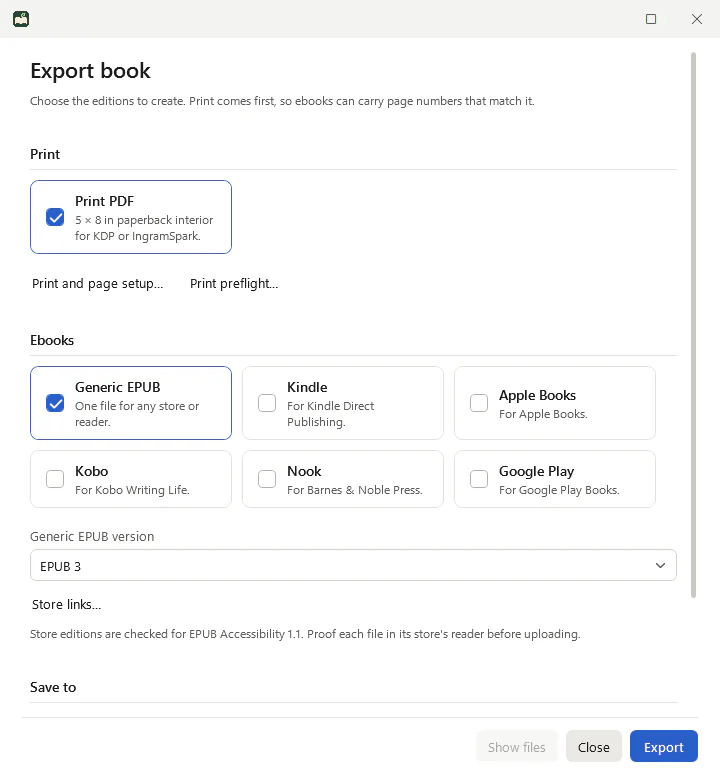
LeafBound writes EPUB Accessibility 1.1 metadata, semantic roles and a logical reading order into every ebook edition: the generic EPUB and the Kindle, Apple Books, Kobo, Nook and Google Play editions alike. Before export it asks for any missing image descriptions, and it marks an ebook accessible only when every image that matters has one. When you export print first, the ebook carries a page list mapped to the print edition, so a reader can cite the same page as the paperback. Ebook styling follows the theme but never fixes the page color or forces a text size.
EPUBCheck and Ace by DAISY run in LeafBound’s test suite, so every export format is tested with both. That is testing, not certification; the reports are yours to run on your own file, and the Ace App takes a LeafBound EPUB as it takes any other. Equations from the Academic edition are written as MathML, which is what screen readers read; see equations in print and ebooks. Footnotes become linked notes with backlinks; see footnotes in ebooks.
EPUB accessibility questions
What is an accessible EPUB?
An EPUB that a reader can use with a screen reader, a braille display, magnification or their own colors and fonts, without losing anything. In practice it means real headings, a logical reading order, a navigation document, text descriptions for images, a declared language, and metadata that says all of this so a store can show it. EPUB Accessibility 1.1 is the W3C specification that sets the bar, with WCAG 2.1 Level AA as the content standard.
How do I make my EPUB accessible?
Work through the 12-point checklist above: structure first (headings, reading order, navigation), then images (alt text or alt=""), then language, tables and equations, then metadata. Run EPUBCheck to confirm the file is valid and Ace by DAISY to confirm it is accessible. Fix what the reports name, then run both again.
What is EPUB Accessibility 1.1?
A W3C Recommendation from October 2024 that defines what an accessible EPUB contains and how it declares that. It points to WCAG 2.1 for the content rules and adds EPUB-specific requirements: the schema.org accessibility metadata in the package document, a conformance statement (dcterms:conformsTo), and guidance on page navigation and media overlays. It replaced EPUB Accessibility 1.0.
Does the European Accessibility Act apply to self-published ebooks?
Yes, if you sell ebooks into the EU and you are not a microenterprise. Directive (EU) 2019/882 has applied to ebooks sold in the EU since 28 June 2025. Businesses with fewer than 10 staff and under 2 million euro turnover are exempt as service providers, which covers most self-publishers, but a retailer may still ask for accessible files. Check the national law in each country you sell to.
Does the EAA apply to my backlist?
It depends on the country. The directive lets member states set transition periods for existing titles, and the deadlines vary; France, for example, runs to 2030. New titles published since 28 June 2025 are covered now. Check the transposition in each market you sell to.
Does the EAA apply to publishers outside the EU?
Yes, when the ebook is sold to customers in the EU. The directive covers products and services placed on the EU market, wherever the seller is based. A US author selling through a store that serves EU readers is in scope unless the microenterprise exemption applies.
Is Ace by DAISY free?
Yes. Ace is free and open source from the DAISY Consortium. It comes as a desktop app (Ace App, with installers for Windows, macOS and Linux) and as a command-line tool installed through npm. Both produce the same HTML and JSON report.
Does KDP require alt text?
KDP recommends image descriptions and does not reject a file for missing them, as of 3 November 2026. The European Accessibility Act and EPUB Accessibility 1.1 do expect them, and screen-reader users notice their absence first. Treat alt text as required for every image that carries meaning.
More guides
Export an accessible EPUB without hand-editing the package.
Import your manuscript, add the image descriptions LeafBound asks for, and export editions that carry EPUB Accessibility 1.1 metadata and a page list that matches print.
Early access · Author from $79 once · free 4-day trial · Windows 10 and 11