 LeafBound
Guide · Ebooks
Ebook formatting checklist, before you upload.
Fifteen checks, each with the free tool that confirms it, plus the facts that change most often: which files Amazon still accepts, what a working table of contents needs, why Enhanced Typesetting is sometimes refused, and EPUB 2 against EPUB 3.
The 15-item checklist
Work down the list in order; the early items are about the manuscript, the middle about the file, the last three about tools. EPUBCheck and Ace by DAISY are free downloads, and Kindle Previewer is Amazon’s free desktop app.
| Check | What passes | Tool |
|---|---|---|
| 1. Structure comes from styles | Every chapter title is Heading 1, sections are Heading 2, body text is Normal; no bold-and-big headings, no manual numbering. | Your word processor; see the Word guide |
| 2. One file, chapters in order | The whole manuscript in one .docx or one EPUB, with front and back matter where they belong. | Your word processor |
| 3. Navigation document | An EPUB 3 nav document that lists every chapter and section, declared with properties="nav", with a landmarks entry marked epub:type="toc". | EPUBCheck (errors if missing); Kindle Previewer’s Go To menu |
| 4. HTML contents page | A contents page in the spine near the front, for readers and older devices that do not show the logical TOC. KDP strongly recommends it. | Kindle Previewer |
| 5. Language declared | dc:language in the package and lang on every content document. | Ace by DAISY |
| 6. Every image has alt text | A description for every image that carries meaning; alt="" for ornaments. | Ace by DAISY |
| 7. Images sized for screens | Within KDP’s guidance of 5 MB or less per image, at a resolution that reads on a tablet; no 20 MB print scans. | KDP image guidance; Kindle Previewer |
| 8. No fixed colors or sizes | CSS never sets a page or text color or an absolute font size, so night mode and the reader’s size choice work. | Kindle Previewer in dark mode at a large text size |
| 9. Notes link both ways | Every note reference links to its note and the note links back; note markup carries epub:type="noteref" and "footnote". | A reader; see the footnotes guide |
| 10. Package metadata | Title, author, language, identifier and publication date, plus the EPUB Accessibility 1.1 properties. | EPUBCheck; Ace by DAISY |
| 11. No print-only elements | No running heads, printed page numbers, blank pages or “continued on page 12”. | Reading the file in Kindle Previewer |
| 12. Cover image in the package | The cover declared as the cover image, at the size the store asks for. | EPUBCheck; the store’s cover guidance |
| 13. EPUBCheck passes | No errors. Warnings are worth reading; fatal errors stop the upload at most stores. | EPUBCheck 5.4.0 |
| 14. Ace report reviewed | No violations; metadata summary matches what the file contains. | Ace by DAISY 1.4.6 |
| 15. Previewed on three sizes | E-reader, tablet and phone views in Kindle Previewer, Enhanced Typesetting confirmed in Book Information, then KDP’s online previewer after upload. | Kindle Previewer; KDP online previewer |
Amazon’s format timeline
“EPUB or MOBI” is still the most common question and the answer changed twice. Here is the whole sequence in one place.
| When | What changed | What to upload |
|---|---|---|
| 2021 | Reflowable MOBI no longer accepted for new KDP uploads. | Upload EPUB (or KPF or .docx); KDP converts to its own format. |
| 18 March 2025 | Fixed-layout MOBI no longer accepted; Kindle Kids’ Book Creator and Kindle Comic Creator retired. | Fixed-layout EPUB, or KPF from Kindle Create. |
| Now | KDP accepts EPUB, KPF, DOC/DOCX, HTML, RTF, TXT and PDF (PDF for some languages only) and converts them to KFX for Enhanced Typesetting, with a KF8 version for older devices. | Upload EPUB; check in Kindle Previewer. |
Kindle Create’s KPF remains accepted and the retired Kids’ Book Creator and Comic Creator have no replacement beyond fixed-layout EPUB and Kindle Create. See Kindle ebook formatting for the Kindle-specific notes and picture books for the fixed-layout case.
Logical TOC, HTML TOC and NCX
Three things get called “the table of contents”, and a Kindle rejection for a missing TOC usually means one of them is absent. KDP requires a logical TOC for every book, strongly recommends the HTML one, and still reads an NCX.
| Kind | What it is | Status |
|---|---|---|
| Logical TOC (nav document) | An XHTML file with a nav element marked epub:type="toc", declared in the manifest with properties="nav". Feeds the reader’s Go To menu and progress display. | Required by KDP for every Kindle book; required by EPUB 3. |
| HTML TOC (contents page) | A visible contents page in the spine, usually the nav document itself placed near the front, or a separate page of links. | Strongly recommended by KDP; helps readers on older devices. |
| NCX (toc.ncx) | The EPUB 2 navigation file. Kindle still reads it but prefers the nav document when both exist; Kobo ignores it in an EPUB 3. | Optional in EPUB 3; include only for an older reader you must support. |
The nav document rules, from KDP’s page: an ordered list of links inside <nav epub:type="toc">, nested lists for hierarchy, the file declared in the manifest with properties="nav", listed in the spine if you want it visible, and a <nav epub:type="landmarks"> with an entry marked epub:type="toc" so the Go To menu can reach it. Every entry must be clickable, go to the right place, match the chapter name, and no two entries may lead to the same location.
Why Enhanced Typesetting is refused
Enhanced Typesetting is Amazon’s layout engine for reflowable Kindle books: hyphenation, kerning, better drop caps and tables, Page Flip, MathML. Amazon’s help says it is applied only to reflowable books (EPUB, DOC, DOCX or HTML uploads) and “when possible”; it does not publish the full eligibility rules. From that page and from what publishers report in Kindle Previewer’s conversion log, the common reasons a book shows “Enhanced Typesetting: Not supported” are:
- Fixed layout. Never eligible; Enhanced Typesetting is for reflowable books only.
- Unsupported CSS. Properties the converter cannot map, such as fixed positioning, complex floats or font-size in absolute units on every element.
- Scripts. JavaScript in the EPUB, even if it does nothing.
- Very large images, above KDP’s 5 MB guidance, or image-only pages.
- Unusual markup, such as deeply nested tables or inline SVG the converter rejects.
Open the EPUB in Kindle Previewer, choose View > Book Information, and read the Enhanced Typesetting line and the conversion log. Simplify the CSS, remove the script, resize the image, export again and recheck. A book without Enhanced Typesetting still sells; it is delivered without the newer layout features.
EPUB 2 versus EPUB 3
EPUB 3 has been the standard since 2011 and every store accepts it. EPUB 2 survives in old converters and in a few library readers. Make EPUB 3; add an NCX only when you know who needs it.
| EPUB 2 | EPUB 3 | |
|---|---|---|
| Navigation | NCX file | Nav document (XHTML), NCX optional |
| MathML | No | Yes |
| Audio and video | No | Yes |
| Accessibility metadata | Not defined | Schema.org properties and dcterms:conformsTo (EPUB Accessibility 1.1) |
| Semantic markup (notes, chapters, landmarks) | No | epub:type and ARIA roles |
| Fixed layout | Not standardized | Yes (rendition properties) |
| Store support | Still accepted by most stores | Accepted everywhere; KDP, Apple Books, Kobo and Google Play all take EPUB 3 |
KPF versus EPUB
| Format | Where it can go | What makes it |
|---|---|---|
| KPF (Kindle Create) | Amazon only; no other store accepts it. About four locked themes; tables, lists, footnotes and inline images cannot be edited in Kindle Create. | Free; one store. |
| EPUB 3 | Kindle (converted by KDP), Apple Books, Kobo, Nook, Google Play, libraries and direct sales. Yours to edit and validate. | Any formatter or converter; every store. |
The short version: KPF locks you to Amazon; EPUB goes everywhere. If Amazon is the only store you will ever use and the book is plain text, Kindle Create is free and adequate. If there is any chance of Apple Books, Kobo, libraries or direct sales, keep an EPUB master. See the comparison of formatters for how Kindle Create sits against the others.
How LeafBound exports editions
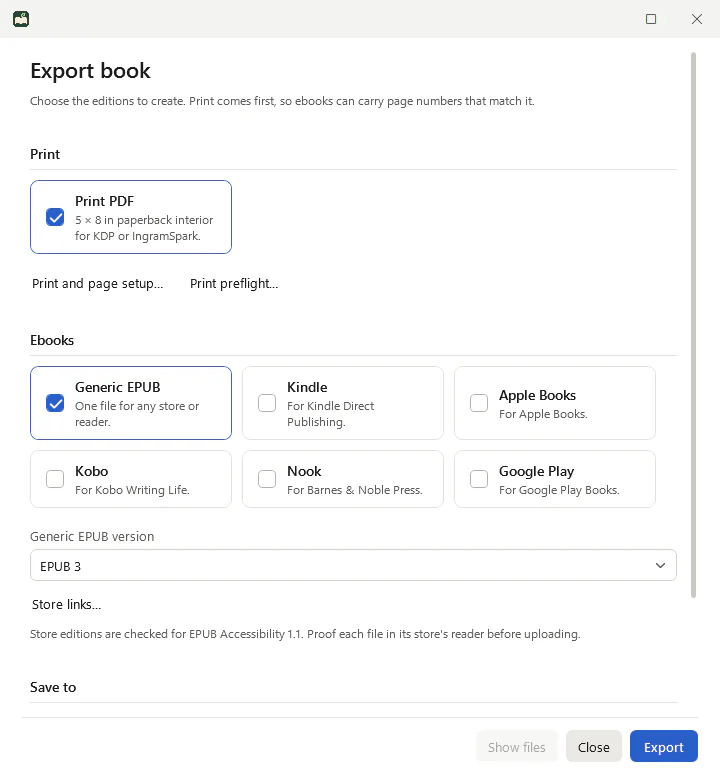
LeafBound exports from one source: a generic EPUB 3 (or EPUB 2 when a reader needs it) plus store editions for Kindle, Apple Books, Kobo, Nook and Google Play, each with its own store links in the “Also by” pages. Every edition carries a navigation document with landmarks, EPUB Accessibility 1.1 metadata, semantic roles and a logical reading order, and the Kindle edition warns about images larger than KDP’s guidance. Export print first and the ebooks carry a page list mapped to the print pages, so “go to page 212” lands on the same paragraph in both. The styling never fixes a page color or forces a text size. In Pro, LeafBound also writes a fixed-layout EPUB for picture books and image-led books; it has not been tried on a Kindle device or in Kindle Previewer, so check it there before you upload.
LeafBound asks for missing image descriptions before export, and EPUBCheck and Ace by DAISY run in its test suite, so the exports are tested with both; running them on your own file is still item 13 and 14 above. The ebooks feature page lists the editions in detail; for the metadata and the 12-point accessibility checklist, see EPUB accessibility.
Ebook checklist questions
Does Kindle accept MOBI?
Not for new uploads. KDP stopped accepting MOBI for reflowable ebooks in 2021 and for fixed-layout ebooks in March 2025. Upload an EPUB (or KPF from Kindle Create, or a .docx) and KDP converts it. Kindle devices still open older MOBI files you already own.
What is KPF?
Kindle Package Format, the file Kindle Create produces. KDP accepts it directly, but no other store does. If you ever want to sell outside Amazon, keep an EPUB as your master.
Why is my table of contents not working on Kindle?
Usually one of three things: the EPUB has no navigation document (only an HTML contents page), the nav document is not declared with properties="nav" in the manifest, or the landmarks nav has no entry marked epub:type="toc". KDP’s help page on the navigation document lists the markup. Fix the file, then open it in Kindle Previewer and use the Go To menu.
Why does Kindle Previewer say Enhanced Typesetting is not supported?
Amazon says it enables Enhanced Typesetting on reflowable books “when possible” and does not publish the full rule set. Fixed-layout books are never eligible. For a reflowable book, the common causes reported by publishers are CSS the converter cannot handle, scripts, very large images and unusual markup. Simplify, export again and recheck in Previewer.
Should I make EPUB 2 or EPUB 3?
EPUB 3. Every major store accepts it, it carries the navigation document, MathML, accessibility metadata and pop-up note markup, and KDP recommends the nav document over NCX. Add an NCX only if a particular older reader you care about needs it; LeafBound can export EPUB 2 for that case.
Is Kindle Create better than uploading an EPUB?
Kindle Create is free and simple, but it produces a KPF that only Amazon accepts, with about four locked themes, and tables, lists, footnotes and inline images cannot be edited in it. An EPUB made with a formatter goes to Amazon and every other store, and remains yours to edit.
Do I need to run EPUBCheck if KDP accepts the file?
Yes. KDP’s converter is forgiving and will accept files that other stores reject, and it may silently drop what it does not understand. EPUBCheck takes a minute and tells you what the other stores will say. Ace by DAISY takes another minute and tells you what a screen-reader user will meet.
How do I preview before I publish?
Open the EPUB in Kindle Previewer on your PC (it opens .epub, .docx, .html, .opf and .kpf files) and read a few chapters on the e-reader, tablet and phone views; check the Book Information pane for Enhanced Typesetting. After uploading, use KDP’s online previewer as the final check, because it shows the file KDP actually built.
More guides
Export every edition from one book.
Import your manuscript, export print, then export the Kindle, Apple Books, Kobo, Nook and Google Play editions with accessibility metadata and a page list that matches print.
Early access · Author from $79 once · free 4-day trial · Windows 10 and 11