 LeafBound
Guide · Print
Bleed for KDP and IngramSpark, explained.
Bleed is the 0.125 in of extra artwork past the trim line that lets the printer cut a page without leaving a white sliver. This guide gives the exact page sizes, the three-edge rule, and the margin changes that go with it.
What bleed is
A printed book is printed on a larger sheet and cut down to its trim size. The blade is accurate to about 1/16 in, not to a hair. If an image stops exactly at the trim line, half the copies will show a thin white edge where the cut landed a fraction outside the ink. Bleed solves it: the artwork runs 0.125 in past the trim line, so wherever the cut lands, there is ink on both sides of it.
Bleed is a property of the file, not the printer. You build it into the PDF page size and the artwork. The printer trims it off.
When you need it
- Needed: full-page photographs, chapter-opening images that run to the edge, colored page backgrounds, decorative borders, picture books, cookbooks with edge-to-edge photos, and any bar or tint that touches the page edge.
- Not needed: a novel or nonfiction book whose text, running heads and page numbers sit inside the margins. Most text-only books have no bleed.
- Rule: on KDP, if one page bleeds, the entire file must be set up with bleed. You cannot mix bleed and no-bleed pages in one interior.
The size and the three-edge rule
Both KDP and IngramSpark use 0.125 in (3.2 mm). It goes on three edges: top, bottom and outside. The inside edge, which disappears into the spine, gets no bleed. The page is therefore trim width plus 0.125 in and trim height plus 0.25 in.
Page size with bleed, by trim
KDP’s standard paperback trims and the PDF page size each needs when the interior bleeds.
| Trim (in) | Page size with bleed (in) | Page size with bleed (mm) |
|---|---|---|
| 5 x 8 | 5.125 x 8.25 | 130.2 x 209.6 |
| 5.06 x 7.81 | 5.185 x 8.06 | 131.7 x 204.7 |
| 5.25 x 8 | 5.375 x 8.25 | 136.5 x 209.6 |
| 5.5 x 8.5 | 5.625 x 8.75 | 142.9 x 222.3 |
| 6 x 9 | 6.125 x 9.25 | 155.6 x 234.95 |
| 6.14 x 9.21 | 6.265 x 9.46 | 159.1 x 240.3 |
| 6.69 x 9.61 | 6.815 x 9.86 | 173.1 x 250.4 |
| 7 x 10 | 7.125 x 10.25 | 181 x 260.4 |
| 7.44 x 9.69 | 7.565 x 9.94 | 192.2 x 252.5 |
| 7.5 x 9.25 | 7.625 x 9.5 | 193.7 x 241.3 |
| 8 x 10 | 8.125 x 10.25 | 206.4 x 260.4 |
| 8.25 x 6 | 8.375 x 6.25 | 212.7 x 158.8 |
| 8.25 x 8.25 | 8.375 x 8.5 | 212.7 x 215.9 |
| 8.5 x 8.5 | 8.625 x 8.75 | 219.1 x 222.3 |
| 8.5 x 11 | 8.625 x 11.25 | 219.1 x 285.8 |
| 8.27 x 11.69 (A4) | 8.395 x 11.94 | 213.2 x 303.3 |
Margins change too
Margins are measured from the trim line, never from the bleed edge. When a KDP file has bleed, the minimum outside, top and bottom margin rises from 0.25 in to 0.375 in, because text near a wandering cut is the most common reason for a “text outside the printable area” rejection. The inside margin does not change; it depends only on page count. See KDP paperback formatting for the inside-margin table.
KDP and IngramSpark compared
| KDP | IngramSpark | |
|---|---|---|
| Bleed size | 0.125 in | 0.125 in |
| Edges | Top, bottom, outside | Top, bottom, outside |
| Whole file must bleed if one page does | Yes | Single pages at the bleed page size throughout |
| Minimum outside margin with bleed | 0.375 in | 0.5 in recommended on every side |
| Inside margin | By page count, 0.375 to 0.875 in | 0.5 in plus about 0.125 in gutter for perfect-bound and hardcover |
| PDF standard | PDF/X-1a preferred | PDF/X-1a:2001 or PDF/X-3:2002 |
Common rejections
- Page size does not match the trim. A 6 x 9 page uploaded for a 6 x 9 book that has edge artwork: the printer sees no bleed. Fix: 6.125 x 9.25 in pages.
- Bleed on the inside edge. A page that is 0.25 in wider than the trim because bleed was added on all four sides. The gutter edge should carry none.
- Artwork that stops at the trim. The page size is right but the image was placed to the trim line, not the bleed line. Extend the image to the page edge.
- Text too close to the edge. Running heads or page numbers inside the 0.375 in zone. Move them inward.
- Mixed pages. One chapter opener with bleed in an otherwise no-bleed file.
How LeafBound handles it
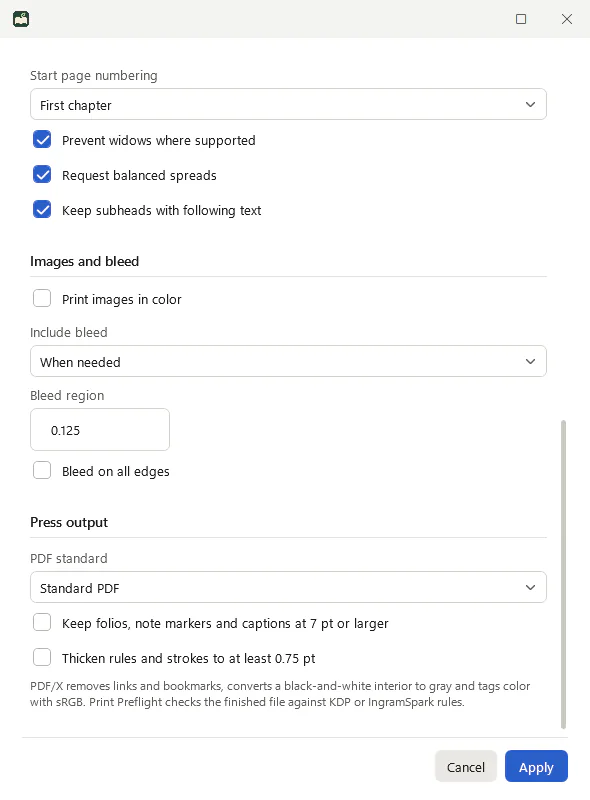
In Print and page setup, choose bleed When needed and LeafBound adds 0.125 in on the three outer edges only when a page has artwork at the trim, keeping the whole file consistent, or choose Every page. Print preflight then checks the trim and bleed boxes on every page, flags artwork that touches the trim without bleed, and confirms that text, running heads and folios stay inside the safe area. A failed check names the page and offers a one-click fix.
Bleed questions
Does my book need bleed?
Only if something printed reaches the edge of the page: a full-page image, a chapter-opening photograph, a colored background or a border. Plain text with page numbers and running heads inside the margins needs no bleed. If any single page bleeds, KDP requires the whole file to be set up with bleed.
What size is KDP bleed?
0.125 in (3.2 mm) on the top, bottom and outside edges. The inside edge, next to the spine, gets none. Your PDF page is therefore 0.125 in wider and 0.25 in taller than the trim: a 6 x 9 in book becomes 6.125 x 9.25 in.
Is IngramSpark bleed different from KDP?
Same size, same three edges: 0.125 in on top, bottom and outside, none on the bind side. The difference is the margins around it. IngramSpark recommends at least 0.5 in from the trim on every side, while KDP allows 0.375 in with bleed. Set the stricter value and one file passes both.
Do I add bleed to the margins too?
No. Margins are measured from the trim line, not from the bleed edge. KDP’s minimum outside margin rises from 0.25 in to 0.375 in when a file has bleed, because the trim cut can wander by about 0.0625 in and text must stay clear of it.
How do I add bleed in Word?
Word has no bleed setting. Set the page size to the trim plus bleed (for 6 x 9, a 6.125 x 9.25 in page), add 0.125 in to the top, bottom and outside margins so the text block stays where it was, and extend any edge artwork to the page edge. A formatter does this for you.
How does LeafBound handle bleed?
In Print and page setup, choose bleed “When needed” and LeafBound adds 0.125 in on the three outer edges only when a page has artwork at the trim, or choose “Every page”. Preflight then checks the trim and bleed boxes on every page, flags artwork that touches the trim without bleed, and confirms text stays inside the safe area.
More guides
Let preflight check the bleed for you.
Import your manuscript, choose the KDP or IngramSpark profile and see every page’s trim and bleed boxes checked before you upload.
Early access · Author from $79 once · free 4-day trial · Windows 10 and 11