 LeafBound
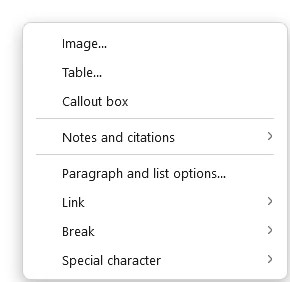
Everything on the Insert menu goes in at the cursor.
| Menu item | What it adds |
|---|---|
| Insert then Image… | A picture from your PC. |
| Insert then Table… | A table. |
| Insert then Callout box | Turns the paragraph into a boxed callout. |
| Insert then Notes and citations | Footnote, endnote, study note or commentary, citation, inline source citation, and Edit notes. |
| Insert then Math and science | Equations, the equation library, molecules, multi-panel figures, scale bars, scientific symbols, species names and biological sequences. |
| Insert then References and lists | Numbering and generated lists, cross-references, glossary and index entries, and appendices. |
| Insert then Paragraph and list options… | Paragraph formats, lists, Never hyphenate this word and breaks. |
| Insert then Link | Web link… or a link Within this book…. |
| Insert then Break | Scene break, Ornamental break or Page break. |
| Insert then Special character | Non-breaking spaces and hyphens, a soft hyphen, thin and hair spaces, dashes, the ellipsis and the section and copyright signs. |
Items that come and go
- Items for tools your book type does not use (for example citations or equations in a novel) are hidden. A group with nothing left in it is hidden too. Change the book type to get them.
- Items for tools your plan does not include are shown but unavailable, and their tooltip says which plan adds them. Content you already have stays editable and exportable.
The quick Insert menu
The Insert button on the format bar and the Insert item of the right-click menu offer a shorter version of this menu, with the most used items.
Related
- Insert breaks and special characters
- Add a web link or a link within the book
- Set the paragraph format
- Use the format bar above the text
Still stuck?
Choose Help then Report a problem… in LeafBound to send us the details, or write to support.