 LeafBound
| Menu item | What it does |
|---|---|
| Book then Book settings… | Opens the book settings. |
| Book then Title, author and details… | Title, subtitle, series, authors, contributors, language, ISBN and the other details. |
| Book then Book type… | Changes the book type and the tools it offers. |
| Book then Print and page setup… | Trim size, margins, chapter starts and bleed. |
| Book then Publishing settings… | Settings for publishing the editions. |
| Book then Cover… | Opens the cover. |
| Book then Special edition… | Sets up a special edition. |
| Book then Add chapter | Adds a chapter after the selected element. |
| Book then Add element… | Adds front matter, back matter, a part, a volume and more. |
| Book then Chapter options… | Options of the selected element. |
| Book then Copyright page from a template… | Fills the copyright page from a template. |
| Book then Duplicate | Copies the selected element. |
| Book then Organize chapters | Split chapter at cursor…, Merge with next chapter, Group into a part…, Group into a volume…, Move up, Move down and Delete. |
| Book then Reused elements | Detach reused element and Update reused elements, for elements reused from another book with File > Import. |
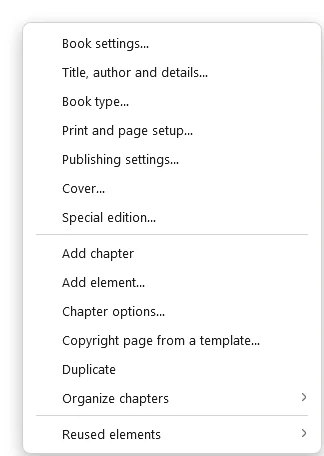
Items that need a selected element are unavailable when nothing is selected. Move up and Move down are unavailable at the ends of a level, and Merge with next chapter for the last element.
Related
- Split, merge, group and move chapters
- Add chapters and other elements
- Set chapter options
- Set the title, authors and book details
- Make a copyright page from a template
Still stuck?
Choose Help then Report a problem… in LeafBound to send us the details, or write to support.