 LeafBound
| Menu item | What it does |
|---|---|
| Edit then Undo Ctrl+Z | Reverses the last change. |
| Edit then Redo Ctrl+Y | Puts back what you undid. |
| Edit then Cut Ctrl+X | Moves the selection to the clipboard. |
| Edit then Copy Ctrl+C | Copies the selection. |
| Edit then Paste Ctrl+V | Pastes at the cursor. |
| Edit then Select all Ctrl+A | Selects all the text of the open element. |
| Edit then Find and replace… Ctrl+F | Opens or closes the Find and replace panel. |
| Edit then Find next F3 | Goes to the next match. |
| Edit then Find previous Shift+F3 | Goes to the previous match. |
| Edit then Find special | Jumps to the next heading, scene break, ornamental break, image, block quote, verse, page break, or footnote or endnote. |
| Edit then Spelling | Offers corrections for the misspelled word at the cursor. |
| Edit then Smart quotes | Convert quotes in this chapter or Convert quotes in the whole book. |
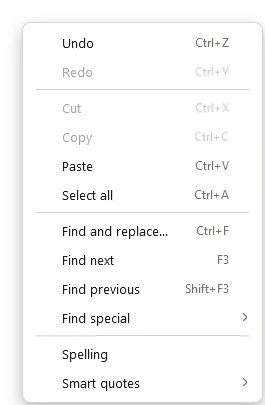
Undo and Redo are unavailable when there is nothing to undo or redo. Cut and Copy are unavailable until you select text.
Related
- Undo, redo, cut, copy and paste
- Find and replace text in the whole book
- Jump to headings, breaks, pictures and notes
- Check spelling
- Convert straight quotes to curly quotes
Still stuck?
Choose Help then Report a problem… in LeafBound to send us the details, or write to support.