 LeafBound
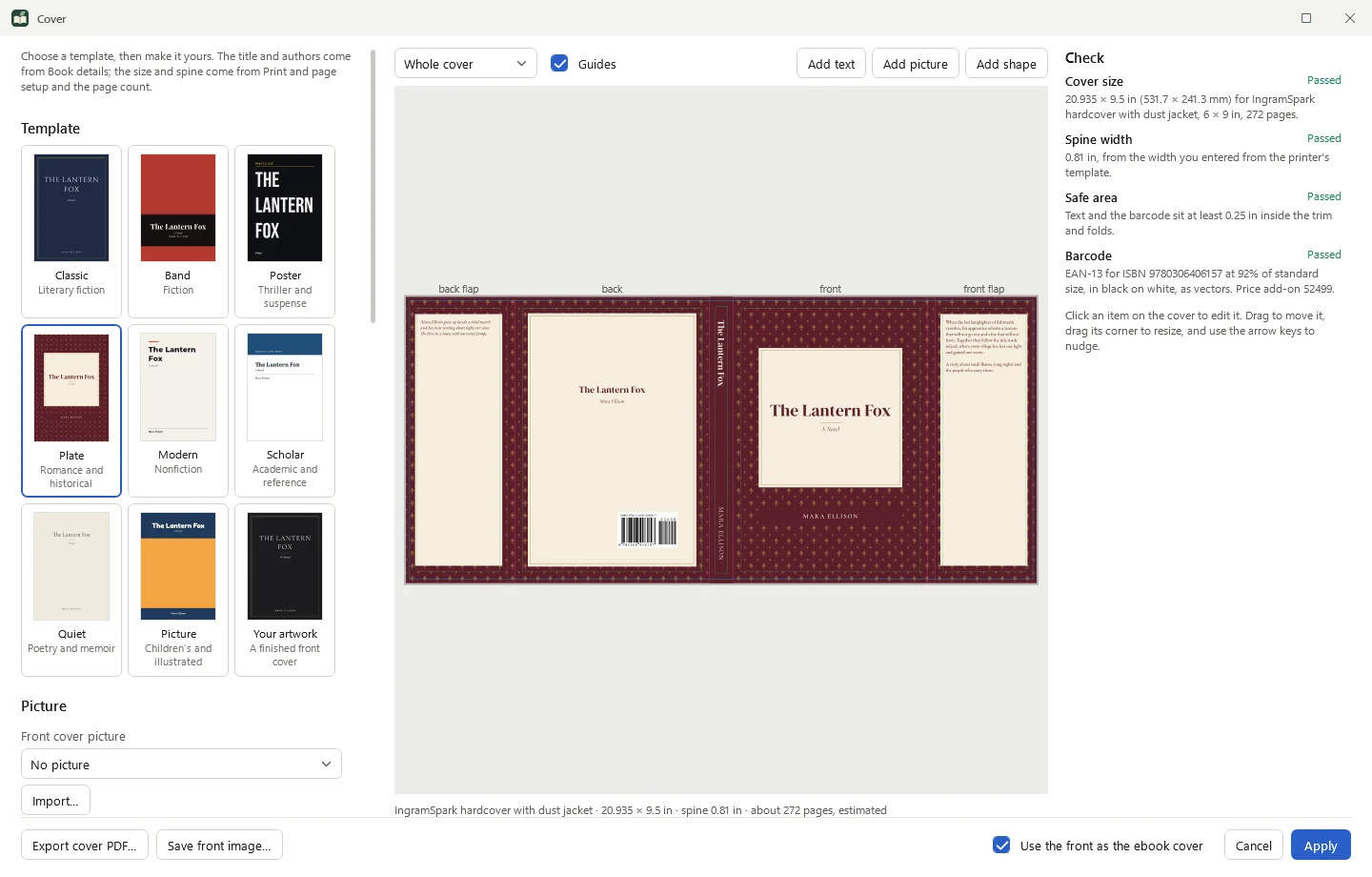
When the book is set up for a hardcover with a dust jacket, the cover designer lays out the whole jacket: back flap, back cover, spine, front cover and front flap, in that order from left to right.
- Choose Book then Print and page setup… and set the printer to IngramSpark with a hardcover dust jacket format, or choose the dust jacket under Binding in the cover designer.
- Choose Book then Cover….
- Check the flaps. The template places the back cover text and the author bio on them.
- Change Flap width if your printer asks for a different flap. 0 uses the printer's width.
- Choose Export cover PDF… and save the file.
- Choose Apply. It keeps the design and closes the window.
Sizes for jackets and printed cases
Jackets and printed cases use the printer's own sheet rules for the wrap, the hinge, the boards and the flaps. When a printer publishes no case or jacket sizes, LeafBound uses IngramSpark's as typical ones, and the check asks you to compare them with the template your printer gives you.
Keep text out of the hinge, where the cover creases when it opens. The check warns about any text there.
Related
Still stuck?
Choose Help then Report a problem… in LeafBound to send us the details, or write to support.