 LeafBound
 carries the published interior rules of print-on-demand printers: their sizes, page counts, bleed, margins, PDF/X preference and spine formula. Setting the book up for one printer fills in its rules, and Print preflight checks the finished PDF against the same printer.
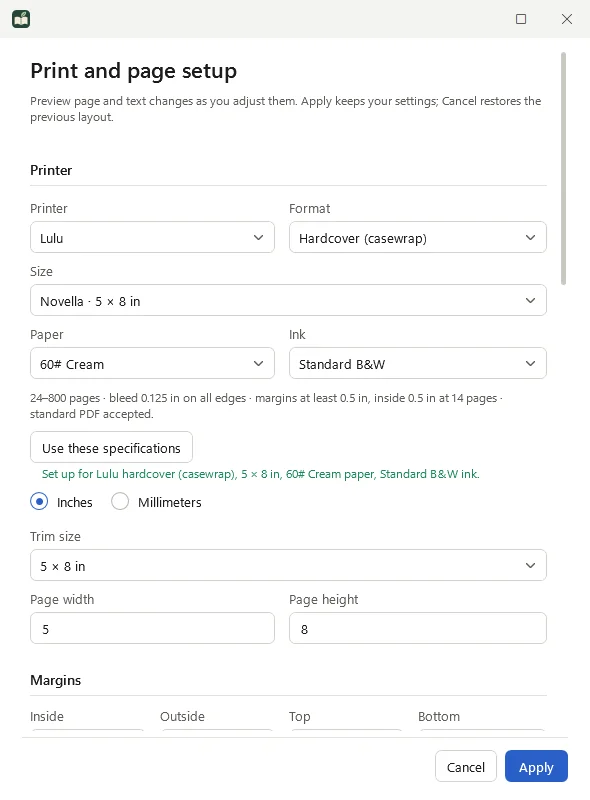
- Choose Book then Print and page setup….
- Under Printer, choose the printer in the Printer list.
- Choose the Format (for example a paperback or a hardcover), then the Size, Paper and Ink.
- Read the summary line under the lists: the page range, the bleed, the minimum margins at your current page count, the PDF/X preference and, once the book has pages, the spine width.
- Choose Use these specifications. A green line confirms what was set, for example "Set up for Lulu hardcover (casewrap), 5 × 8 in, 60# Cream paper, Standard B&W ink."
- Choose Apply.
What Use these specifications changes
- The trim size, when you chose a size (choose Keep the current size to leave it).
- The bleed amount and edges. For a printer that adds its own bleed, bleed is turned off.
- The outside, top and bottom margins and the inside margin, raised to the printer's minimum for your page count. Margins are never lowered.
- Print images in color, which follows the ink you chose.
- The printer that Print preflight checks against.
When you choose Apply after using the specifications of Amazon KDP, LeafBound also turns on its KDP publishing checks with the matching binding, ink and paper. Using another printer's specifications turns them off.
Printers
| Printer | Formats | Interior bleed |
|---|---|---|
| Amazon KDP | Paperback; hardcover (case laminate) | 0.125 in, outside edges |
| IngramSpark | Paperback; hardcover (case laminate); hardcover with dust jacket; hardcover, Digital Cloth | 0.125 in, outside edges |
| Lulu | Paperback; hardcover (casewrap); hardcover linen with dust jacket; coil bound; saddle stitch | 0.125 in, all edges |
| Blurb | Trade paperback; trade hardcover; trade hardcover with dust jacket; photo book softcover and hardcover; premium magazine | 0.125 in, outside edges |
| Barnes & Noble Press | Paperback; hardcover (printed case); hardcover with dust jacket | 0.125 in, outside edges |
| BookBaby | Softcover; hardcover (case wrap); hardcover with dust jacket | 0.125 in, all edges |
| Draft2Digital Print | Paperback | 0.125 in, outside edges |
| PublishDrive | Paperback | None: the printer adds it |
| Bookvault | Paperback; hardcover (printed case, or cloth with foil); hardcover with dust jacket; wire or spiral bound; saddle stitch | 3 mm (0.118 in), all edges |
| Mixam | Paperback (PUR); hardcover (casebound); hardcover with dust jacket; wiro bound; saddle stitch | 3 mm (0.118 in), all edges |
| tredition | Softcover; hardcover (printed case) | 5 mm (0.197 in), all edges |
| BoD (Books on Demand) | Paperback; hardcover (printed case); hardcover with dust jacket; ring binding; booklet (saddle stitch) | 5 mm (0.197 in), all edges |
| epubli | Softcover; hardcover; wire binding; saddle stitch | 3 mm (0.118 in), all edges |
| Peecho | Softcover; hardcover | None: the printer adds it |
Plans
Amazon KDP and IngramSpark are included from the Author plan. The other printers need the Pro plan. A printer a book is already set up for stays available to that book on any plan.
Related
- Set the trim size, margins and bleed
- Check the print PDF before you upload
- Publish a paperback or hardcover on KDP
- Publish a print book with IngramSpark
Still stuck?
Choose Help then Report a problem… in LeafBound to send us the details, or write to support.