 LeafBound
Chapter openings
Chapter openings that look designed, not typed.
Choose how the chapter number reads, how the first paragraph begins and what marks a scene break. Every theme sets all three for you, and the real print preview shows each change on your own pages.
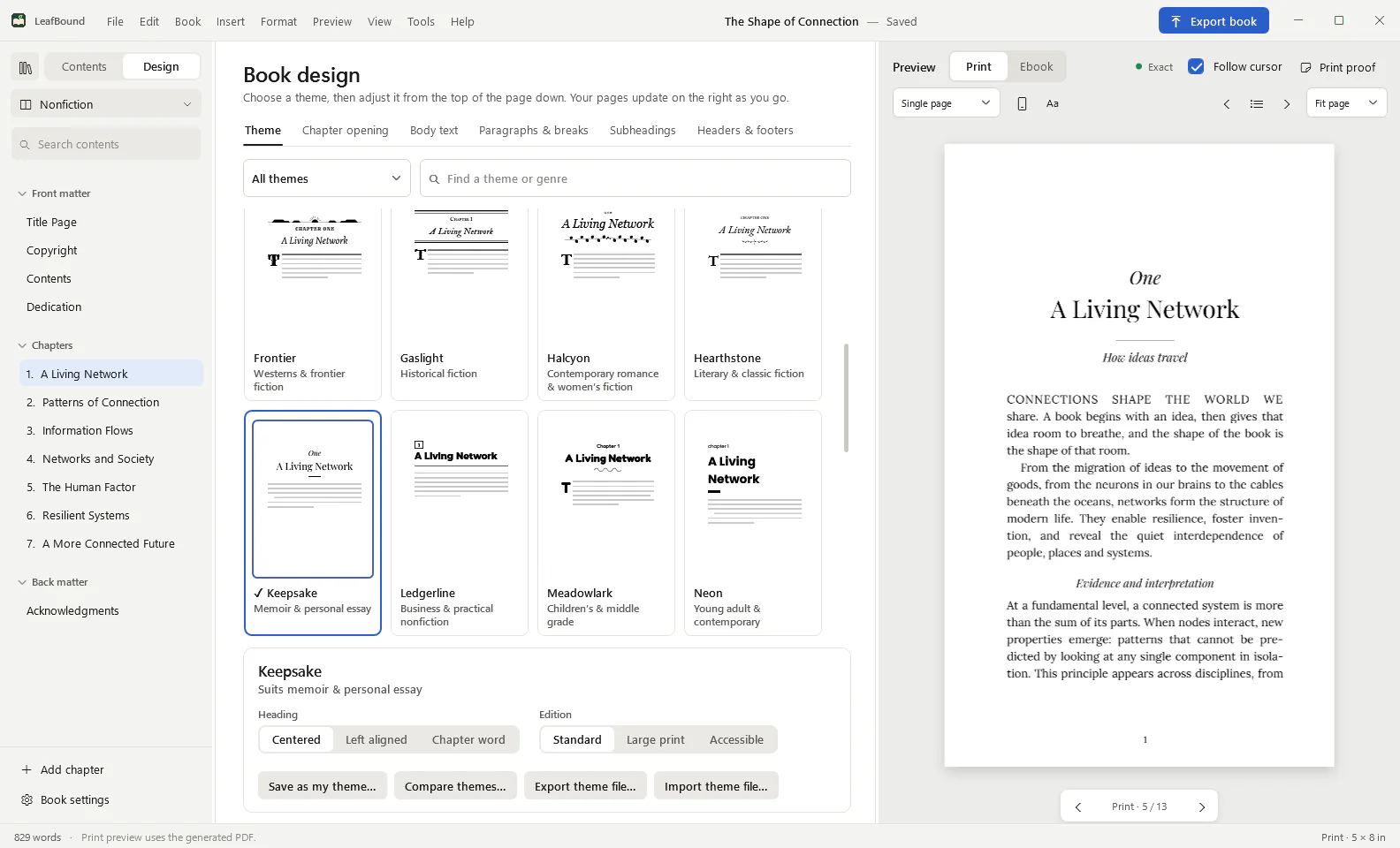
- 8chapter number styles, from 1 to Chapter One
- 3ways to begin the first paragraph
- 200original artworks for headings and ornaments
- 128themes, each with its own chapter opening
What you can set on a chapter opening
Eight number styles
1, 01, I, One, Chapter 1, Chapter One, Chapter I, or no number at all.
Drop caps and lead-ins
Begin the first paragraph with a drop cap, with lead-in words, or with first-line caps.
Scene-break ornaments
The pause inside a chapter gets an ornament from the theme, in place of a row of typed asterisks.
Heading art
Heading art, opening frames and backgrounds, and ornaments from a library of 200 original artworks, with a searchable art picker.
Real point sizes
Sizes are entered in points, the unit of the printed page, so the number you set is the size that prints.
Headers and footers
Headers and footers are part of the same design, so the pages after the opening match it.
Eight ways to number a chapter.
The number style tells a reader what kind of book this is before the chapter begins.
LeafBound has eight: 1, 01, I, One, Chapter 1, Chapter One, Chapter I, or none. A spelled-out Chapter One reads as traditional, a bare 01 reads as modern, and a book of short untitled sections may want no number at all.
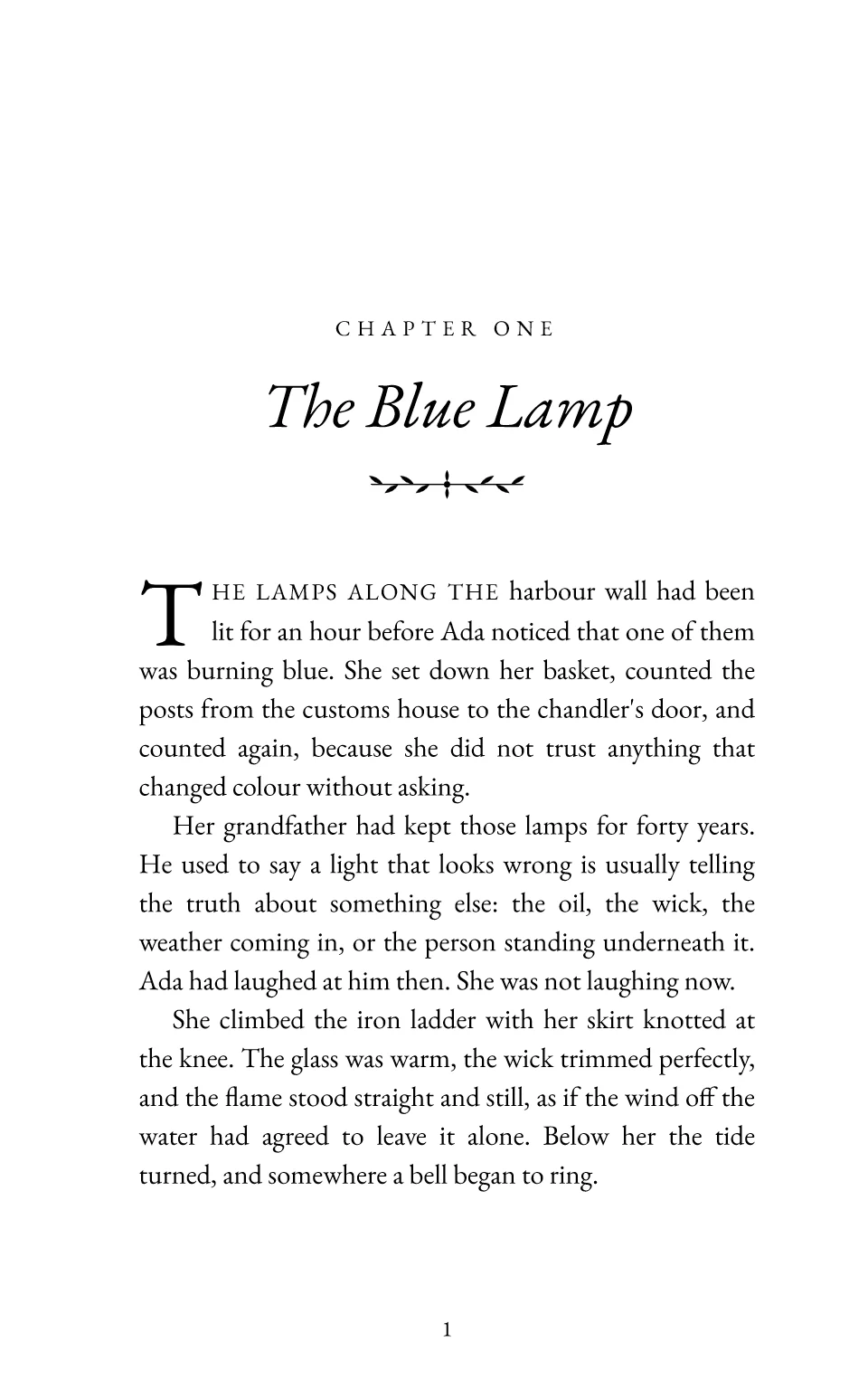
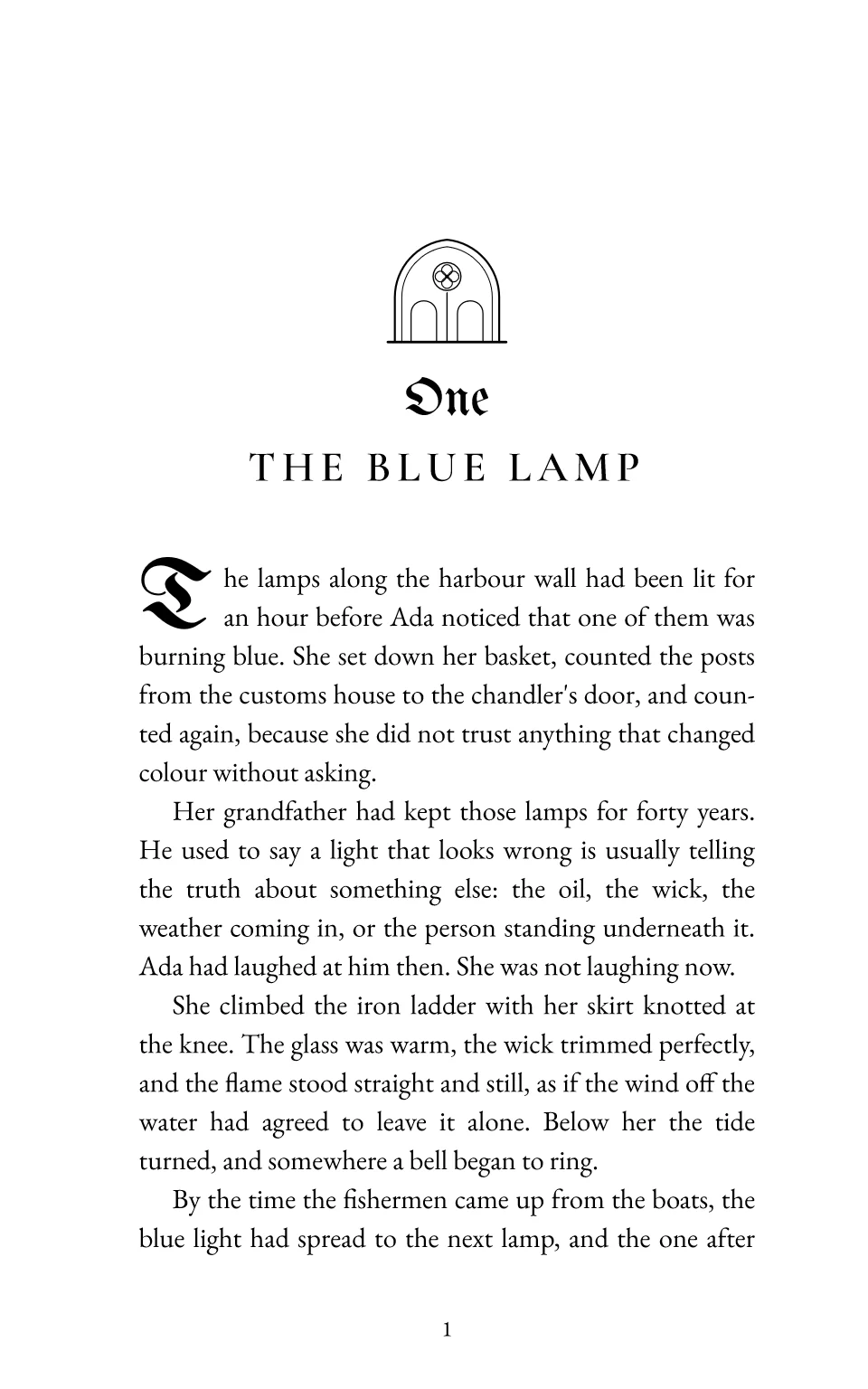
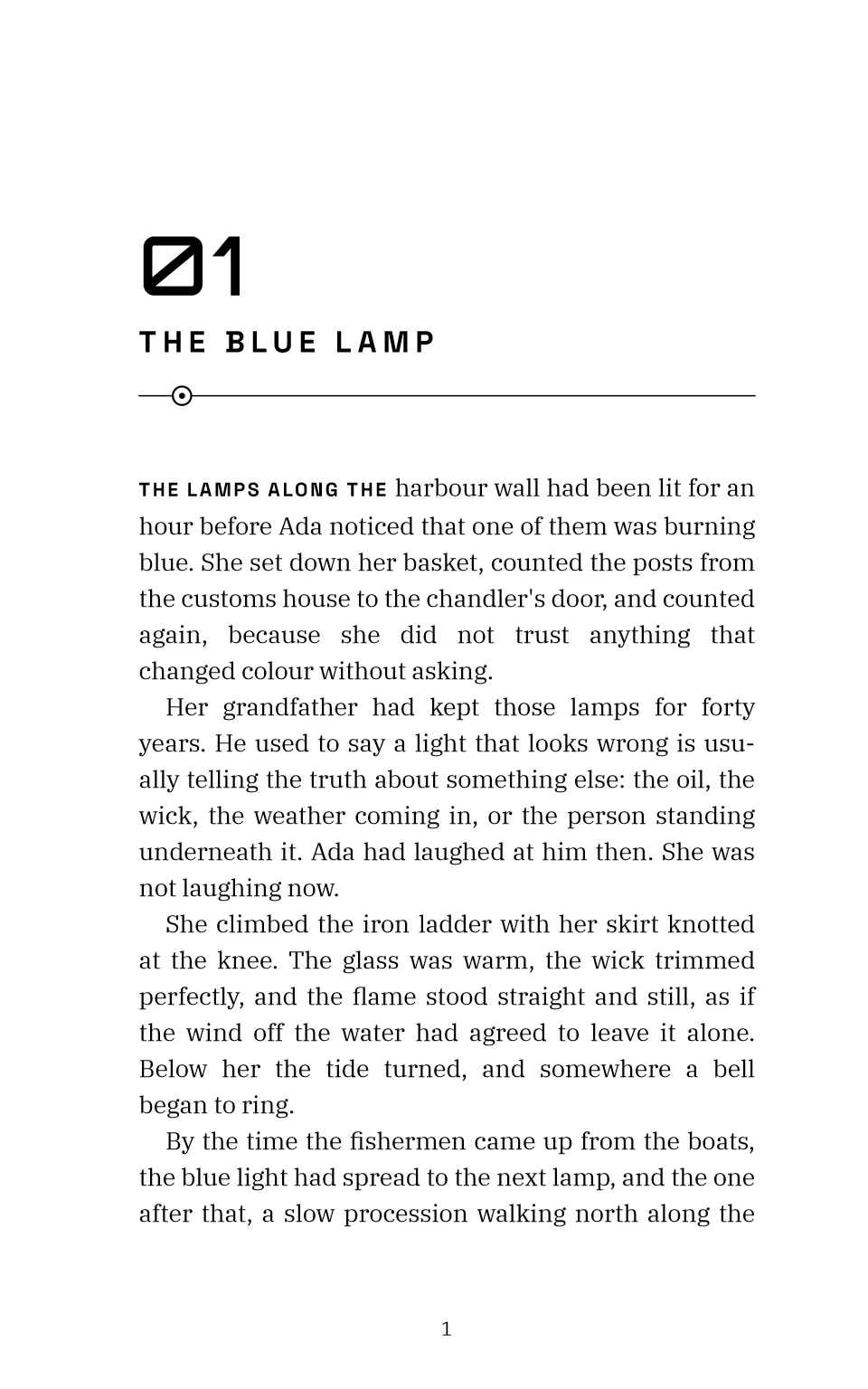
The three pages shown here set the same invented chapter, The Blue Lamp, in three themes. Hearthstone spells out Chapter One in spaced capitals above an italic title. Vesper sets One in blackletter under a small arch. Orbit uses 01 in a squared display face above a rule. Each theme chooses a style that suits its genre, and the themes page shows fifteen openings to compare.
How the first paragraph begins.
Three treatments mark the start of the text.
A drop cap is a large first letter set into the opening lines. Lead-in words set the first few words apart, in capitals or small capitals. First-line caps carry that treatment across the whole first line. LeafBound offers all three, and the theme decides which one a design starts with.
If your manuscript faked a drop cap with an oversized first letter, smart import rejoins the letter to its word, so the theme can set a real one. The Accessible version of every theme leaves drop caps out and sets headings left-aligned in mixed case; see large print and accessible editions.
How deep a drop cap should sit, and how an illuminated initial differs from one, is covered in the page frames and drop caps guide.
Scene breaks and heading art.
Small pieces of art do a lot of the work on an opening page.
A scene break is the pause inside a chapter. On import, a line of ***, # or ~ in your manuscript becomes a scene break, and the theme marks it with a scene-break ornament in place of the typed characters.
The art library holds 200 original artworks: heading art, opening frames and backgrounds, and ornaments. The art picker is searchable, and you can upload your own heading images and ornaments when the book needs a mark of its own.
Opening frames and backgrounds belong to the chapter opening and are set by the theme. For a border on body pages, chapter openings or every page, Design, then Page border, offers 8 built-in borders or an image you upload, in every paid tier. The art frames of a collector’s edition are part of special editions in the Studio tier.
Set in points, judged on the real page.
Chapter opening sizes are real point sizes, so a 22 pt title is 22 pt on paper. The preview beside the controls is the print PDF itself, recomposed a moment after each change, so you judge a heading on your own chapter and not on a sample.
Headers and footers are set in the same design. The typography basics guide explains the conventions an opening page follows, such as the sunk first line and the page number dropped to the foot.
In Pro, when the opening is right, save the theme to My themes, or export it as a theme file and import it into the next book, so every volume of a series opens its chapters the same way. Compare themes shows up to three designs side by side with their page counts.
Which tier
Author, $79 once.
Author includes 14 core themes, each with its chapter openings designed, and the Design controls to change them: the number style, the first-paragraph treatment and heading art, including art you upload. Every paid tier has them. Pro adds all 128 themes, importing your own fonts, and saving, exporting and importing theme files. The free 4-day trial includes every tool in the personal tiers.
Questions
What chapter number styles can I choose?
Eight: 1, 01, I, One, Chapter 1, Chapter One, Chapter I, or none. Choosing none leaves the chapter title to stand on its own.
What is the difference between a drop cap, lead-in words and first-line caps?
A drop cap enlarges the first letter and sets it into the opening lines. Lead-in words set the first few words in capitals or small capitals. First-line caps do the same for the whole first line. LeafBound offers all three for the first paragraph of a chapter.
How do I mark a scene break in my manuscript?
Type a line of ***, # or ~ where the scene changes. Smart import turns those lines into scene breaks, and the theme draws its scene-break ornament there.
Can I use my own chapter heading image or ornament?
Yes. You can upload your own heading images and ornaments, or choose from 200 original artworks in the searchable art picker.
Does the Accessible version keep the drop cap?
No. The Accessible version has no drop caps, and its headings are left-aligned in mixed case. The Large print version changes the body text: 17 pt, ragged right, no hyphenation. Both versions exist for every theme.
Can every book in my series use the same chapter opening?
Yes, in Pro. Save the theme to My themes, or export it as a .leafbound-theme file and import it into the next book. The file carries artwork you uploaded.
Which tier do I need?
Author. Every paid tier can change a theme’s number style, first-paragraph treatment and heading art, including art you upload, and Author includes 14 core themes. Pro adds all 128 themes, your own fonts and theme files you can save, export and import. Compare the tiers.
Keep reading
Try the openings on your own first chapter.
The free 4-day trial lets you import your manuscript and change the number style, the first paragraph and the ornaments on your own pages.
Early access · Author from $79 once · free 4-day trial · Windows 10 and 11