 LeafBound
Theme designer
Make a theme your own, then use it for every book.
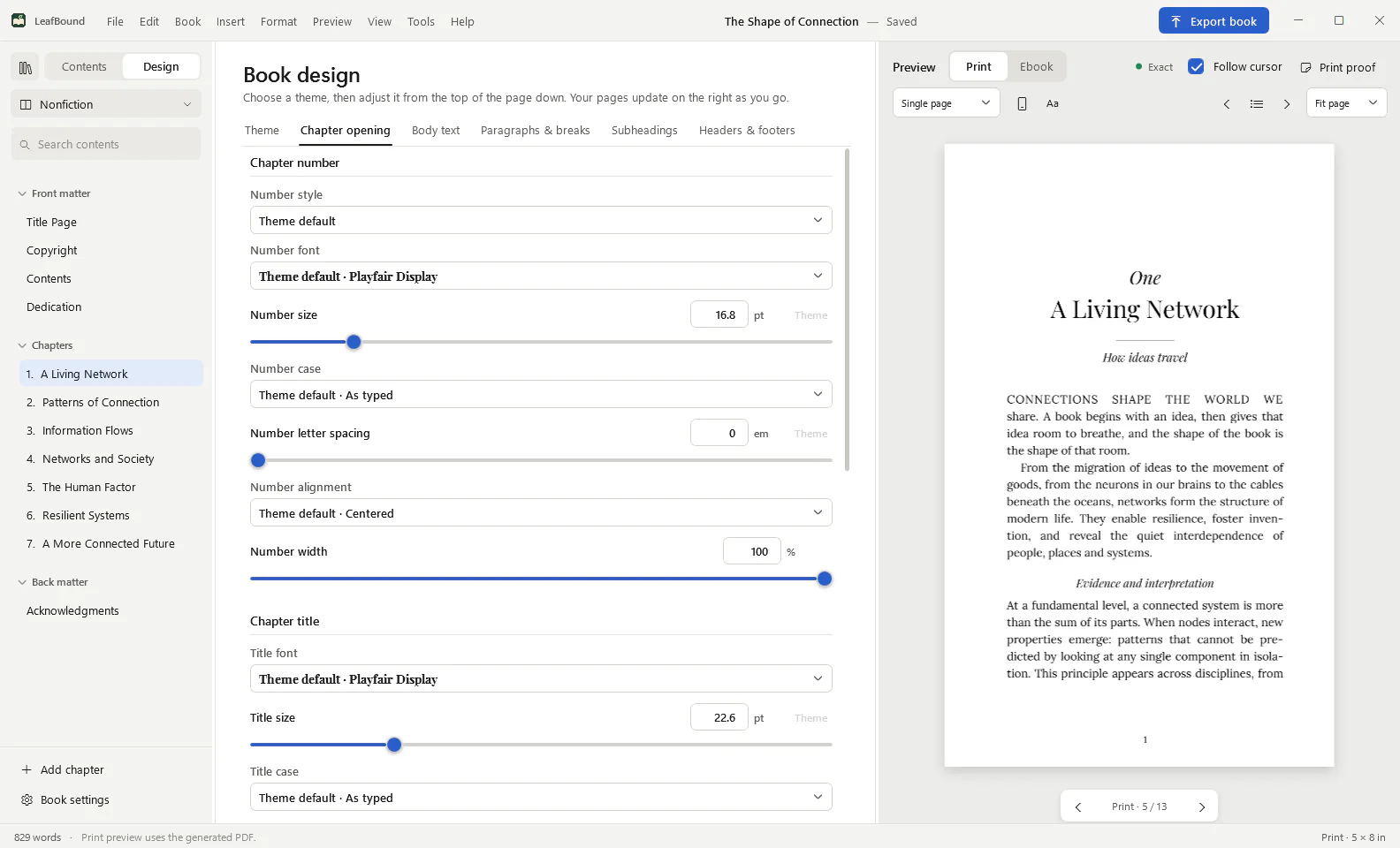
Start from a theme and change its chapter headings, type and artwork in real point sizes. In Pro, import your own fonts, save the result to My themes and export it as a file, so the same design goes to the next book in the series.
- 128themes to start from, in Pro
- 200original artworks in the art picker
- 63bundled font families, plus your own
- $149once, for the Pro tier
What you can change, and keep
Chapter headings
Eight chapter number styles, from 1 and 01 to Chapter One and none, with the title treatment set beside them.
First lines and breaks
A drop cap, lead-in words or first-line caps to open a chapter, and the ornament that marks a scene break.
Real point sizes
Sizes are set in points, the unit printers and designers use, and the print preview shows the result on your real pages.
200 artworks, or your own
Heading art, opening frames and backgrounds, and ornaments from a searchable art picker, or your own uploaded heading images and ornaments.
Your own fonts
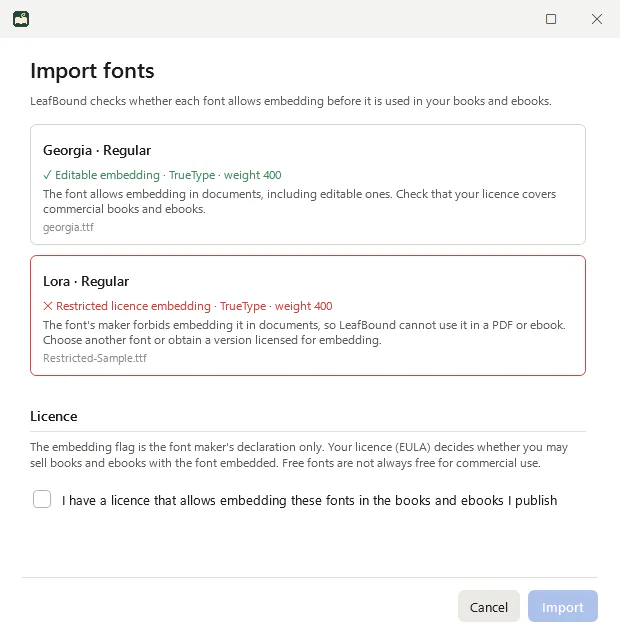
In Pro, import .ttf or .otf fonts. LeafBound reads each font’s embedding permission and refuses fonts that may not be embedded.
Saved and shareable
In Pro, save the design to My themes, export it as a .leafbound-theme file, and import it into another book.
Edit a theme one property at a time.
A theme is a set of design decisions. The designer lets you change each one.
Open the Design area and the theme’s properties are laid out in tabs: chapter opening, body text, paragraphs and breaks, subheadings, and headers and footers. Each property starts at the theme’s own value, so you change only what you want to change and the rest of the design stays intact. The number style, the first-paragraph treatment and heading art, including art you upload, can be changed in every paid tier.
Custom chapter heading design is where most authors start. Choose the number style, the font, the size in points, the case, the letter spacing and the alignment, then do the same for the title. The chapter openings page goes through those choices one by one.
- Chapter number styles: 1, 01, I, One, Chapter 1, Chapter One, Chapter I, or none
- Opening treatment: a drop cap, lead-in words or first-line caps
- Scene-break ornaments
- Headers and footers
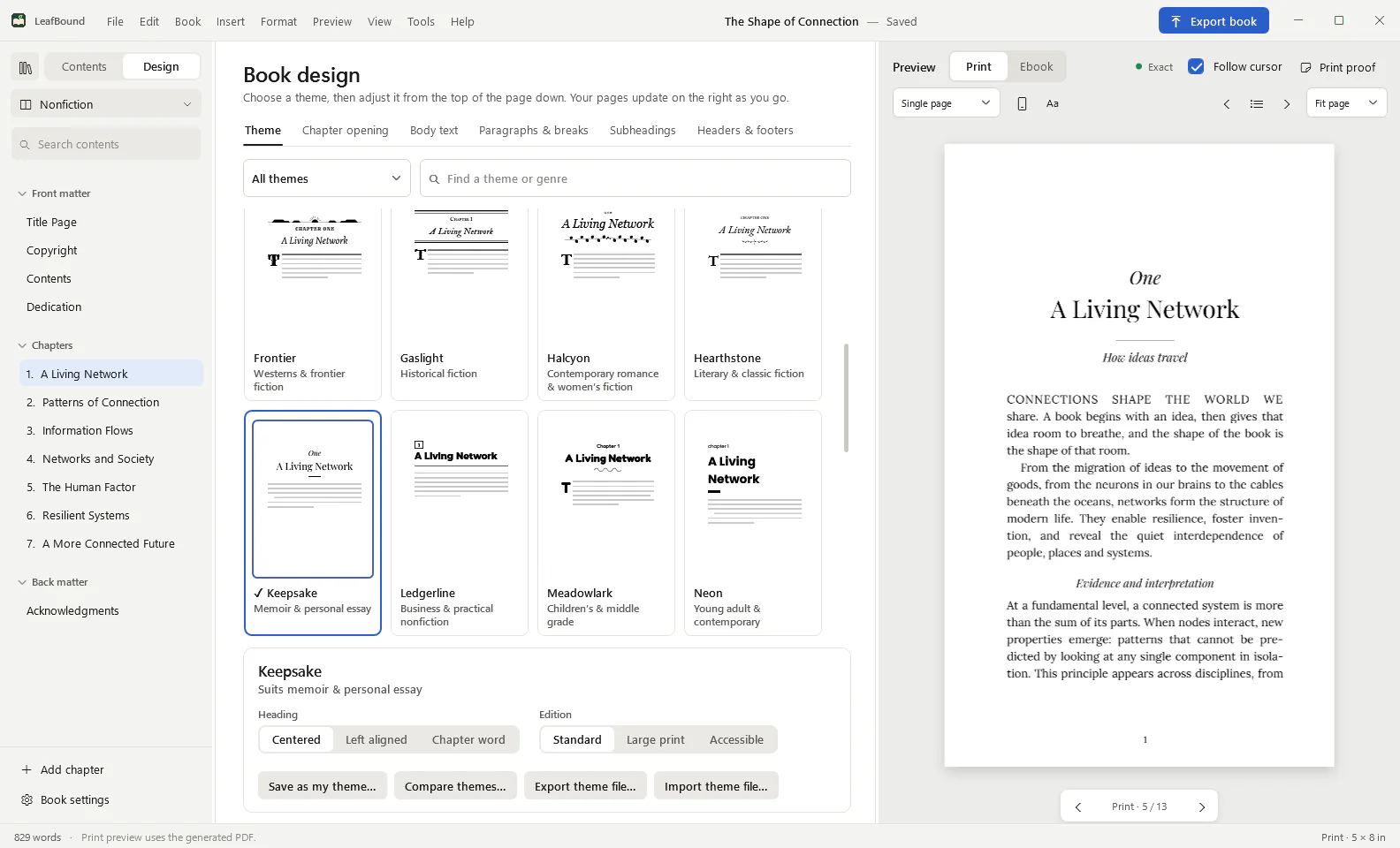
200 original artworks, and room for your own.
LeafBound comes with 200 original artworks made for book interiors: heading art, opening frames and backgrounds, and ornaments. The art picker is searchable, so you can search for a motif instead of scrolling for one.
If the book has its own emblem or hand-drawn ornament, upload it as a heading image or an ornament and use it in the theme. For a border on every page, Design, then Page border, offers 8 built-in borders or an image you upload, on body pages, chapter openings or every page, in every paid tier. The art frames of a collector’s edition belong to special editions in the Studio tier.
Your own fonts, checked on the way in.
The theme designer works with the 63 bundled font families, all under the SIL Open Font License, and, in Pro, with fonts you import as .ttf or .otf files. A print PDF has to embed every font it uses, and some fonts do not permit that. LeafBound reads the embedding permission stored in the font and refuses one that may not be embedded, at import, before it can fail at the printer.
The fonts page covers the bundled families and the embedding check.
Save it to My themes. Share it as a file.
When the design is right, save it to My themes, which is part of Pro. Export it and you get a .leafbound-theme file that carries the design and any artwork you uploaded. Import that file into another book and the design comes with it, with nothing to rebuild.
That is how a series stays a series, and how a small press can keep a house style across its list. Before you commit, Compare themes shows up to three designs on your own pages with the page count of each, and live print preview explains why those counts are exact.
Which tier
Pro, $149 once.
Your own fonts and theme files you can save, export and import are part of Pro, with all 128 themes in 394 variations. Every paid tier can change the number style, the first-paragraph treatment and heading art, including art you upload, and Author includes 14 core themes. The free 4-day trial includes the theme designer.
Questions
Can I design my own book template on Windows without layout software?
Yes. You start from a finished theme and change its properties with plain controls, such as number style, font, size and ornament. There are no frames or master pages to build.
Which tier has the theme designer?
Pro, $149 once. Pro includes all 128 themes, your own fonts and theme files you can save, export and import. The number style, the first-paragraph treatment and heading art, including art you upload, can be changed in every paid tier, and Author includes 14 core themes. Compare the tiers.
Can I create a custom chapter heading design?
Yes. Set the chapter number style, the fonts, the sizes in points, the case, the spacing and the alignment, and add heading art from the 200 bundled artworks or an image of your own.
Can I reuse my design for the next book in a series?
Yes. Save it to My themes, or export it as a .leafbound-theme file and import it into the next book. The file carries any artwork you uploaded.
Can I use fonts I bought?
In Pro, you can import .ttf and .otf fonts. LeafBound checks each font’s embedding permission and refuses fonts that may not be embedded in a PDF, because a print file has to embed its fonts.
Does a custom theme apply to the ebook as well?
Yes. Ebook styling follows the theme, with the fonts embedded, and it does not fix the page color or force a text size, so the reader’s own settings still apply. See the ebooks page.
Can I design each page by hand, as in a picture book?
Not with the theme designer, which styles the whole book at once. For that, the Picture book type opens a page-by-page picture-book designer, in the Pro tier. See picture books.
Keep reading
Try your own design on your own manuscript.
The free 4-day trial lets you import your manuscript, adjust a theme and save it to My themes.
Early access · Author from $79 once · free 4-day trial · Windows 10 and 11