 LeafBound
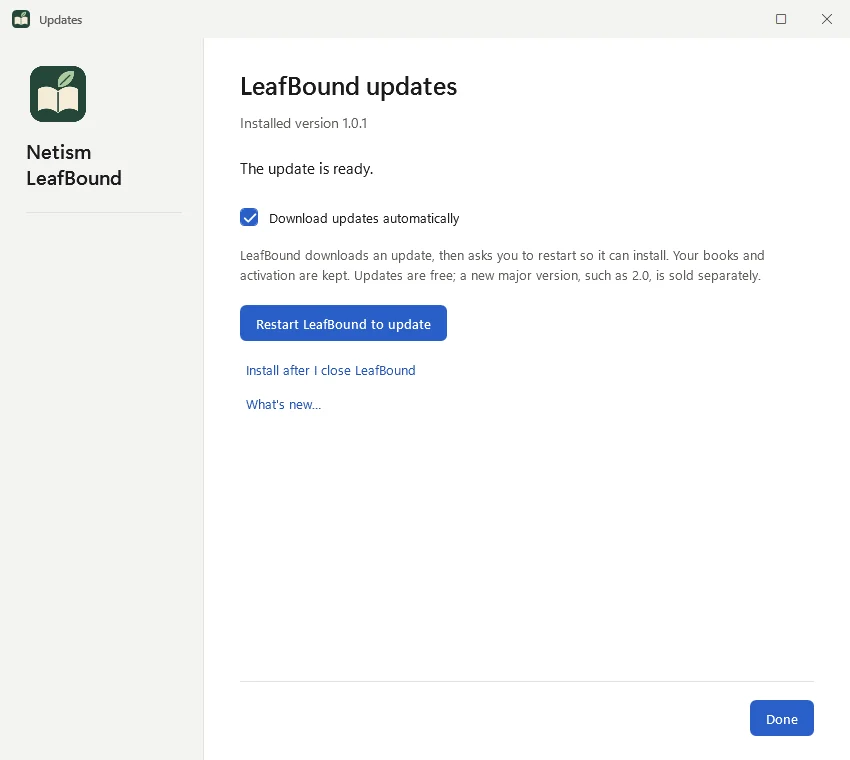
 checks the LeafBound account server for updates shortly after it starts and every 12 hours while Download updates automatically is on. A new version downloads in the background and is checked against LeafBound's signature. LeafBound then asks you to restart: choose Restart LeafBound to update, and it installs in its own window and opens again on the new version. Your books, themes and activation are kept.
- Choose Help then Check for updates….
- Read the status line under Installed version.
- Choose Check for updates to check now.
- If a version is available, choose Update now. When it is ready, choose Restart LeafBound to update.
Status messages
| Status | What it means |
|---|---|
| "LeafBound is up to date." | You have the newest version for your license. |
| "Downloading LeafBound 1.2.3…" (with the version) | A new version is downloading. |
| "The update is ready." | Choose Restart LeafBound to update, or Install after I close LeafBound. |
| "The update will install after you close LeafBound." | Close LeafBound to install it. |
| "The connection dropped. Trying again…" | The download carries on by itself from where it stopped. |
| "Updates could not be checked. You can keep working offline and try again later." | No connection, LeafBound is not activated, or the update did not pass verification. Nothing was installed. Try again later. |
| "The Microsoft Store keeps LeafBound up to date." | Your copy came from the Microsoft Store, which installs updates. Choose Open in Microsoft Store. |
If an update does not arrive
- Make sure LeafBound is activated and online. An update check uses your activation.
- Turn on Download updates automatically, or choose Update now yourself. A downloaded update waits until you choose Restart LeafBound to update or Install after I close LeafBound.
- If the update fails its signature or download check, LeafBound keeps your working version and tries again at the next check.
- Major version upgrades are sold separately and do not arrive as updates.
If installing by hand, setup may say "A newer LeafBound version is installed. Open that version instead." or "Save your work and close LeafBound before installing." The installer article explains each setup message.
Related
Still stuck?
Choose Help then Report a problem… in LeafBound to send us the details, or write to support.