 LeafBound
Each book has its own source library: the facts about every work you cite. Citations and the bibliography are built from it.
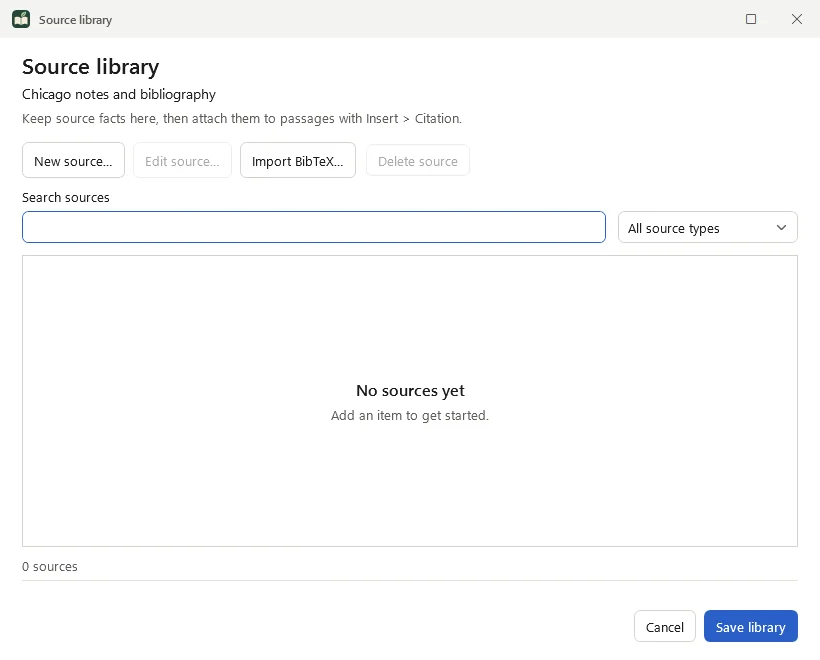
Add a source
- Choose Tools then Source library….
- Choose New source….
- Pick a Source type: Book, Chapter, Journal article or Website. The fields change to suit it.
- Fill in Title and the other facts from the source you used. Leave unknown optional fields blank.
- Under Authors (in the order printed), choose Add… for each author. Enter Given name(s) and Family name, or an Organization or exact name (optional), which is used exactly as written. Choose Save name.
- Check the Formatted preview, then choose Save source.
- Choose Save library to keep your changes in the book.
To change a source, select it and choose Edit source…, or double-click it. Search by title and filter by type to find sources in a long list.
Fields and what is required
| Source type | Required | Also available |
|---|---|---|
| Book | Title, publisher, publication year (or Source has no publication date) | Short title, authors, editors, publisher location, edition, URL, DOI |
| Chapter | Title, book title, publisher, year (or undated) | Editors of the book, publisher location, edition, URL, DOI |
| Journal article | Title, journal title, journal volume, year (or undated) | Journal abbreviation, issue, page range, URL, DOI |
| Website | Title, URL | Website title, owner or sponsor, publication date, access date (required when the page is undated) |
- Dates are written YYYY-MM-DD. Use a year or the undated box, not both.
- A URL must be a complete http or https address. A DOI looks like 10.xxxx/identifier, or its doi.org address.
- The Short title for later notes (optional) is used in shortened Chicago notes.
- Save source stays grayed out, and the missing facts are listed in red, until the source is complete.
Delete a source or import a .bib file
- Select a source and choose Delete source. LeafBound refuses, with a message, while a note, an inline citation or a bibliography entry still uses that source.
- Choose Import BibTeX… to add the entries of a .bib file on its own. In Import a BibTeX file, pick the .bib file and open it. Entries already in the library are left alone.
Limits
- A source no citation uses does not appear in the bibliography.
- LeafBound formats the facts you enter. It does not look sources up online.
Related
- Cite a source in a note
- Insert an inline APA, IEEE or Vancouver citation
- Choose Chicago, APA, IEEE or Vancouver citations
- The bibliography and reference list
Still stuck?
Choose Help then Report a problem… in LeafBound to send us the details, or write to support.