 LeafBound
Compare
Book formatting software instead of Word: free and paid, honestly.
You wrote the book in Word. The question is whether to format it there too. This page answers that first, with KDP’s own Word route and where it stops, then lists what to look for in a formatter, the paid options and what each gives up, and the free options and their ceilings. Whatever you choose, Word stays for writing.
Can you format the book in Word?
Only a plain paperback, and only by hand. KDP publishes blank Word templates per trim size with the page size and margins set, and a guide, checked 4 November 2026, to the rest: mirror margins with the inside margin from its page-count table, a section break before each chapter, Heading 1 chapter titles, odd and even headers, page numbers, an automatic table of contents, and “Before exporting, embed all fonts.”
What Word cannot do is also plain. No EPUB. No PDF/X, so IngramSpark’s named standards need Acrobat. Fonts embed only if you set the option. Footnotes work in print and not in an ebook made from the same file. A trim change means redoing the margins. The LeafBound vs Word page sets it all out in 21 rows; this page is about the alternatives.
Why people look for something else
- The rejection email. Word’s “PDF export engine often fails to embed custom fonts, leading to KDP upload rejections” (DesignDile, 5 February 2026, updated June 2026), and Word’s Save as PDF “cannot natively create the PDF/X-1a:2001 file that IngramSpark’s file creation guide requires” (ebookpbook, 25 June 2026).
- The ebook. The stores take EPUB; Word makes none. KDP converts a .docx for Kindle only.
- The hours. Word and its kind “were never meant to be page layout programs” (Indie Author Magazine, 1 November 2023); print in Word is “harder, especially for mirrored margins, gutters and chapter openings” (The Novel Kit, 2026); the DesignDile review puts a standard novel at 15 to 20 hours of learning Word’s layout quirks.
- The look. Images that “jump to unexpected pages when you edit text,” no optical kerning, ligatures or baseline grid (DesignDile, same page), and a designer’s verdict from 2020 that a book formatted in Word “will usually not look professional enough” (Julie Karen, 7 September 2020).
What to look for
The complaints imply the checklist. Software instead of Word for formatting should have:
- Word (.docx) in, so the manuscript you have is the starting point, and ideally .docx out, so the editor can keep working in Word.
- A print PDF with every font embedded, and PDF/X-1a:2001 or PDF/X-3:2002 if IngramSpark is on the list. See PDF/X explained.
- EPUB 3 with a navigation table of contents and accessibility metadata; store editions if you sell beyond Amazon.
- Footnotes that work on the page in print and as linked notes in the ebook, from one manuscript.
- A designed layout you choose rather than build, with the trim as a setting.
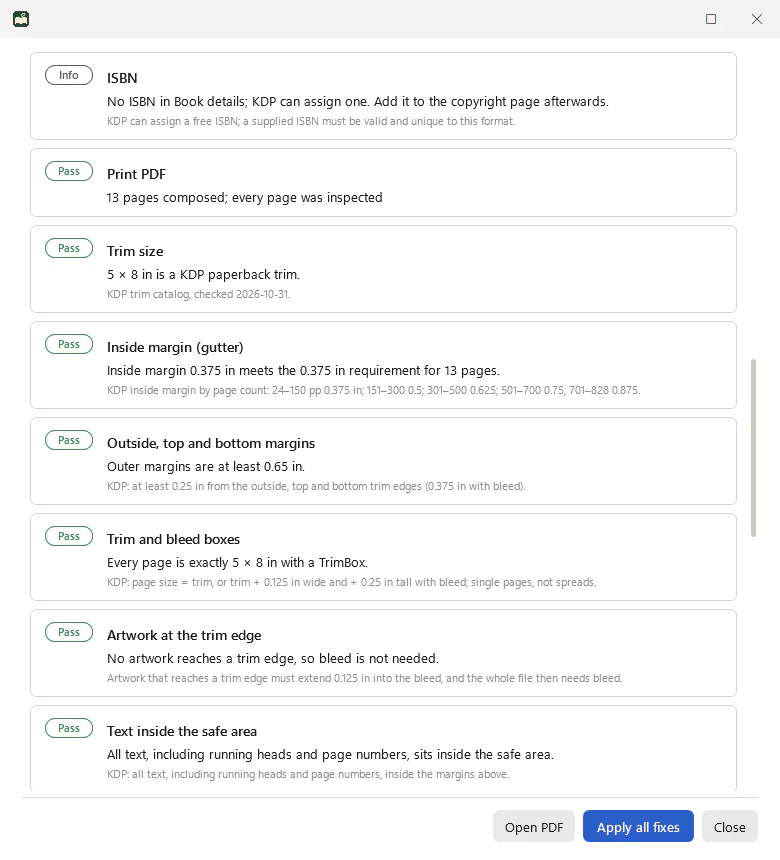
- A check of the finished PDF against the printer’s rules before you upload.
- A price you can justify for the number of books you will make, including free.
The paid options
LeafBound
$79 Author, $99 Academic, one-time per major version. Native app for Windows 10 and 11. 4-day trial of every feature.
What you gain: a formatter built around the Word round trip: .docx in with headings, footnotes, images and emphasis, where smart import finds the title page, parts, prologue and chapters even in a manuscript formatted by hand, and an editable .docx out at any time. 128 themes, each in Standard, Large print and Accessible versions (Author includes 14 core themes, Pro all 128); a preview composed from the generated print PDF; PDF/X-1a:2001 and PDF/X-3:2002 with every font embedded; print preflight with more than 25 checks and KDP and IngramSpark profiles; EPUB 3 or 2 plus Kindle, Apple Books, Kobo, Nook and Google Play editions with EPUB Accessibility 1.1 metadata; footnotes on the page in print and linked in ebooks; tables in four styles; your own fonts with an embedding check; in Pro, CMYK color interiors and a picture-book designer with fixed-layout ebooks; and, in Academic, citations in Chicago, APA 7, IEEE or Vancouver style and LaTeX equations.
What you give up: free page-by-page design for anything other than a picture book, and a Mac version, since LeafBound runs on Windows 10 and 11 only. We make LeafBound and wrote this page.
Atticus
$147 one-time. Web app with desktop wrappers for Windows, Mac, Linux and Chromebook. No trial; 30-day money-back.
What you gain: a browser formatter with 17 or more templates and a theme builder, footnotes, simple tables, co-writing roles, and a Word (.docx) export.
What you give up: local files (the book lives in your account, and reports differ on what works offline), a stated PDF/X standard, your own fonts, and a printer preflight. See LeafBound vs Atticus.
Vellum (the Mac book formatter at vellum.pub)
$199.99 for ebooks, $249.99 with print, one-time. macOS 14 or later only; the makers say no Windows version is planned.
What you gain: designed styles, store-specific EPUBs and PDF/X-1a print.
What you give up: Windows: it needs a Mac. Also your own fonts, tables, citations and equations, and a printer preflight report. See LeafBound vs Vellum.
Scrivener 3 compile
$59.99 per platform, one-time. Windows and Mac. 30 days of use as a trial.
What you gain: a tool many authors already own, whose compile step produces EPUB 3 and, in the macOS 3.3 paperback compile formats, PDF/X-1a.
What you give up: ease: compile is hard to learn, and Scrivener is a writing tool first. The common route is compile to .docx and format elsewhere. LeafBound also opens a .scriv project directly; that import was tested on sample projects, so check the result in the preview.
Adobe InDesign
US$22.99 a month on the annual plan billed monthly; seven-day trial; no one-time purchase. Checked 4 November 2026.
What you gain: any PDF/X preset, CMYK, fixed layout, tables, an index, a baseline grid, and EPUB with accessibility metadata.
What you give up: the subscription for as long as the file needs opening, weeks of learning, no book templates and no .docx export. See LeafBound vs InDesign.
The free options, and where each stops
These tools cost nothing, and each stops somewhere. Facts checked 3 November 2026 unless stated.
Reedsy Studio
Free formatting in the browser; the free plan adds a “typeset on Reedsy” credit line to the book.
What you gain: an EPUB 3 and a PDF/X-1a:2001 print file for nothing, from three templates and four trim sizes, with 30-day version history.
What you give up: choice (three templates, four trims), offline work, a book without the credit line unless you pay, and any printer preflight.
Kindle Create
Free from Amazon. Windows and Mac.
What you gain: a Kindle ebook and a paperback from one project, in a file Amazon accepts, with about four themes.
What you give up: every other store, since it writes KPF; the themes are locked; tables, lists, footnotes and inline images cannot be edited in print. See Kindle formatting.
Draft2Digital formatter
Free in the browser, with fees if you publish through Draft2Digital.
What you gain: an EPUB and a print PDF from fixed templates, inside a distributor.
What you give up: template control, a stated PDF/X standard, and independence from the distributor.
Calibre, with Word for the print file
Free and open source. Windows, Mac and Linux.
What you gain: an EPUB converted from your .docx, with a contents list built from the headings. Word still makes the print PDF.
What you give up: accessibility metadata, store editions, pop-up footnotes (notes come through as links), and every Word limit on the print side. Run EPUBCheck on the result.
Affinity by Canva (free; November 2026 release)
Free with a verified Canva account. Windows, Mac and iPad. Checked 4 November 2026.
What you gain: a professional layout program: master pages, a Book feature, footnotes, tables, an index, PDF/X-1a:2003 and PDF/X-3:2003 with CMYK, and reflowable and fixed-layout EPUB 3.0.
What you give up: ease: it is a layout program with a learning curve reviewers put near InDesign’s, no book templates, no text export and no KDP or IngramSpark preflight. See LeafBound vs Affinity.
Keep writing in Word
Word stays the manuscript’s home. Write and edit there, then import the .docx into LeafBound for the layout, the print file and the ebooks. Smart import finds the title page, parts, prologue and chapters, and LeafBound exports an editable .docx back at any time, so your editor’s corrections go round the loop without re-formatting. The Word import guide is about preparing the file, not leaving the program.
Why LeafBound
What a Word author gets by formatting the book in LeafBound.
- The Word round trip. .docx in with headings, footnotes, images and emphasis; an editable .docx out at any time.
- Layout done for you. 128 themes in Standard, Large print and Accessible versions; running heads, page numbers and chapter openings set by the theme, and a trim change reflows the book.
- Print files printers ask for. PDF/X-1a:2001 and PDF/X-3:2002 with every font embedded, checked by a preflight of more than 25 checks with KDP and IngramSpark profiles.
- Ebooks for every store. EPUB 3 or 2 plus five store editions, with footnotes linked and EPUB Accessibility 1.1 metadata.
- One price, tried first. $79 once; the 4-day trial includes every tool.
All of them in one table
Scroll sideways on a phone. “Not stated” means the vendor publishes no claim, not that the feature is missing.
| Tool | Price | Runs on | Layouts supplied | Print standard | Ebooks | Preflight |
|---|---|---|---|---|---|---|
| Microsoft Word (for reference) | Microsoft 365 Personal $99.99 a year; Office Home 2024 $179.99 once | Windows and Mac | KDP templates per trim; manual | PDF; PDF/X-1a only through Acrobat | No | None |
| Reedsy Studio | Free (credit line on the free plan) | Browser | 3 templates, 4 trim sizes | PDF/X-1a:2001 | EPUB 3 | None stated |
| Kindle Create | Free | Windows and Mac | About 4 locked themes | Print PDF, fixed margins | KPF, Amazon only | None |
| Draft2Digital formatter | Free (fees if publishing through D2D) | Browser | Fixed templates | Print PDF; standard not stated | EPUB | None |
| Calibre (with Word for print) | Free | Windows, Mac, Linux | None; Word does the print layout | No | EPUB from .docx | None |
| Affinity by Canva | Free with a Canva account | Windows, Mac, iPad | Your own design | PDF/X-1a:2003, PDF/X-3:2003; CMYK | EPUB 3.0, reflowable and fixed | Custom rules you write |
| LeafBound | $79 Author, $99 Academic, one-time | Windows 10 and 11, native | 128 themes (14 in Author), each in three versions | PDF/X-1a:2001 and PDF/X-3:2002; CMYK in Pro | EPUB 3 or 2 plus five store editions | More than 25 checks, KDP and IngramSpark profiles |
| Atticus | $147 one-time | Browser; wrappers for Windows, Mac, Linux, Chromebook | 17+ templates plus a theme builder | Print PDF; PDF/X not stated | EPUB | General pre-export check |
| Vellum | $199.99 ebooks, $249.99 with print | macOS 14 or later only | About two dozen styles | PDF/X-1a | EPUB 3, store editions | None stated |
| Scrivener 3 | $59.99 per platform | Windows and Mac | Compile formats | PDF/X-1a in paperback compile formats (macOS 3.3) | EPUB 3 | None stated |
| Adobe InDesign | US$22.99 a month, annual plan billed monthly | Windows and Mac | Your own design | Any PDF/X preset; CMYK | EPUB 2.0.1 and 3.0, reflowable and fixed | General preflight panel |
Two columns decide most cases. If the Ebooks column says No, the tool is not a formatter for a book that goes to a store. If the Print standard column has no PDF/X, IngramSpark is a problem; that rules out Word alone, Kindle Create and the Draft2Digital formatter as far as their pages state. The Preflight column is where only one tool makes a claim against the printers’ own rules.
Questions
Can I format a book in Microsoft Word?
Only a plain paperback for KDP, using KDP’s blank templates per trim size and its guide to mirror margins, section breaks, Heading 1 chapters, odd and even headers and font embedding, checked 4 November 2026. It stops at PDF/X for IngramSpark, EPUB for the ebook stores, footnotes that work in both, and a late trim change. The LeafBound vs Word page goes through each limit with its source.
Is there free book formatting software?
Free tools exist, each with a ceiling: Reedsy Studio (three templates, a credit line on the free plan), Kindle Create (Amazon-only KPF, about four locked themes), the Draft2Digital formatter (fixed templates) and Calibre, which converts a .docx to EPUB but makes no print file. None runs a KDP or IngramSpark preflight. LeafBound is not free, but its 4-day trial includes every tool on your own manuscript; exporting needs a license, $79 once. Facts checked 3 November 2026 and 4 November 2026.
What is better than Word for formatting a book?
On Windows, LeafBound. It takes your .docx, supplies the layout from a theme, keeps the footnotes working in print and ebooks, and writes PDF/X-1a:2001 and PDF/X-3:2002 with a KDP and IngramSpark preflight of more than 25 checks, plus EPUB 3 and five store editions, for $79 once. It exports an editable .docx back at any time, so Word stays for writing.
Do I need software other than Word to publish on KDP?
KDP’s Word route covers a plain paperback if you embed the fonts and follow the template exactly, and KDP converts an uploaded .docx for Kindle itself, with no control over the result. You need a formatter when the book has footnotes you want linked in the ebook, goes to Apple Books, Kobo, Nook or Google Play, needs accessibility metadata, or goes to IngramSpark, which names PDF/X-1a:2001 or PDF/X-3:2002. LeafBound covers all of those from the same .docx.
Can Word save as EPUB?
No. Word saves PDF and filtered HTML. A .docx becomes an EPUB through Calibre or Pandoc (both free), through KDP’s conversion for Kindle, or through a formatter that imports the .docx. The Word import guide compares those routes.
Does KDP accept .docx?
For ebooks, yes; KDP converts it, with no control over the result and no accessibility metadata, so check it in Kindle Previewer. For paperbacks, KDP’s template page says to convert to PDF before uploading if the book has bleed, and to embed the fonts when saving.
Is Word good enough for IngramSpark?
Not on its own. IngramSpark names PDF/X-1a:2001 or PDF/X-3:2002, which Word’s Save As PDF cannot write; KDP’s own page gives the route as printing to the Adobe PDF printer with Acrobat and choosing PDF/X-1a. A guide from 25 June 2026 reports Word-exported PDFs “are often rejected there.” LeafBound writes PDF/X directly and checks the file against IngramSpark’s rules before you upload.
Can I keep writing in Word and format elsewhere?
Yes, and that is the workflow every formatter on this page assumes. Write and edit in Word; clean the headings and footnotes; import; format; export. LeafBound also exports an editable .docx back at any time, so the editor’s corrections go round the loop without re-formatting.
Keep comparing
Write in Word. Format the book here.
The free 4-day trial includes every feature: import your .docx, compare three themes and run preflight before you pay.
Early access · Author from $79 once · free 4-day trial · Windows 10 and 11