 LeafBound
Compare
Draft2Digital formatter alternative for Windows: a book you own, files you can take anywhere.
Draft2Digital’s formatter is free and automated. Authors look for an alternative when the conversion strips footnotes or scene breaks, when the print PDF has no stated standard and D2D Print offers only grayscale paperbacks in six trims, or when a template is not the design they wanted. This page answers each of those, sets out seven formatting alternatives for Windows, and separates them from the D2D Print alternatives, which are printers and distributors rather than formatters.
Why people look for a Draft2Digital formatter alternative
The search results for “draft2digital alternative” are mostly lists of other distributors, because D2D is a distributor first. This page is about the formatter, the free tool inside the D2D account that turns a Word file into an EPUB and a print PDF. The complaints about it are consistent across D2D’s own pages, 2026 reviews and author reports, and most are the shape of an automated template tool rather than bugs.
- Footnotes can disappear. A 2026 review says notes “can be removed as unnecessary to the final file”, and an author writing in May 2025 quotes D2D’s own FAQ saying the automated conversion may remove embedded fonts, extra line breaks, empty pages and footnotes.
- Scene breaks and spacing are not always respected. The same review reports that “a single blank line between scenes can be ignored” and that ornaments are dropped; a poetry author reports D2D ignoring a line space after a paragraph.
- The print PDF has no stated standard. D2D’s FAQ, print page and print Q&A say nothing about PDF/X, output intents or font embedding, and a 2026 review calls the print PDF “basic”.
- D2D Print is narrow. Perfect-bound paperbacks in black and white (grayscale) only, for text-based books, in six trim sizes, with a 32-page minimum on the FAQ (a 2023 Q&A and a 2026 review say 64). No hardcover, no color, no a la carte distribution.
- Templates are the design. D2D publishes no current template count, no font options and no font upload; a 2026 review counts “a handful of interior themes” and calls the tool limited for nonfiction, footnote-heavy work and designed print interiors.
- It is online only. No desktop app; the book lives in your account. An author’s October 2026 report describes extra pages and lines in the proof PDF that were not in the preview.
- Publishing through D2D now has fees. Since April 2026: $20 activation for new accounts, $12 a year for accounts under $100 in sales, and about 10 percent of retail. The formatter stays free; see the pricing page.
What to look for
Turn the complaints around and you have the checklist. An alternative should give you:
- Footnotes and endnotes that survive, on the page in print and as linked notes in the ebook.
- Scene breaks you can see before you upload, with the ornament the design calls for.
- A print PDF with a stated standard, ideally PDF/X-1a:2001, which KDP asks for “if possible” and IngramSpark requires, plus some check that the file passes the printer’s rules. See PDF/X explained.
- Trim, margins, bleed, hardcover and color when the book needs more than a grayscale paperback in six sizes.
- An EPUB you can upload anywhere, including back to D2D if you keep distributing there.
- Files on your own disk, and a Word (.docx) way out, so the next tool is never locked either.
Seven formatting alternatives for Windows
Prices in US dollars, checked 3 November 2026 unless stated. LeafBound is first because it was built for what D2D’s formatter leaves out: footnotes that survive, PDF/X with a preflight report, and files on your own PC. Scrivener, Lacuna, Cambric, Deckle and Calibre are in the table.
LeafBound
$79 Author, $99 Academic, one-time per major version. Native app for Windows 10 and 11. 4-day trial of every feature.
What you gain over the D2D formatter: footnotes on the page and endnotes in a Notes section, with linked notes in every ebook edition; a scene-break ornament from one consistent mark; PDF/X-1a:2001 or PDF/X-3:2002 print output with print preflight and KDP and IngramSpark profiles, including hardcover; trim, margins and bleed you set; a preview that is the real print PDF and recomposes a moment after you stop typing; 128 themes, each in Standard, Large print and Accessible versions (Author includes 14 core themes, Pro all 128); 63 bundled font families plus your own; tables in four styles; EPUB Accessibility 1.1 metadata; a generic EPUB 3 that uploads to D2D or anywhere else; an editable .docx export at any time; and, in Academic, citations and equations.
What you give up: a free price; a Mac version, since LeafBound runs on Windows 10 and 11 only; printing and distribution, which LeafBound does not do. We make LeafBound and wrote this page.
Atticus
$147 one-time. Web app (PWA) with desktop wrappers for Windows, Mac, Linux and Chromebook. No trial; 30-day money-back.
What you gain over the D2D formatter: a theme builder with 17 or more templates and 1,500 or more Google heading fonts; footnotes, endnotes, callouts and simple tables; co-writer, editor and beta-reader roles; writing goals.
What you give up: a free price; a stated PDF/X standard; local files (the book lives in your account, and reports differ on what works offline); font upload; an accessibility conformance claim. See LeafBound vs Atticus.
Reedsy Studio
Free in the browser.
What you gain over the D2D formatter: a stated PDF/X-1a:2001 print file and EPUB 3 for nothing; 30-day version history.
What you give up: template choice (three), trim choice (four sizes), offline use, and a clean title page: the free plan adds a “typeset on Reedsy” credit line. Like D2D, it is a website.
Kindle Create
Free from Amazon. Windows 10 or later and Mac.
What you gain over the D2D formatter: a desktop app that runs offline, and Amazon’s own preview of its own conversion.
What you give up: portability: the KPF output is accepted only by KDP, the EPUB export is for reflowable books only, and the paperback has locked margins and fonts and no PDF. For a D2D author it is a step backwards. See LeafBound vs Kindle Create.
Vellum (Mac)
$199.99 for ebooks, $249.99 with print, one-time. macOS 14 or later only; free to use until you generate files.
What you gain over the D2D formatter: PDF/X-1a print output, EPUB 3 with store editions, about two dozen styles, printed backgrounds, borders and ornaments, box sets. Its help pages tell you to make a generic EPUB for D2D.
What you give up: Windows: its makers say no Windows version is planned, so a Mac comes first. See a Vellum alternative for Windows.
Affinity
Free with a Canva account since October 2025. Windows and Mac.
What you gain over the D2D formatter: a professional layout program: PDF/X with CMYK, full control of every page, fixed-layout work for picture books, reflowable EPUB in version 3.x.
What you give up: the author’s workflow: no themes, no chapter model, no KDP or IngramSpark preflight, and a learning curve measured in days.
Microsoft Word with KDP’s templates
Part of Microsoft 365. Windows and Mac.
What you gain over the D2D formatter: a program you already own, and the very .docx you uploaded to D2D; KDP publishes a Word template per trim size with mirror margins set; footnotes and tables work in print.
What you give up: EPUB output (Word has none), PDF/X (Word writes plain PDF), bleed handling, and the hours spent on chapter openings, running heads and page numbers by hand. The Word import guide shows how to prepare the file for any tool here.
D2D Print alternatives: printers and distributors, not formatters
“D2D Print alternative” is a different question from “formatter alternative”. D2D Print is the printing and distribution service: it takes the PDF, prints perfect-bound grayscale paperbacks in six trims, and places them across the Amazon and Ingram networks together, with no a la carte choice, per D2D’s print page and FAQ, checked 4 November 2026. Its alternatives are other printers and distributors, and none of them formats your book.
- KDP (Amazon). No upload fee; Amazon keeps a share of each sale. It wants a PDF, asks for PDF/X-1a “if possible”, and publishes 16 paperback trim sizes plus custom sizes, white or cream paper, standard color and hardcover, per KDP’s help pages, checked 31 October 2026. See KDP paperback formatting and the trim size guide.
- IngramSpark. Fees and wholesale discounts are set on its site. Its file creation guide requires PDF/X-1a:2001 or PDF/X-3:2002 with every font embedded, and offers paperback and hardcover in a page range of 18 to 1,200 depending on binding, checked 3 November 2026. See IngramSpark formatting.
- Other distributors. The search results list PublishDrive, Smashwords (now owned by D2D), BookBaby and Lulu. This site has not checked their file requirements and makes no claim about them.
Whichever you pick, the job is the same: a PDF that meets the printer’s standard. LeafBound exports PDF/X-1a:2001 or PDF/X-3:2002 and runs print preflight with KDP paperback, KDP hardcover, IngramSpark paperback and IngramSpark hardcover profiles. It does not print, distribute or sell anything. The printer makes the final decision; order a printed proof.
Draft2Digital vs the usual names, in one line each
- vs Vellum: Vellum is paid and Mac-only; D2D is free and browser-based, and Vellum’s own help says to make a generic EPUB for D2D.
- vs Atticus: Atticus is $147 with a theme builder, footnotes and simple tables; D2D is free with fixed templates and a print PDF with little control.
- vs Reedsy Studio: both free in the browser; Reedsy states PDF/X-1a:2001 and has three templates and a credit line; D2D has more templates and six print trims and states no PDF/X.
- vs Kindle Create: both free; D2D gives you a portable EPUB and a PDF, Kindle Create gives you a KPF that only KDP accepts.
- vs Scrivener and Calibre: different jobs; Scrivener drafts and compiles, Calibre converts and manages, D2D is hands-off conversion with black-and-white print only.
- vs LeafBound: D2D is free and distributes; LeafBound is $79 and formats, with footnotes, PDF/X and preflight. The full 21-row comparison is on its own page.
D2D stripped your footnotes or scene breaks?
Two causes are on record. For scene breaks, D2D’s tutorials say three blank lines between scenes and Heading 1 for chapters; standardize the mark in Word and upload again. For footnotes, a May 2024 Scrivener forum thread traces D2D’s RSC-012 rejection to styled footnote links in an uploaded EPUB; a plain Word file with real footnotes avoids that path, though the 2025 author report and the 2026 review say the conversion itself can drop them.
None of this puts your book at risk, because the book is not inside D2D. It is the .docx you uploaded, and that file opens in LeafBound and in every formatter on this page. Real Word footnotes become footnotes on the page in print and linked notes in ebooks, one consistent scene-break mark becomes the theme’s ornament, and the preview shows every break where it lands. The move-from-Draft2Digital guide takes that .docx from import to a finished PDF/X file and store editions, and the generic EPUB goes back to D2D for distribution if you want it to.
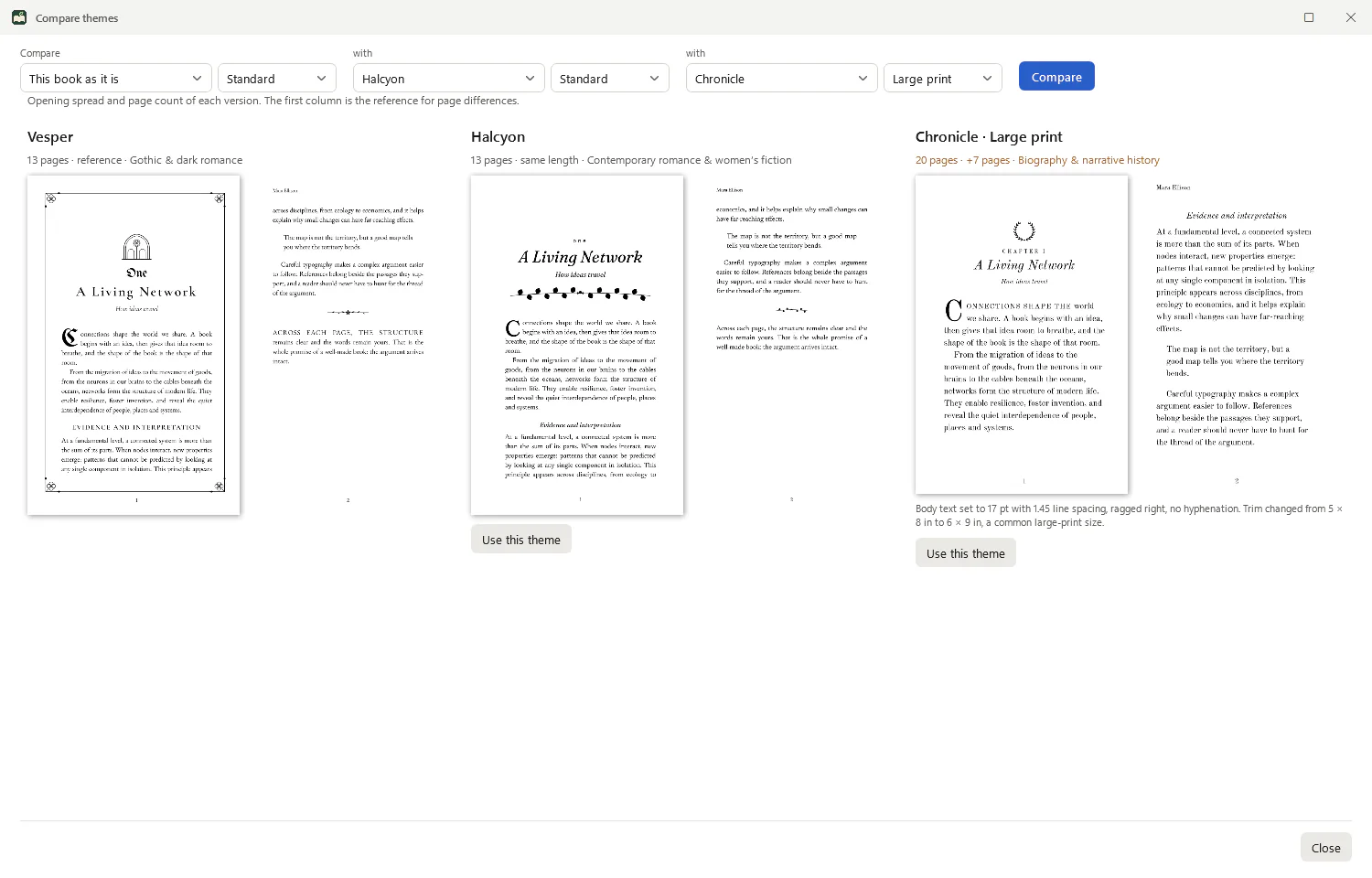
Why LeafBound
What a Draft2Digital author gets by formatting in LeafBound, and keeping any distributor they like.
- Footnotes and endnotes that survive, on the page in print and as linked notes in every ebook edition.
- Scene breaks you can see: one consistent mark becomes the theme’s ornament, shown in the preview where it lands.
- Print files with a stated standard. PDF/X-1a:2001 or PDF/X-3:2002, checked by a preflight with KDP and IngramSpark profiles, paperback and hardcover.
- Your design, not a template. 128 themes in Standard, Large print and Accessible versions, trim, margins and bleed you set, and your own fonts.
- Files on your PC. A native Windows desktop app, with an editable .docx export at any time.
- Any distributor. The generic EPUB 3 and the PDF/X file upload to D2D, KDP, IngramSpark or each store directly.
- One price. $79 once, with a 4-day trial of every tool first.
All of them in one table
Scroll sideways on a phone. “Not stated” means the vendor publishes no claim, not that the feature is missing. The last two rows are printers and distributors, not formatters.
| Tool | Price | Runs on | Try first | Print output | Ebooks | Notes and tables | Themes and fonts |
|---|---|---|---|---|---|---|---|
| LeafBound | $79 Author, $99 Academic, one-time | Windows 10 and 11, native; files on your PC | 4-day trial | PDF/X-1a:2001 and PDF/X-3:2002 with preflight | EPUB 3 or 2 plus five store editions | Footnotes, endnotes, tables and callouts | 128 themes (14 in Author), each in three versions; your own fonts |
| Atticus | $147 one-time | Browser; Windows, Mac, Linux, Chromebook wrappers | None; 30-day money-back | Print PDF; PDF/X not stated | EPUB | Footnotes, endnotes, simple tables | 17 or more templates plus a theme builder; no font upload |
| Reedsy Studio | Free (credit line on the free plan) | Browser | n/a | PDF/X-1a:2001 | EPUB 3 | Not stated | 3 templates, 4 trim sizes |
| Kindle Create | Free | Windows and Mac | n/a | None; the paperback is the same KPF | KPF; EPUB for reflowable only | Not editable; none in paperbacks | 4 locked themes; no font import |
| Vellum | $199.99 ebooks, $249.99 with print, one-time | macOS 14 or later only | Free until you generate files | PDF/X-1a | EPUB 3, EPUB 2, store editions | Footnotes; no tables | About two dozen styles; curated fonts |
| Affinity | Free with a Canva account (since October 2025) | Windows and Mac | n/a | PDF/X, CMYK | Reflowable EPUB in 3.x; fixed layout by design | You build them | Design it yourself |
| Microsoft Word with KDP templates | Part of Microsoft 365 | Windows and Mac | n/a | PDF (no PDF/X) | No | Footnotes and tables in print; nothing for ebooks | KDP templates per trim size |
| Adobe InDesign | About $22.99 a month | Windows and Mac | 7 days | PDF/X, CMYK | Reflowable and fixed-layout EPUB | You build them | Design it yourself |
| Scrivener 3 | $59.99 per platform | Windows and Mac | 30 days of use | PDF/X-1a (paperback compile, macOS 3.3) | EPUB 3 | Footnotes; compile is hard to learn | Compile formats |
| Lacuna | $149 one-time | Windows, Mac and Linux, native | Free to use, pay to export | PDF/X-1a | EPUB 3, EPUB 2, Kobo | Footnotes, tables, call-outs | Not stated |
| Cambric | $199 one-time | Windows and Mac, native | Not stated | PDF/X not mentioned | EPUB 3 | Not stated | 20 or more genre styles (vendor claim); custom fonts |
| Deckle | $197 one-time | Desktop, offline (Typst engine) | Free to use, pay to export | EPUB | No tables or footnotes (reviews) | 26 presets | |
| Calibre | Free, open source | Windows, Mac, Linux | n/a | PDF without PDF/X, bleed or trim boxes | EPUB, AZW3, many others | Converter, not a designer | None; CSS only |
| Draft2Digital formatter (for reference) | Free; $20 activation, $12 a year under $100 in sales and about 10 percent of retail if you publish through D2D | Browser only | n/a | Print PDF; PDF/X not stated; D2D Print is grayscale perfect-bound in six trims | EPUB; usable anywhere | Footnotes reported stripped in reviews | Templates; count not stated on a current page; no font upload |
| KDP Print (a printer and distributor, not a formatter) | No fee; Amazon keeps a share of each sale | Website | n/a | Wants a PDF, PDF/X-1a “if possible”; 16 trims plus custom; hardcover; color | Wants an EPUB | Depends on your formatter | Depends on your formatter |
| IngramSpark (a printer and distributor, not a formatter) | Fees and discounts set on its site | Website | n/a | Requires PDF/X-1a:2001 or PDF/X-3:2002; paperback and hardcover; 18 to 1,200 pages by binding | Accepts an EPUB | Depends on your formatter | Depends on your formatter |
Questions
What is the best Draft2Digital formatter alternative?
LeafBound, on Windows. It keeps what D2D’s conversion is reported to drop: footnotes on the page in print and linked in every ebook, and a scene-break ornament from one consistent mark. It writes PDF/X-1a:2001 or PDF/X-3:2002 with a KDP and IngramSpark preflight, supports hardcover and your own trim, margins and bleed, and its generic EPUB 3 uploads to D2D or anywhere else. It costs $79 once. The 4-day trial includes every tool on your own manuscript; exporting needs a license. Free formatters such as Reedsy Studio (three templates, a credit line on the free plan) and Kindle Create (KPF accepted only by KDP) have stated limits; checked 3 November 2026.
Is Draft2Digital formatting any good?
It is free and automated. D2D’s FAQ says the formatter is free even without distribution, the EPUB can be used anywhere and will pass EPUBCheck, and the paperback PDF downloads free. Reviews from 2026 call it limited for print and complex layouts, with footnotes and scene-break ornaments reported dropped by the conversion and no PDF/X standard stated for the print PDF, checked 4 November 2026. LeafBound keeps footnotes and ornaments and writes PDF/X with a preflight report.
What is the alternative to D2D Print?
KDP Print and IngramSpark, which are printers and distributors rather than formatters. D2D Print offers grayscale perfect-bound paperbacks in six trim sizes with a 32-page minimum on its FAQ. KDP offers 16 paperback trim sizes plus custom sizes, hardcover, and black-and-white or color interiors; IngramSpark offers paperback and hardcover with a page range of 18 to 1,200 depending on binding, checked 31 October and 3 November 2026. Both want a PDF, and IngramSpark requires PDF/X-1a:2001 or PDF/X-3:2002, so the formatter you pair with them matters. LeafBound writes both standards and checks the file against KDP and IngramSpark rules, paperback and hardcover.
Draft2Digital vs Vellum: which is better?
Vellum (the Mac book formatter at vellum.pub) costs $199.99 for ebooks or $249.99 with print and runs on macOS 14 or later only. D2D’s formatter is free and browser-based, with templates instead of styles. On Windows, Vellum is not an option at all. LeafBound is a native Windows formatter at $79 with PDF/X output, a KDP and IngramSpark preflight and a generic EPUB that uploads to D2D; see a Vellum alternative for Windows.
Draft2Digital vs Atticus: which is better?
Atticus costs $147 one-time and runs in a browser with desktop wrappers; the book lives in your account, and no PDF/X standard is stated for its print PDF. D2D’s formatter is free with fixed templates and a print PDF with little control. LeafBound is a native Windows app with local files, PDF/X-1a:2001 or PDF/X-3:2002 and a KDP and IngramSpark preflight. See LeafBound vs Atticus.
Draft2Digital vs Reedsy Studio: which is better?
Both are free and browser-based, and both export an EPUB and a print PDF. Reedsy Studio states PDF/X-1a:2001, offers three templates and four trim sizes, and adds a credit line on the free plan. D2D offers six print trims, states no PDF/X standard, and reviews report little control. Neither keeps the book on your own PC or checks the PDF against KDP and IngramSpark rules; LeafBound does both.
Can I use a different formatter and still distribute through Draft2Digital?
Yes. D2D’s FAQ says it accepts a preformatted EPUB for ebook distribution (though it cannot apply its templates to it) and a preformatted PDF for the print interior. LeafBound’s generic EPUB 3 and its PDF/X-1a:2001 print file are both uploads D2D accepts, so switching formatter does not mean switching distributor. See the migration guide.
Draft2Digital stripped my footnotes or scene breaks. What now?
Your uploaded .docx is untouched, so nothing is lost. A 2026 review and an author quoting D2D’s own FAQ report that the automated conversion can remove footnotes, extra line breaks and empty pages, and that a single blank line between scenes can be ignored. Import the same .docx into LeafBound: real Word footnotes become footnotes on the page in print and linked notes in ebooks, and one consistent scene-break mark becomes the theme’s ornament. The trial lasts 4 days and includes every feature.
Keep comparing
Take the same manuscript somewhere the footnotes survive.
The free 4-day trial includes every feature: import the .docx you gave Draft2Digital, pick a theme and export an EPUB for every store and a PDF/X for any printer.
Early access · Author from $79 once · free 4-day trial · Windows 10 and 11