 LeafBound
Compare
Sigil alternatives: for authors who would rather not hand-code an EPUB.
Sigil is a free, open-source EPUB editor that works at the level of code. Authors look for an alternative when the code is the problem: they want a book formatted from a manuscript, a print PDF as well as an ebook, or a tool that does not need HTML and CSS. This page answers that search honestly, starting with LeafBound, which does all three.
Why authors look for a Sigil alternative
Sigil does one thing: it opens an EPUB and lets you edit the XHTML, CSS, OPF and images inside it, with a contents generator, spell check, an index editor and checkpoints. Version 2.8.1, from 18 July 2026, runs on Windows 10 (version 1809) and later, macOS 13 and later, and Linux. It is free under GPLv3 and maintained by volunteers. The reasons people search for something else are in the public record.
- It needs HTML and CSS. A 2012 MobileRead thread comparing Sigil with Jutoh put it directly: if you do not know HTML and CSS at all, it is a tough place to start. A 2026 review at lwn.net calls it a capable EPUB editor but not a good choice for actually writing content or collaborating.
- It makes ebooks only. Sigil saves EPUB and nothing else: no Word file, no PDF, no print. An April 2026 roundup of formatters for Windows notes that none of the free EPUB editors exports PDF/X, so none is enough on its own for a paperback.
- Word files do not open in it. Sigil imports EPUB and HTML. A .docx goes through the free DOCXImport plugin, which produces a single-section EPUB you split by hand and which ignores table formatting.
- Validation errors land on you. A guide at publishing.co.uk, updated 28 October 2026, warns that Sigil validation errors can lead to rejected KDP uploads. KDP accepts Sigil EPUBs, but the EPUB is only as clean as your code.
- Big or damaged files. Older MobileRead threads describe crashes on very large EPUBs and files that would not open after editing. Sigil’s own tips page recommends enabling Mend On Open and warns about a Qt dialog bug and a KDE reorder crash. Keep a copy before you edit.
What to look for
Those complaints imply a checklist. An alternative that fixes one and ignores the rest is not an upgrade.
- Works from a manuscript, not from code. Import a Word (.docx) file with chapters, headings, footnotes and images, and get a finished book without opening a stylesheet.
- Makes the print book too. A print PDF with a stated standard, PDF/X-1a:2001 or PDF/X-3:2002, with trim, margins and bleed handled. See PDF/X explained.
- Checks the result. An EPUB tested with EPUBCheck, and for print, a check against KDP and IngramSpark rules before you upload.
- Handles footnotes and accessibility. Linked notes in the ebook, same-page footnotes in print, and EPUB Accessibility 1.1 metadata without hand-editing the package.
- Runs where you are. Sigil runs on Windows, Mac and Linux. Check each alternative’s platforms; two of the seven here are Windows-only or Mac-only.
- Keeps a way back. An editable Word export, so you are never locked into the tool.
The options
Six alternatives, in the order most Sigil users will find useful, with what each gains and gives up against Sigil. Prices in US dollars, checked 4 November 2026.
LeafBound
$79 Author, $99 Academic, one-time per major version. Native app for Windows 10 and 11. 4-day trial of every feature.
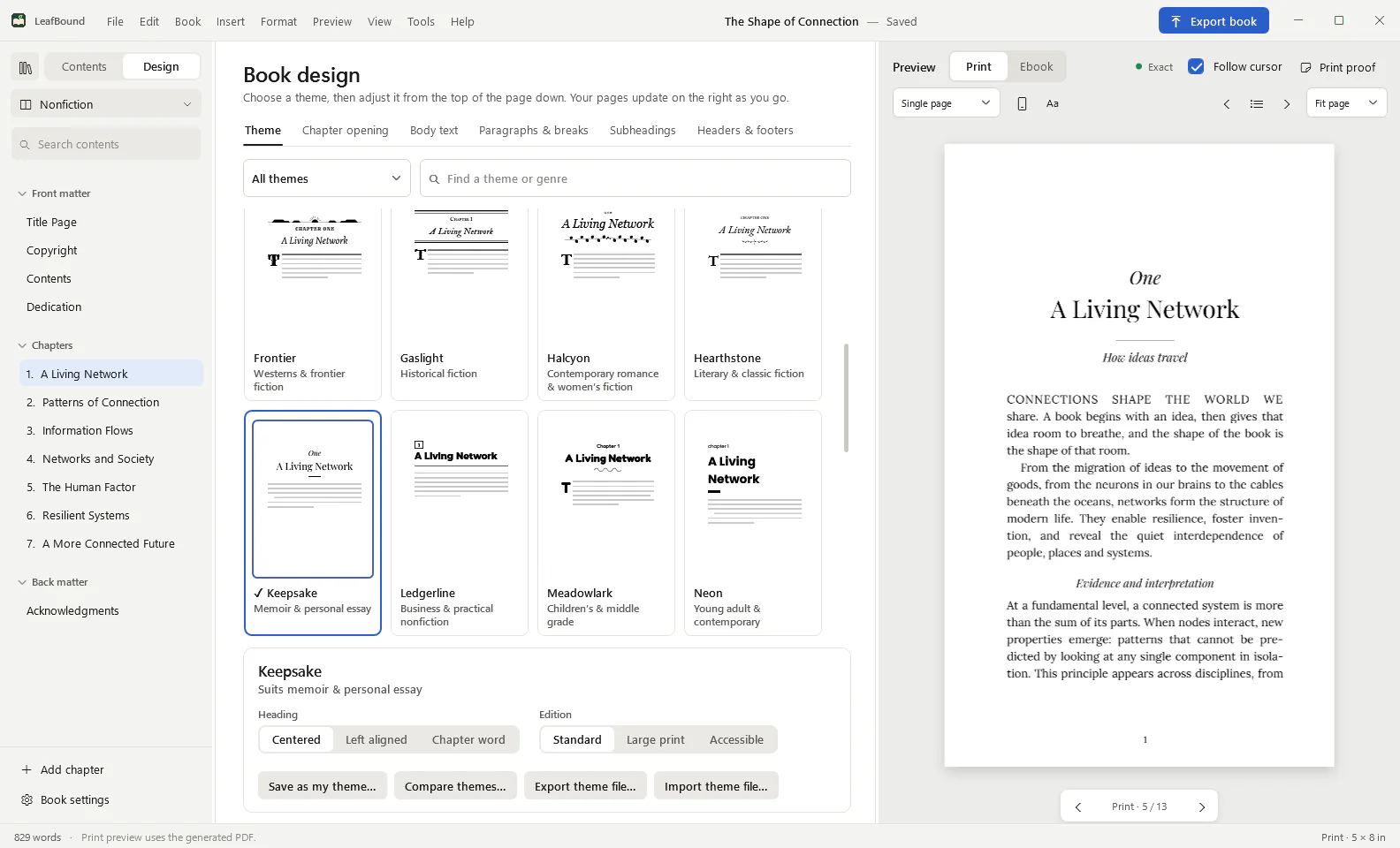
What you gain over Sigil: a finished print book and ebook from a Word, RTF, Markdown, text or EPUB manuscript, with no code. 128 themes, each in Standard, Large print and Accessible versions (Author includes 14 core themes, Pro all 128); a preview that is the generated print PDF, recomposed a moment after you stop typing; Print preflight with more than 25 checks and KDP and IngramSpark profiles; PDF/X-1a:2001 and PDF/X-3:2002; EPUB 3 or 2 with EPUB Accessibility 1.1 metadata and Kindle, Apple Books, Kobo, Nook and Google Play editions; footnotes on the page in print and linked in the ebook; your own fonts with an embedding check; tables in four styles; an editable .docx export at any time. Academic adds citations in Chicago, APA 7, IEEE or Vancouver style and LaTeX equations.
What you give up: access to the EPUB’s code (LeafBound does not expose it), fixed layout for books other than picture books (Pro has it for picture books), and Mac or Linux (LeafBound runs on Windows 10 and 11 only). We make LeafBound and wrote this page. See LeafBound vs Sigil for the 21-row table.
Calibre’s Edit book tool
Free and open source. Windows 10 (1809) and later, macOS 14 and later, Linux. Version 9.17, 23 October 2026.
What you gain over Sigil: the same code-level editing in a program you may already have, plus a converter that reads about two dozen formats and a library manager.
What you give up: a dedicated editor’s depth: Sigil’s index editor, checkpoints and spell check are the reasons many authors keep it beside Calibre. Still code, still no print layout, still no PDF/X. See LeafBound vs Calibre.
Atticus
$147 one-time. Web app (PWA) with desktop wrappers for Windows, Mac, Linux and Chromebook. No trial; 30-day money-back.
What you gain over Sigil: a manuscript-first formatter that runs on every platform Sigil does and makes a print PDF as well as an EPUB; 17 or more templates and a theme builder; footnotes, callouts and simple tables; co-writer and editor roles.
What you give up: local files (the book lives in your account, and reports differ on what works offline), a stated PDF/X standard, a font upload, and an accessibility conformance claim; none of those is stated on its site. See LeafBound vs Atticus.
Reedsy Studio
Free formatting in the browser; a “typeset on Reedsy” credit on the free plan.
What you gain over Sigil: PDF/X-1a:2001 and EPUB 3 from a manuscript for nothing, with 30-day version history.
What you give up: choice (three templates, four trim sizes), local files and offline use, and a clean title page on the free plan.
Jutoh
$45 Standard, $90 Plus, one-off before VAT. Windows 10 and 11, macOS 11 and later, Linux. Demo with no time limit.
What you gain over Sigil: a word-processor-style ebook editor on all three platforms, with footnotes, tables, fixed layout, EPUBCheck built in and accessibility metadata for the European Accessibility Act.
What you give up: direct editing of the EPUB’s HTML and CSS in the Standard edition (Plus adds code editing), and print: Jutoh goes through an ODT file and LibreOffice, with no PDF/X. See LeafBound vs Jutoh.
Vellum
$199.99 Ebooks, $249.99 Press (adds print), one-time. macOS 14 or later only. Free to use, pay when you generate files.
What you gain over Sigil: a manuscript-first formatter with about two dozen styles, PDF/X-1a print output, store-specific ebook editions, accessible styles and output assessed with Ace.
What you give up: Windows and Linux entirely: Vellum is Mac-only and its makers say no Windows version is planned. No font upload, no tables, no code access. See LeafBound vs Vellum.
Format in LeafBound, inspect the EPUB if you like
A manuscript-first formatter produces a finished EPUB without hand-coding. LeafBound does not expose the EPUB’s code inside the app, but the files it exports are standard EPUB 3 or 2, so you can open one in any EPUB editor to look inside before upload. LeafBound’s editions are tested with EPUBCheck and Ace in its test suite, so what you will find is a clean file.
Why LeafBound
What a Sigil user gets by formatting the book in LeafBound.
- No code to write. Import Word, RTF, Markdown, text or an existing EPUB, and choose a theme.
- The print book as well. PDF/X-1a:2001 and PDF/X-3:2002, with a preflight of more than 25 checks and KDP and IngramSpark profiles.
- Store-ready ebooks. EPUB 3 or 2 plus five store editions, with EPUB Accessibility 1.1 metadata written for you.
- Footnotes in both formats. On the page in print, linked in the ebook, from one manuscript.
- Designed themes. 128 themes in Standard, Large print and Accessible versions, with a preview built from the print PDF.
- Try it first. $79 once; the 4-day trial includes every tool.
All seven in one table
Scroll sideways on a phone. “Not stated” means the vendor publishes no claim, not that the feature is missing.
| Tool | Price | Runs on | Imports | Design | Print output | KDP and IngramSpark preflight | Ebooks and accessibility |
|---|---|---|---|---|---|---|---|
| Sigil 2.8.1 | Free (GPLv3) | Windows 10 (1809)+, macOS 13+, Linux | EPUB only | You edit the code | No | No | EPUB 2 and 3; metadata by hand |
| LeafBound | $79 Author, $99 Academic, one-time | Windows 10 and 11, native | Word (.docx), RTF, Markdown, text, EPUB, Vellum projects | 128 themes (14 in Author), three versions each | PDF/X-1a:2001 and PDF/X-3:2002 | More than 25 checks, KDP and IngramSpark | EPUB 3 or 2, five store editions, EPUB Accessibility 1.1 metadata |
| Calibre 9.17 (Edit book) | Free (GPL) | Windows 10 (1809)+, macOS 14+, Linux | EPUB, DOCX, HTML, MOBI and about 20 more | You edit the code; conversion Look and feel settings | Plain PDF; no PDF/X | No | EPUB 2 or 3, AZW3, KEPUB; no accessibility claim |
| Atticus | $147 one-time | Browser; Windows, Mac, Linux, Chromebook wrappers | Word (.docx) | 17+ templates and a theme builder | Print PDF; PDF/X not stated | Pre-export check | EPUB; no accessibility claim |
| Reedsy Studio | Free (credit line on the free plan) | Browser | Word (.docx) | 3 templates | PDF/X-1a:2001 | No | EPUB 3 |
| Jutoh 3.33 | $45 Standard, $90 Plus, before VAT | Windows 10 and 11, macOS 11+, Linux | DOCX, ODT, EPUB, HTML, text, Markdown, CBZ | Style sheets with custom CSS | ODT to LibreOffice; no PDF/X | No | EPUB 2 and 3, Kindle via KindleGen; EAA metadata and checks |
| Vellum 4.1.7 | $199.99 Ebooks, $249.99 Press, one-time | macOS 14 or later only | Word (.docx) | About two dozen styles | PDF/X-1a | No | EPUB 3, optional EPUB 2 and MOBI, store editions; assessed with Ace |
Sources: sigil-ebook.com, its download page, its tips page, Sigil releases, the DOCXImport plugin, publishing.co.uk, Calibre vs Sigil (updated 28 October 2026), lwn.net (2026), ebookpbook.com (8 April 2026), KDP’s MOBI support FAQ, calibre-ebook.com and jutoh.com, checked 4 November 2026. Vellum, Atticus and Reedsy facts from the comparison hub, checked 3 November 2026.
Questions
What is the best alternative to Sigil?
LeafBound, on Windows, if you want a finished book without hand-coding it. Import a Word, RTF, Markdown, text or EPUB manuscript, choose one of 128 themes, and export a PDF/X print file checked against KDP and IngramSpark rules plus EPUB 3 or 2 and five store editions with EPUB Accessibility 1.1 metadata. It costs $79 once. The 4-day trial includes every tool; exporting needs a license.
Sigil vs Calibre: which should I use?
Calibre manages a library and converts between formats; its Edit book tool handles fixes to an EPUB’s code. Sigil is a dedicated EPUB editor with a contents generator, spell check, index editor and checkpoints. Both are free and code-level, and neither designs a print book or writes PDF/X. LeafBound does both from a manuscript, with no code.
Is there a Sigil alternative that is not a code editor?
Yes. LeafBound, Atticus, Vellum, Reedsy Studio and Jutoh all work from a manuscript and a theme or template rather than from the EPUB’s code. The trade is control for time: you cannot open the result and change one CSS rule, but you also never have to.
Does Sigil run on Windows 11?
Yes. Sigil 2.8.1 runs on Windows 10 (version 1809) and later in 64-bit, which includes Windows 11, checked 4 November 2026. The installer is 64-bit only; Sigil’s download page suggests winget or Chocolatey to avoid the unknown-publisher warning. The 2.7.6 release notes say Windows users may need to update the Visual C++ redistributable if Sigil does not start.
Can any of these open my Sigil EPUB?
Calibre, Jutoh and LeafBound can open an EPUB directly; LeafBound imports it as a new book and finds the title page, parts and chapters. Atticus and Vellum import a Word (.docx) manuscript, so for them an EPUB-only book goes through Calibre’s EPUB to DOCX conversion first. The Sigil to LeafBound guide covers the move and what to check.
Which Sigil alternative makes a print PDF?
LeafBound (PDF/X-1a:2001 and PDF/X-3:2002, with KDP and IngramSpark preflight), Atticus (print PDF, PDF/X not stated), Vellum (PDF/X-1a, Mac only) and Reedsy Studio (PDF/X-1a:2001, three templates). Jutoh goes through an ODT file and LibreOffice with no PDF/X. Calibre writes a plain PDF with no trim, bleed or PDF/X. Sigil writes no PDF.
Which alternative handles accessibility metadata?
LeafBound writes EPUB Accessibility 1.1 metadata on every edition and asks for missing image descriptions before export. Jutoh writes accessibility metadata for the European Accessibility Act and checks contrast, alt text and heading structure. Vellum has accessible styles and says its output is assessed with Ace. Atticus makes no accessibility conformance claim. Calibre makes no formal accessibility claim. In Sigil you write the metadata yourself.
Where do these facts come from?
From each vendor’s own site and the reviews and forum threads linked on this page, checked 4 November 2026 (Vellum, Atticus and Reedsy Studio facts checked 3 November 2026). Prices are in US dollars and change; the vendor’s page is the final word. If you find an error, tell LeafBound support and we will fix it.
Keep comparing
Format the book, then inspect the EPUB if you like.
The free 4-day trial includes every feature: import your Word manuscript, pick a theme and see the print and ebook editions side by side. Buy LeafBound to export them.
Early access · Author from $79 once · free 4-day trial · Windows 10 and 11